alphaMode decides how the page composites the canvas. The default, 'opaque', ignores alpha; 'premultiplied' blends the canvas with the page and expects colors already multiplied by alpha (100% red at 50% alpha is [0.5, 0, 0, 0.5]). Two canvases over a striped page, cleared to BookNest blue at 50% alpha:
<style>body { margin: 8px; font: 14px system-ui; background: repeating-linear-gradient(45deg,
  #f06b00 0 12px, #fff 12px 24px) } figure { display: inline-block; margin: 0 12px 0 0 }
  figcaption { background: #fff; text-align: center }</style>
<figure><canvas id="a" width="200" height="100"></canvas><figcaption>opaque</figcaption>
</figure>
<figure><canvas id="b" width="200" height="100"></canvas><figcaption>premultiplied</figcaption>
</figure>
<script type="module">
  const device = await (await navigator.gpu.requestAdapter()).requestDevice();
  const format = navigator.gpu.getPreferredCanvasFormat();
  const encoder = device.createCommandEncoder();
  for (const [canvas, alphaMode] of [[a, 'opaque'], [b, 'premultiplied']]) {
    const context = canvas.getContext('webgpu');
    context.configure({ device, format, alphaMode });
    const view = context.getCurrentTexture().createView();
    encoder.beginRenderPass({ colorAttachments: [{ view, loadOp: 'clear', storeOp: 'store',
      clearValue: [0.04, 0.20, 0.375, 0.5] }] }).end();
  }
  device.queue.submit([encoder.finish()]);
  await device.queue.onSubmittedWorkDone();
  window.__done = true;
</script>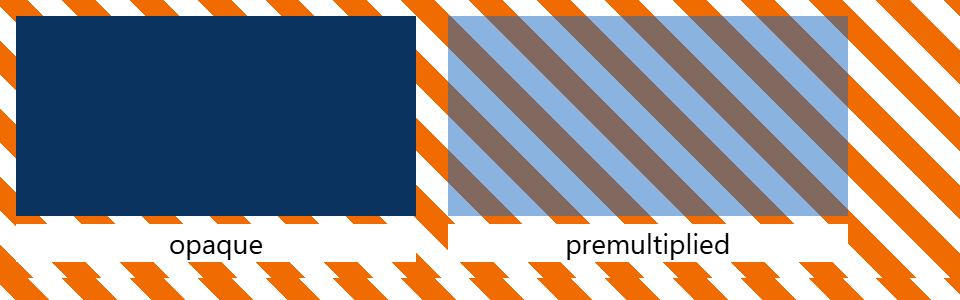
The opaque canvas discards alpha and shows the stored color, a darker blue; the premultiplied one lets the stripes through. With 'premultiplied', no color channel may exceed alpha (the specification leaves the result on screen undefined), so fragment shaders multiply color by alpha and blend with srcFactor: 'one' and dstFactor: 'one-minus-src-alpha' (Render Pipelines). Otherwise keep 'opaque'.