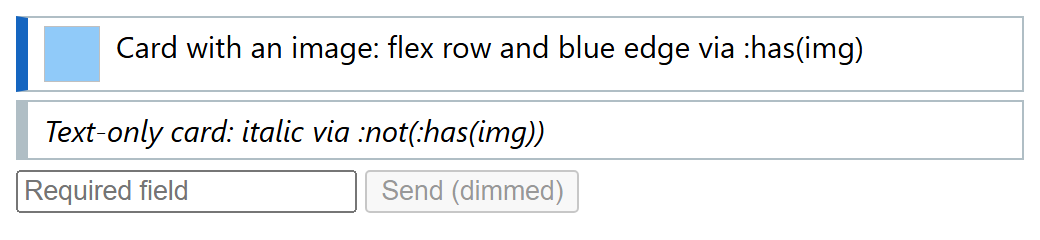
These pseudo-classes take a selector list. :is(), :where() and :not() are Baseline widely available since July 2023, :has() since June 2026.
| Selector | Matches | Specificity |
|---|---|---|
| :is(h2, h3) a | <a> in <h2> or <h3> | Heaviest argument: 0-0-2 |
| :where(ul, ol) li | The same, weightless | Argument adds 0: 0-0-1 |
| li:not(.done, #x) | <li> matching neither | Heaviest argument: 1-0-1 |
| .card:has(> img) | .card with an <img> child | Heaviest argument: 0-1-1 |
:is() and :where() are forgiving: an invalid argument is dropped instead of voiding the rule; :has() is not. :has() takes a relative selector, so h2:has(+ p) selects an <h2> followed by a paragraph: parent and previous-sibling selection at last. Avoid broad anchors such as body:has(.x) on fast-changing pages, since any change inside can restyle everything.
<!doctype html>
<style>
  body { font: 15px system-ui; }  p { margin: 0; }
  .card { border: 1px solid #b0bec5; border-left-width: 6px; padding: 4px 8px; margin: 4px 0; }
  .card:has(img) { display: flex; gap: 8px; border-left-color: #1565c0; }
  .card:not(:has(img)) { font-style: italic; }  form:has(:invalid) button { opacity: 0.4; }
</style>
<div class="card"><img width="28" height="28" alt="" style="background:#90caf9">
  <p>Card with an image: flex row and blue edge via :has(img)</p></div>
<div class="card"><p>Text-only card: italic via :not(:has(img))</p></div>
<form><input required placeholder="Required field"> <button>Send (dimmed)</button></form>