With a bundler (Vite 25,978 , webpack 3,824 or esbuild 126 ; npm 2,036 itself is MERN Stack Development's subject), install the collection or single modules, plus DefinitelyTyped 51,442 's declarations for TypeScript, because D3 18,089 ships none:
npm install d3@7.9.0            # all 30 modules: import * as d3 from "d3"
npm install d3-scale d3-shape   # two modules: import { scaleLinear } from "d3-scale"
npm install -D @types/d3        # 7.4.3, declarations for the whole collection
Without a build step, a <script> loads the UMD bundle from jsDelivr 15,886 and defines a global d3. Every figure in this chapter loads it this way, pinned to 7.9.0 so a future release cannot change a page you haven't retested:
<script src="https://cdn.jsdelivr.net/npm/d3@7.9.0/dist/d3.min.js"></script>
<p id="info" style="font: 15px Arial"></p>
<svg width="580" height="64"></svg>
<script>
  const ratings = [4.6, 4.3, 4.8, 4.1, 4.5, 4.4];
  d3.select('#info').text(`d3.version is ${d3.version}; one circle per BookNest rating:`);
  d3.select('svg').selectAll('circle').data(ratings).join('circle')
    .attr('cx', (d, i) => 45 + i * 95).attr('cy', 32).attr('r', d => (d - 3.9) * 32)
    .attr('fill', '#1f5f8b');
</script>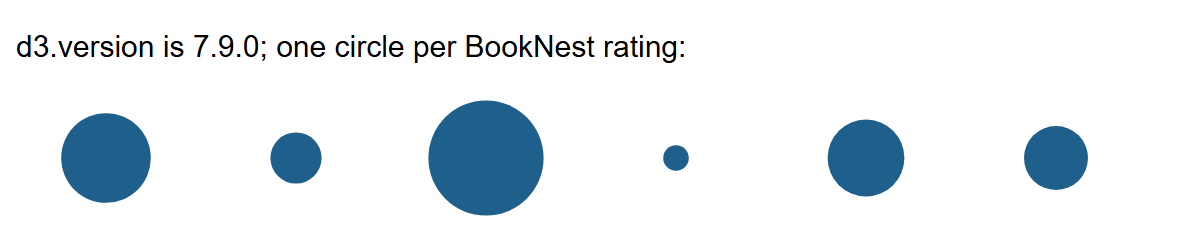
The ES module build (import * as d3 from '.../d3@7.9.0/+esm') also works but, in Chrome 154 1 , had no version export. From disk, Chrome blocks d3.json() on file:// with a CORS error, so serve pages that load data over HTTP (npx serve or python -m http.server), as d3-fetch does.