d3.interpolate(a, b) picks an interpolator by type: numbers, colors, dates, arrays, objects, or strings with embedded numbers ('10px' to '20px'). It fails for paths whose commands differ, such as wedges, so attrTween interpolates the data and regenerates the path each frame; textTween does it for text:
<script src="https://cdn.jsdelivr.net/npm/d3@7.9.0/dist/d3.min.js"></script>
<script src="booknest-sales.js"></script>
<svg width="620" height="114" font-family="Arial" font-size="17"></svg>
<script>
  const arc = d3.arc().innerRadius(32).outerRadius(56), pie = d3.pie().sort(null);
  const from = pie(SALES.ratings[0].counts);                           // The Quiet Harbor
  const to = pie(SALES.ratings[3].counts);                             // Small Steps ...
  const donut = (cx, data) => d3.select('svg').append('g')
    .attr('transform', `translate(${cx},57)`).selectAll('path').data(data).join('path')
    .attr('d', arc).attr('fill', (d, i) => d3.schemeYlOrBr[5][i]);
  donut(70, from);  donut(530, to);                                      // before and after
  donut(300, from).data(to).transition().duration(1000)                  // the animated one
    .attrTween('d', (d, i) => t => arc(d3.interpolate(from[i], d)(t)));  // data, then path
  d3.select('svg').selectAll('text').data([4.6, 4.6, 4.1]).join('text').text(d => d.toFixed(2))
    .attr('x', (d, i) => 70 + i * 230).attr('y', 63).attr('text-anchor', 'middle')
    .filter((d, i) => i === 1).transition().duration(1000)
    .textTween(() => t => d3.interpolate(4.6, 4.1)(t).toFixed(2));
  d3.timeout(() => { d3.selectAll('path, text').interrupt(); window.__done = true; }, 500);
</script>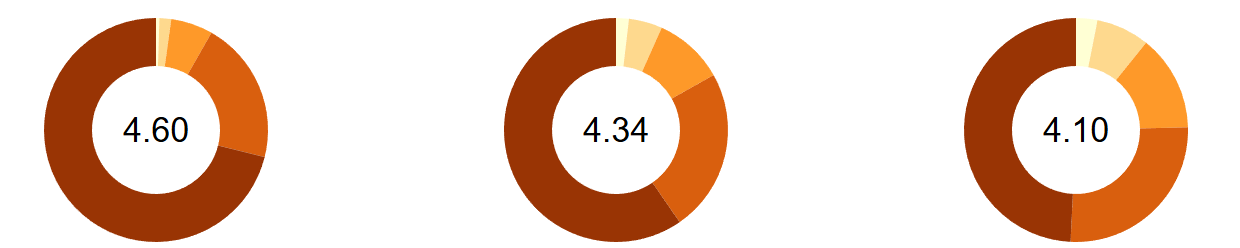
The middle donut is a single frame, 500 ms into the morph from The Quiet Harbor's ratings (left) to Small Steps to Big Summits' (right): every wedge has valid in-between angles, and its label counts toward 4.10. Color space matters too: halfway from harbor blue to saffron, interpolateRgb gives olive, interpolateLab brown and interpolateHcl pink.
<!doctype html>
<style>
  body { margin: 0; padding: 8px; background: #fafaf7; font: 12px system-ui, sans-serif; color: #263238; }
  svg { width: 100%; max-width: 600px; display: block; }
</style>
<script src="https://cdn.jsdelivr.net/npm/d3@7.9.0/dist/d3.min.js"></script>
<p>Show ratings of <select id="book"></select></p>
<svg viewBox="0 0 600 220" font-size="12"></svg>
<script>
  // BookNest sample data, invented for these examples (not real sales)
  const SALES = (() => {
    const books = [
      { id: 1, key: 'harbor', title: 'The Quiet Harbor', author: 'Elena Marsh', genre: 'Fiction', color: '#1f5f8b', price: 18.99, rating: 4.6 },
      { id: 2, key: 'deepweb', title: 'Patterns of the Deep Web', author: 'Ravi Menon', genre: 'Technology', color: '#5b3f99', price: 39.5, rating: 4.3 },
      { id: 3, key: 'saffron', title: 'Salt and Saffron', author: 'Leila Haddad', genre: 'Cooking', color: '#e09a10', price: 24, rating: 4.8 },
      { id: 4, key: 'summit', title: 'Small Steps to Big Summits', author: 'Tom Okafor', genre: 'Self-Help', color: '#3f7d3a', price: 14.99, rating: 4.1 },
      { id: 5, key: 'clock', title: "The Clockmaker's Paradox", author: 'Iris Vale', genre: 'Science Fiction', color: '#b5452f', price: 16.2, rating: 4.5 },
      { id: 6, key: 'glass', title: 'Gardens in Glass', author: 'June Park', genre: 'Gardening', color: '#2a9d8f', price: 22.5, rating: 4.4 },
    ];
    const units = {        // units sold per month, January 2025 to August 2026
      1: [40, 47, 46, 47, 57, 51, 46, 54, 60, 60, 71, 111, 52, 42, 49, 56, 59, 48, 53, 51],
      2: [40, 37, 35, 41, 48, 43, 40, 42, 50, 53, 53, 84, 42, 35, 38, 41, 45, 41, 46, 46],
      3: [46, 45, 41, 46, 53, 49, 46, 45, 60, 51, 63, 100, 48, 48, 49, 48, 53, 49, 48, 52],
      4: [100, 80, 72, 70, 66, 66],                    // released March 2026
      5: [48, 47, 54, 52, 65, 55, 57, 58, 64, 66, 75, 124, 58, 49, 59, 56, 63, 57, 54, 57],
      6: [31, 30, 28, 35, 31, 32, 29, 30, 41, 36, 45, 64, 31, 30, 30, 38, 40, 38, 36, 38],
    };
    const months = d3.utcMonths(new Date('2025-01-01'), new Date('2026-09-01')).map(d3.utcFormat('%Y-%m'));
    const sales = books.flatMap(b => units[b.id].map((n, i) =>
      ({ month: months[i + months.length - units[b.id].length], book: b.id, units: n })));
    const ratings = [[4, 8, 20, 87, 293], [6, 10, 22, 95, 147], [2, 3, 8, 45, 342], [2, 3, 8, 24, 28],
      [4, 8, 20, 90, 228], [4, 7, 20, 82, 147]].map((counts, i) => ({ book: i + 1, counts }));  // 1 to 5 stars
    const regions = [{ id: '826', name: 'United Kingdom', units: 1480 }, { id: '276', name: 'Germany', units: 1120 },
      { id: '250', name: 'France', units: 760 }, { id: '372', name: 'Ireland', units: 540 },
      { id: '528', name: 'Netherlands', units: 410 }, { id: '724', name: 'Spain', units: 320 }];
    const links = [[5, 1, 38], [1, 3, 24], [2, 5, 18], [3, 6, 21], [4, 1, 12], [2, 6, 9], [4, 3, 15], [5, 6, 14]]
      .map(([source, target, value]) => ({ source, target, value }));   // customers who bought both
    return { books, sales, ratings, regions, links };
  })();

  const svg = d3.select('svg');
  const arc = d3.arc().innerRadius(40).outerRadius(70), pie = d3.pie().sort(null);
  const mean = counts => d3.sum(counts, (c, i) => c * (i + 1)) / d3.sum(counts);
  const donut = svg.append('g').attr('transform', 'translate(110,85)');
  const label = donut.append('text').attr('text-anchor', 'middle').attr('dy', '0.35em').attr('font-size', 20);
  let current = pie(SALES.ratings[0].counts);
  donut.selectAll('path').data(current).join('path').attr('d', arc).attr('fill', (d, i) => d3.schemeYlOrBr[5][i]);
  label.text(mean(SALES.ratings[0].counts).toFixed(2));

  function show(index) {
    const counts = SALES.ratings[index].counts, next = pie(counts), from = current;
    const m0 = +label.text(), m1 = mean(counts);
    // d3.interpolate on two path strings would fail (different commands), so interpolate the
    // wedge data and regenerate the path every frame
    donut.selectAll('path').data(next).transition().duration(1000)
      .attrTween('d', (d, i) => { const f = d3.interpolate(from[i], d); return t => arc(f(t)); });
    label.transition().duration(1000).textTween(() => t => d3.interpolate(m0, m1)(t).toFixed(2));
    current = next;
  }
  const select = d3.select('#book');
  select.selectAll('option').data(SALES.books).join('option').attr('value', (d, i) => i).text(d => d.title);
  select.on('change', () => show(+select.property('value')));

  // Color interpolation depends on the space: harbor blue → saffron
  const spaces = ['interpolateRgb', 'interpolateLab', 'interpolateHcl', 'interpolateHsl'];
  spaces.forEach((name, row) => {
    const f = d3[name]('#1f5f8b', '#e09a10');
    const g = svg.append('g').attr('transform', `translate(230, ${20 + row * 48})`);
    g.append('text').attr('y', -4).text(name);
    g.selectAll('rect').data(d3.range(0, 1.0001, 0.05)).join('rect').attr('x', t => t * 340).attr('width', 17.5)
      .attr('height', 22).attr('fill', t => f(t));
  });
  // Start by morphing to Small Steps to Big Summits, once
  d3.timeout(() => { select.property('value', 3); show(3); }, 400);
</script>