selection.transition() returns a transition over the same elements; duration(ms) (default 250) sets its length, ease(fn) maps time to progress (default d3.easeCubic, slow at both ends), and attr() and style() give the end values, D3 18,089 reading the start values from the DOM. easeVarying() picks an ease per element:
<script src="https://cdn.jsdelivr.net/npm/d3@7.9.0/dist/d3.min.js"></script>
<svg width="620" height="120" font-family="Arial" font-size="13"></svg>
<script>
  const eases = ['easeLinear', 'easeCubic', 'easeBackOut', 'easeElasticOut', 'easeBounceOut'];
  const svg = d3.select('svg'), x = d3.scaleLinear([0, 1], [140, 560]);
  const rows = svg.selectAll('g').data(eases).join('g')
    .attr('transform', (d, i) => `translate(0, ${12 + i * 24})`);
  rows.append('text').attr('y', 5).text(d => `d3.${d}`);
  rows.append('line').attr('x1', x(0)).attr('x2', x(1)).attr('stroke', '#bbb');
  rows.append('circle').attr('r', 8).attr('cx', x(0)).attr('fill', '#1f5f8b')
    .transition().duration(1000).easeVarying(d => d3[d]).attr('cx', x(1));
  d3.timeout(() => { svg.selectAll('circle').interrupt(); window.__done = true; }, 400);
</script>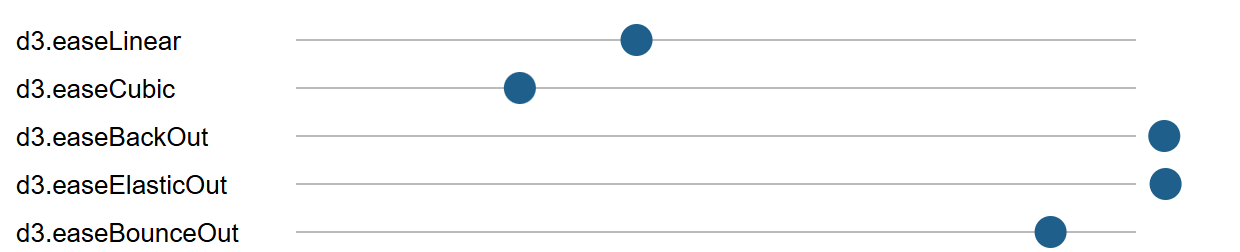
In this single frame, stopped at about 400 ms, the linear dot is 40% along, the cubic one still accelerating and the back and elastic ones past the end. For data prefer cubic or quadratic eases: an overshooting bar briefly shows a value it doesn't have.