d3.drag() turns mouse and touch drags into start, drag and end events whose event.x and event.y are offset from the drag subject: by default the datum's own x and y, so other data yields NaN unless you set subject(). The page presses Small Steps to Big Summits and moves 476 px, without releasing:
<script src="https://cdn.jsdelivr.net/npm/d3@7.9.0/dist/d3.min.js"></script>
<script src="booknest-sales.js"></script>
<svg width="620" height="124" font-family="Arial" font-size="12"></svg>
<script>
  const x = d3.scaleLinear([4, 5], [30, 590]), svg = d3.select('svg'), at = d => x(d.rating);
  const drag = d3.drag().subject((event, d) => ({ x: at(d), y: 50 }))  // where the drag starts
    .on('drag', function (event, d) {
      d.rating = +x.invert(Math.max(30, Math.min(590, event.x))).toFixed(2);
      const g = d3.select(this).attr('transform', `translate(${at(d)},50)`);
      g.select('circle').attr('stroke', '#263238');
      g.select('text').text(`${d.key} ${d.rating}`);
    });
  const g = svg.selectAll('g').data(d3.sort(SALES.books, b => b.rating).map(b => ({ ...b })))
    .join('g').attr('transform', d => `translate(${at(d)},50)`).call(drag);
  g.append('circle').attr('r', 9).attr('fill', d => d.color).attr('stroke-width', 3);
  g.append('text').attr('y', (d, i) => i % 2 ? -16 : 26).attr('text-anchor', 'middle')
    .text(d => `${d.key} ${d.rating}`);
  svg.append('g').attr('transform', 'translate(0,100)').call(d3.axisBottom(x).ticks(10));
  const fire = (el, type, dx) => el.dispatchEvent(new MouseEvent(type,
    { bubbles: true, view: window, clientX: dx }));
  fire(g.filter(d => d.key === 'summit').select('circle').node(), 'mousedown', 0);
  fire(window, 'mousemove', 476);                          // 0.85 of a star; no mouseup yet
  window.__done = true;
</script>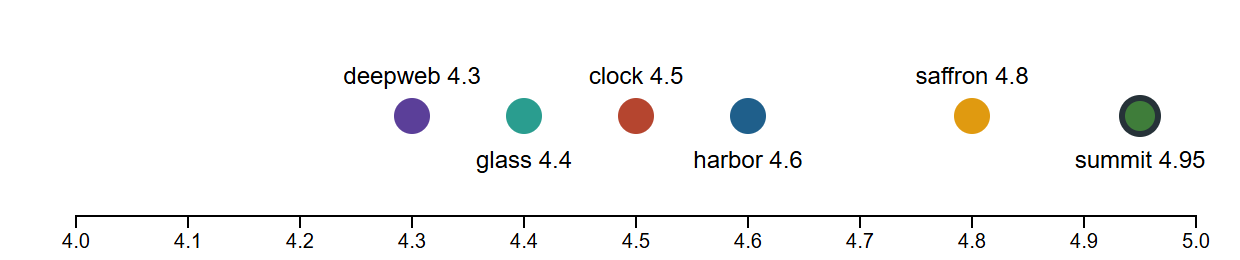
The ring marks the drag in progress: 476 px is 0.85 of a star, so 4.1 became 4.95. d3-drag listens on the window after a press, hence the move's target.
<!doctype html>
<style>
  body { margin: 0; padding: 8px; background: #fafaf7; font: 12px system-ui, sans-serif; color: #263238; }
  svg { width: 100%; max-width: 600px; display: block; }
  g.dot { cursor: grab; }
</style>
<script src="https://cdn.jsdelivr.net/npm/d3@7.9.0/dist/d3.min.js"></script>
<p>Drag a dot to change that book's rating. <span id="out"></span></p>
<svg viewBox="0 0 600 130" font-size="12"></svg>
<script>
  // BookNest sample data, invented for these examples (not real sales)
  const SALES = (() => {
    const books = [
      { id: 1, key: 'harbor', title: 'The Quiet Harbor', author: 'Elena Marsh', genre: 'Fiction', color: '#1f5f8b', price: 18.99, rating: 4.6 },
      { id: 2, key: 'deepweb', title: 'Patterns of the Deep Web', author: 'Ravi Menon', genre: 'Technology', color: '#5b3f99', price: 39.5, rating: 4.3 },
      { id: 3, key: 'saffron', title: 'Salt and Saffron', author: 'Leila Haddad', genre: 'Cooking', color: '#e09a10', price: 24, rating: 4.8 },
      { id: 4, key: 'summit', title: 'Small Steps to Big Summits', author: 'Tom Okafor', genre: 'Self-Help', color: '#3f7d3a', price: 14.99, rating: 4.1 },
      { id: 5, key: 'clock', title: "The Clockmaker's Paradox", author: 'Iris Vale', genre: 'Science Fiction', color: '#b5452f', price: 16.2, rating: 4.5 },
      { id: 6, key: 'glass', title: 'Gardens in Glass', author: 'June Park', genre: 'Gardening', color: '#2a9d8f', price: 22.5, rating: 4.4 },
    ];
    const units = {        // units sold per month, January 2025 to August 2026
      1: [40, 47, 46, 47, 57, 51, 46, 54, 60, 60, 71, 111, 52, 42, 49, 56, 59, 48, 53, 51],
      2: [40, 37, 35, 41, 48, 43, 40, 42, 50, 53, 53, 84, 42, 35, 38, 41, 45, 41, 46, 46],
      3: [46, 45, 41, 46, 53, 49, 46, 45, 60, 51, 63, 100, 48, 48, 49, 48, 53, 49, 48, 52],
      4: [100, 80, 72, 70, 66, 66],                    // released March 2026
      5: [48, 47, 54, 52, 65, 55, 57, 58, 64, 66, 75, 124, 58, 49, 59, 56, 63, 57, 54, 57],
      6: [31, 30, 28, 35, 31, 32, 29, 30, 41, 36, 45, 64, 31, 30, 30, 38, 40, 38, 36, 38],
    };
    const months = d3.utcMonths(new Date('2025-01-01'), new Date('2026-09-01')).map(d3.utcFormat('%Y-%m'));
    const sales = books.flatMap(b => units[b.id].map((n, i) =>
      ({ month: months[i + months.length - units[b.id].length], book: b.id, units: n })));
    const ratings = [[4, 8, 20, 87, 293], [6, 10, 22, 95, 147], [2, 3, 8, 45, 342], [2, 3, 8, 24, 28],
      [4, 8, 20, 90, 228], [4, 7, 20, 82, 147]].map((counts, i) => ({ book: i + 1, counts }));  // 1 to 5 stars
    const regions = [{ id: '826', name: 'United Kingdom', units: 1480 }, { id: '276', name: 'Germany', units: 1120 },
      { id: '250', name: 'France', units: 760 }, { id: '372', name: 'Ireland', units: 540 },
      { id: '528', name: 'Netherlands', units: 410 }, { id: '724', name: 'Spain', units: 320 }];
    const links = [[5, 1, 38], [1, 3, 24], [2, 5, 18], [3, 6, 21], [4, 1, 12], [2, 6, 9], [4, 3, 15], [5, 6, 14]]
      .map(([source, target, value]) => ({ source, target, value }));   // customers who bought both
    return { books, sales, ratings, regions, links };
  })();

  const x = d3.scaleLinear([4, 5], [30, 570]), svg = d3.select('svg'), at = d => x(d.rating);
  // event.x and event.y are offsets from the subject: by default the datum's own x and y,
  // which these data don't have, so the subject says where each drag starts
  const drag = d3.drag().subject((event, d) => ({ x: at(d), y: 50 }))
    .on('start', function () { d3.select(this).select('circle').attr('stroke', '#263238'); })
    .on('drag', function (event, d) {
      d.rating = +x.invert(Math.max(30, Math.min(570, event.x))).toFixed(2);
      d3.select(this).attr('transform', `translate(${at(d)},50)`).select('text').text(`${d.key} ${d.rating}`);
      d3.select('#out').text(`${d.title}: ${d.rating}`);
    })
    .on('end', function () { d3.select(this).select('circle').attr('stroke', null); });

  const g = svg.selectAll('g.dot').data(d3.sort(SALES.books, b => b.rating).map(b => ({ ...b })))
    .join('g').attr('class', 'dot').attr('transform', d => `translate(${at(d)},50)`).call(drag);
  g.append('circle').attr('r', 10).attr('fill', d => d.color).attr('stroke-width', 3);
  g.append('text').attr('y', (d, i) => i % 2 ? -18 : 28).attr('text-anchor', 'middle')
    .text(d => `${d.key} ${d.rating}`);
  svg.append('g').attr('transform', 'translate(0,100)').call(d3.axisBottom(x).ticks(10));

  // Script a press on Summit and a move, without releasing, so the ring shows the drag in progress
  const fire = (el, type, clientX) => el.dispatchEvent(new MouseEvent(type, { bubbles: true, view: window, clientX }));
  const summit = g.filter(d => d.key === 'summit').select('circle').node();
  const scale = svg.node().getBoundingClientRect().width / 600;
  fire(summit, 'mousedown', 0);
  fire(window, 'mousemove', 459 * scale);                   // 0.85 of a star on this axis
</script>