Version control records every change to your project with an author, a date and a reason, so you can see who changed a stylesheet, undo a bad release, and let five people edit the same code without emailing zip files. Git 1,932 was written in 2005 by Linus Torvalds and the Linux kernel community after they lost free use of the proprietary BitKeeper system, and it has become the default everywhere. Git is distributed: every clone holds the complete history, so commits, branches and logs work offline. Install it from git-scm.com (https://git-scm.com/ 1,932 ) (2.55 is the current release); macOS offers it with the Xcode 10 command-line tools, and VS Code 550 's Source Control panel is a graphical front end to the same commands.
GitHub 29 hosts Git repositories and adds what teams need around them: pull requests for code review, issues, GitHub Actions 29 for CI, and GitHub Pages 29 for static hosting (Static Hosting and CDNs). Microsoft bought it for $7.5 billion in 2018. GitLab 377 , Bitbucket 2,046 and the non-profit Codeberg 3,719 offer the same Git workflow.
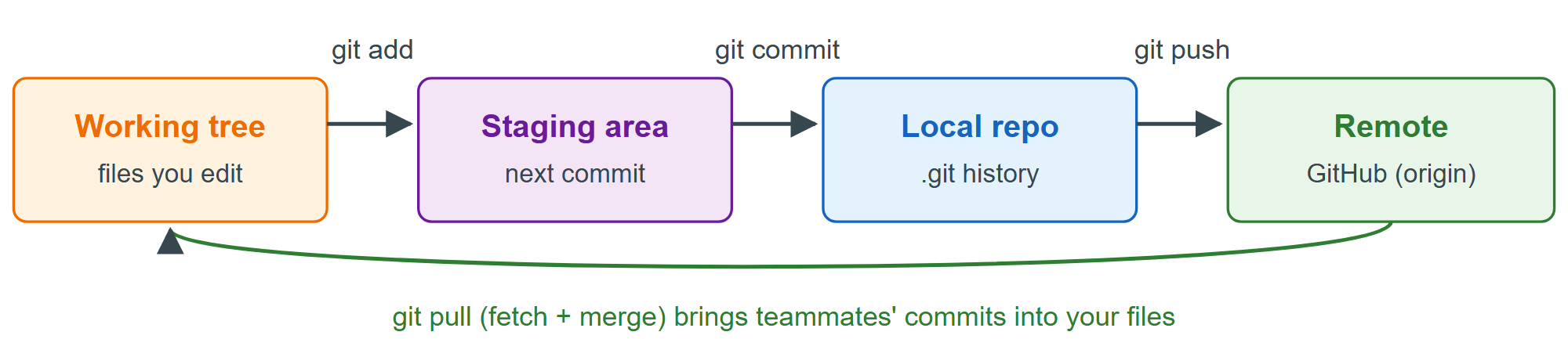
Your first repository
Tell Git who you are once per machine, then turn any project folder into a repository. A .gitignore file keeps generated and secret files out of history: node_modules/ is rebuilt by npm 2,036 ci from the lockfile, dist/ by the build, and .env holds API keys that must never be committed.
git config --global user.name "Ada Lovelace"
git config --global user.email "ada@example.com"
git config --global init.defaultBranch main
cd my-site
git init
printf 'node_modules/\ndist/\n.env\n' > .gitignore
git status --short
git add .
git commit -m "Add home page"Initialized empty Git repository in C:/projects/my-site/.git/ ?? .gitignore ?? index.html ?? styles.css [main (root-commit) 96f4a10] Add home page 3 files changed, 6 insertions(+) create mode 100644 .gitignore create mode 100644 index.html create mode 100644 styles.css
?? marks untracked files; node_modules does not appear because .gitignore excludes it. The seven hexadecimal characters 96f4a10 abbreviate the commit's SHA hash, computed from its content, its parent and its metadata, so no commit can be altered without changing every hash after it.
The branch and pull request workflow
Never commit straight to main on a team. Create a branch per change, push it, and open a pull request (PR), a proposal to merge that GitHub shows as a reviewable diff with the CI results beside it:
gh repo create my-site --public --source=. --push   # first time only (GitHub CLI)
git switch -c feature/dark-mode       # create and switch to a branch
git commit -am "Add dark mode styles" # stage tracked changes and commit
git push -u origin feature/dark-mode  # publish the branch
gh pr create --fill                   # or click "Compare & pull request"
# after review and merge on GitHub:
git switch main
git pull
git branch -d feature/dark-mode
Without the GitHub CLI 29 , create an empty repository on github.com and run the git remote add origin ... and git push -u origin main lines it shows. Write commit messages as imperatives that complete "This commit will...": "Fix mobile menu overlap", not "changes".
Continuous integration with GitHub Actions
The hooks from Code Quality Tools can be skipped with --no-verify; CI cannot. A YAML file in .github/workflows/ runs on GitHub's servers for every push and PR, and a red check blocks the merge once you require it in the repository's branch rules:
name: CI
on: [push, pull_request]
jobs:
  check:
    runs-on: ubuntu-latest
    steps:
      - uses: actions/checkout@v7
      - uses: actions/setup-node@v7
        with:
          node-version: 24
      - run: npm ci
      - run: npm run lint
      - run: npm test -- --run
- run: npm run build| Task | Command |
|---|---|
| What changed? | git status, git diff |
| Discard edits to a file | git restore styles.css |
| Unstage a file | git restore --staged styles.css |
| History, compact | git log --oneline --graph |
| Undo a pushed commit safely | git revert <hash> |
| Put work aside | git stash, later git stash pop |
| Get teammates' changes | git pull |