Node.js 2,131 releases come in lines. Until now, even-numbered lines became Long-Term Support (LTS) and received fixes for 30 months, while odd-numbered lines lived six months; from Node.js 27 there is one major release per year and every line becomes LTS. In September 2026, Node.js 24 "Krypton" is Active LTS (supported until April 30, 2028), Node.js 22 "Jod" is in maintenance until April 30, 2027, Node.js 26 is Current and becomes LTS on October 28, 2026, and Node.js 20 reached end of life in April 2026. Use an LTS line for real projects.
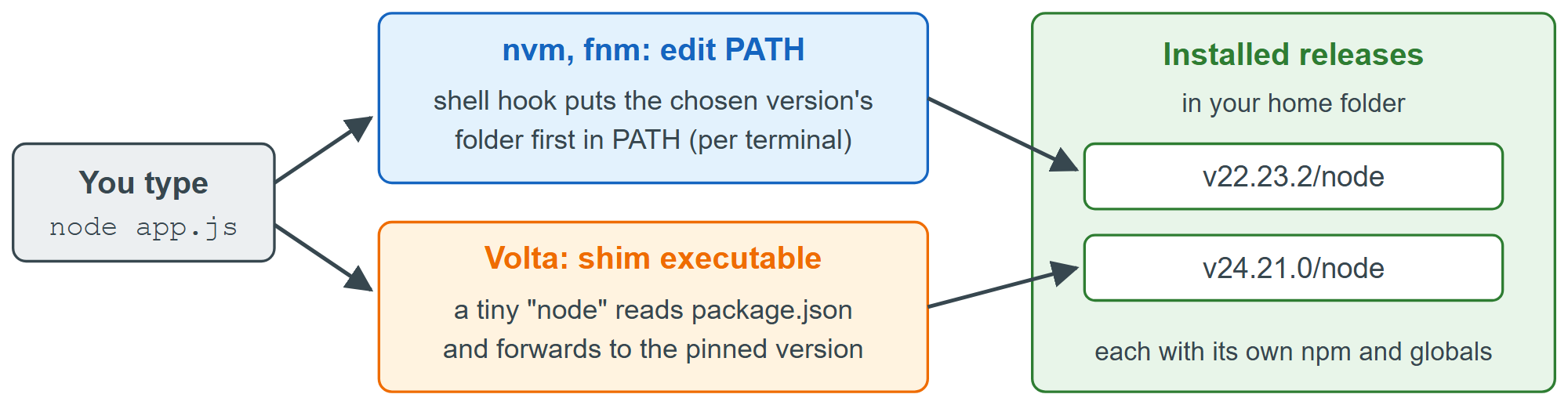
The installer from nodejs.org (https://nodejs.org/ 2,131 ) gives you one system-wide Node.js, which is enough for a first project. Sooner or later, though, one project needs Node.js 22 and another Node.js 24. A version manager installs any number of releases into your home folder and switches between them per terminal or per project. nvm 95,199 is a shell script, so native Windows users pick fnm 26,974 , mise 85,216 or the separate nvm-windows 47,808 (https://github.com/nvm-windows/nvm 47,808 ) project.
| Tool | Platforms | Project pin file | Status |
|---|---|---|---|
| nvm | macOS, Linux, WSL 6 | .nvmrc | Active (v0.40.7) |
| fnm | Windows, macOS, Linux | .node-version, .nvmrc | Active (v1.39.0) |
| Volta 928,810 | Windows, macOS, Linux | "volta" in package.json | Unmaintained |
| mise | Windows, macOS, Linux | mise.toml | Active, many languages |
fnm is a good default because it is a single fast Rust binary that works in PowerShell 55,538 , bash, zsh and fish. The session below installs it on Windows, loads its shell hook, installs two releases and lets a .node-version file choose between them (on macOS use brew 6,457 install fnm, on Linux curl 3,008 -fsSL https://fnm.vercel.app/install 639 | bash).
winget install Schniz.fnm
# add this line to your PowerShell profile ($PROFILE), then open a new terminal
fnm env --use-on-cd --shell powershell | Out-String | Invoke-Expression
fnm install 22
fnm install --lts          # newest LTS release
mkdir legacy-app; cd legacy-app
"22" | Out-File -Encoding ascii .node-version
fnm use                    # --use-on-cd also does this automatically
node -v; npm -vInstalling Node v22.23.2 (x64) Installing Node v24.21.0 (x64) Using Node v22.23.2 v22.23.2 10.9.8
Practical advice:
Commit a .nvmrc or .node-version file so teammates and CI (Version Control Essentials) use the same major version.
Global packages belong to one Node.js release, so prefer npx and project scripts to global installs.
Volta still works, but its README marks it unmaintained and recommends mise.
Node.js 25 and later no longer include Corepack 3,816 , the helper that downloaded the pnpm 69,400 or Yarn 11,798 version named in package.json. Install it with npm 2,036 install -g corepack if a project relies on it.