Visitors should type mysite.com, not 203.0.113.7. Buy a name from a registrar such as Namecheap, Porkbun 715 or Cloudflare 2 Registrar, then create DNS records at your DNS host (usually the registrar itself) that map the name to your server's public address, the WAN address from Port Forwarding, never a 192.168.x.x LAN address.
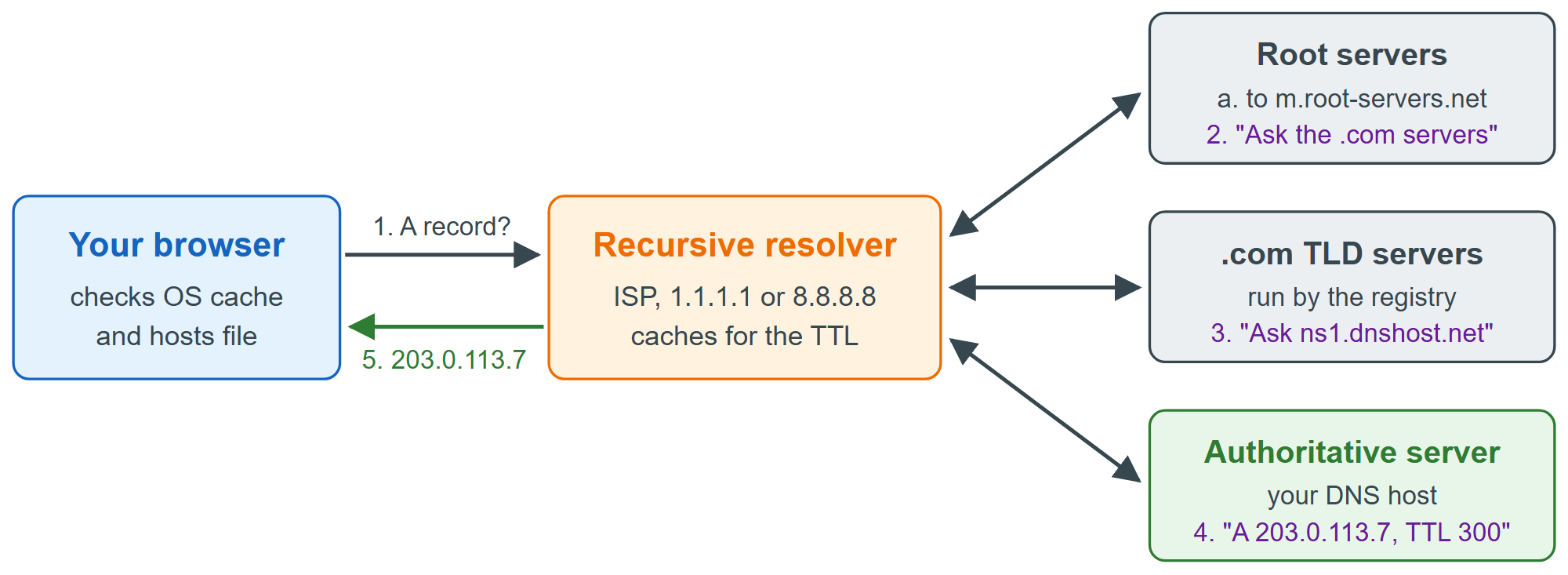
Each answer carries a TTL (time to live, in seconds) that tells resolvers how long they may cache it. Lower the TTL to 300 a day before you move a site to a new server, so the change reaches everyone within minutes instead of hours.
| Type | Example value | Purpose |
|---|---|---|
| A | 203.0.113.7 | IPv4 address of the name |
| AAAA | 2001:db8::7 | IPv6 address of the name |
| CNAME | www → mysite.com | Alias to another name |
| MX | 10 mail.mysite.com | Mail server for the domain |
| TXT | "v=spf1 ..." | Verification, email SPF |
| NS | ns1.dnshost.net | Authoritative servers |
| CAA | 0 issue "letsencrypt.org" | Which CAs may issue |
A typical site needs an A record (and AAAA if you have IPv6) for mysite.com and a CNAME for www. The bare domain, called the apex, cannot be a CNAME, because a CNAME may not coexist with the NS and SOA records every apex must have; DNS hosts work around this with proprietary ALIAS records or "CNAME flattening". Add a subdomain such as blog.mysite.com by creating an A or CNAME record named blog.
You can query records from JavaScript with Node's built-in resolver, which is handy in deployment scripts. Here it looks up a domain:
import { Resolver } from 'node:dns/promises';
const resolver = new Resolver();
resolver.setServers(['1.1.1.1']);   // ask Cloudflare's public resolver directly
const domain = process.argv[2] ?? 'example.com';
for (const type of ['A', 'AAAA', 'MX', 'NS']) {
  const records = await resolver.resolve(domain, type).catch((err) => err.code);
  console.log(type.padEnd(4), [records].flat().join(' '));
}A 65.9.168.13 65.9.168.103 65.9.168.39 65.9.168.95 AAAA ENODATA MX ENODATA NS ns-1328.awsdns-38.org ns-1656.awsdns-15.co.uk ns-198.awsdns-24.com ns-685.awsdns-21.net
The awsdns name servers show that the zone is hosted on Amazon Route 53 24 , and the four A records belong to Amazon CloudFront 24 , a CDN (Static Hosting and CDNs) that answers from edge servers near the visitor. ENODATA means the name exists but has no record of that type. To preview a site before changing public DNS, add a line such as 203.0.113.7 mysite.com to your hosts file (/etc/hosts, or C:\Windows\System32\drivers\etc\hosts on Windows); the OS consults it before asking any resolver.