Your ISP gives your home or office router one public IPv4 address, and every device behind it shares that address through NAT (network address translation). The router remembers which device opened each outgoing connection and routes replies back, but an unsolicited connection from the Internet matches no record, so it is dropped. A port forwarding rule (called Virtual Server or NAT forwarding on some routers) tells the router which LAN device receives new connections on a given port.
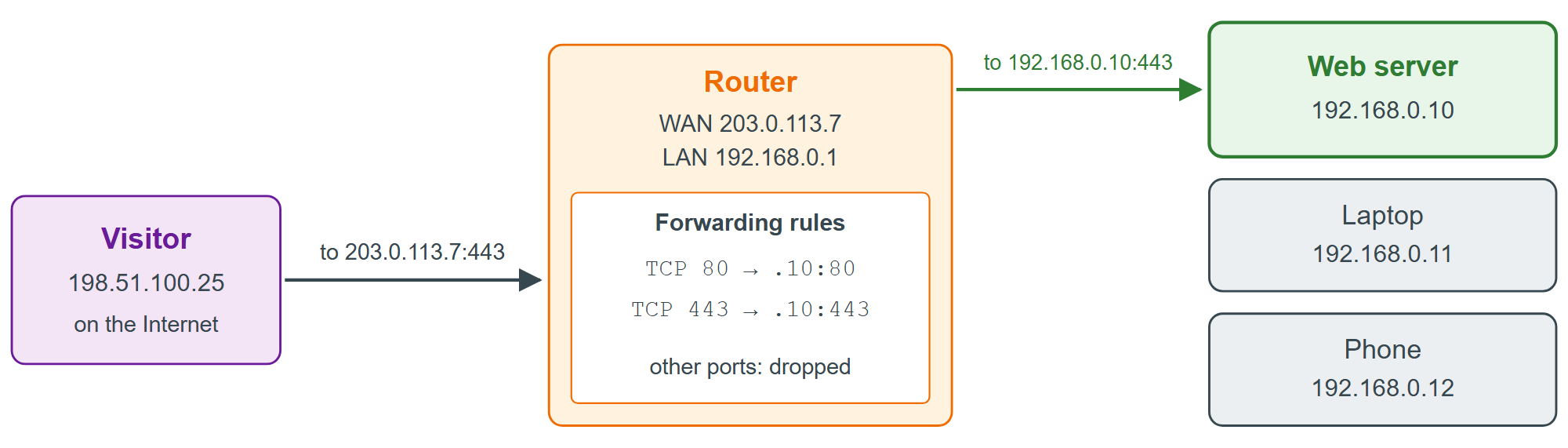
To add the rules, find the router's address (the Default Gateway in ipconfig on Windows, or ip route on Linux, often 192.168.0.1 or 192.168.1.1), open it in a browser and sign in. Under Port Forwarding or Virtual Server, forward TCP port 80 (HTTP) and TCP port 443 (HTTPS) to the fixed LAN address from Connecting Locally. Then test from outside your network, for example from a phone on mobile data or with the port checker at canyouseeme.org (https://canyouseeme.org/ 120,061 ). Many routers do not support NAT loopback (hairpinning), so visiting your own public address from inside the LAN can fail even when outsiders get through.
When forwarding cannot work
Carrier-grade NAT. If the router's WAN address differs from the address the world sees (curl 3,008 https://api.ipify.org 298 ), or lies in 100.64.0.0/10, your ISP has put you behind a second NAT, as mobile networks and SIM-card routers commonly do. Ask for a public IP, or use a tunnel (Tunnels for Local Development).
IPv6. Devices get globally routable addresses, so nothing is translated, but the router's firewall still blocks inbound connections until you allow the server's address.
Blocked ports. Some residential ISPs block inbound port 80 or forbid hosting in their terms of service.