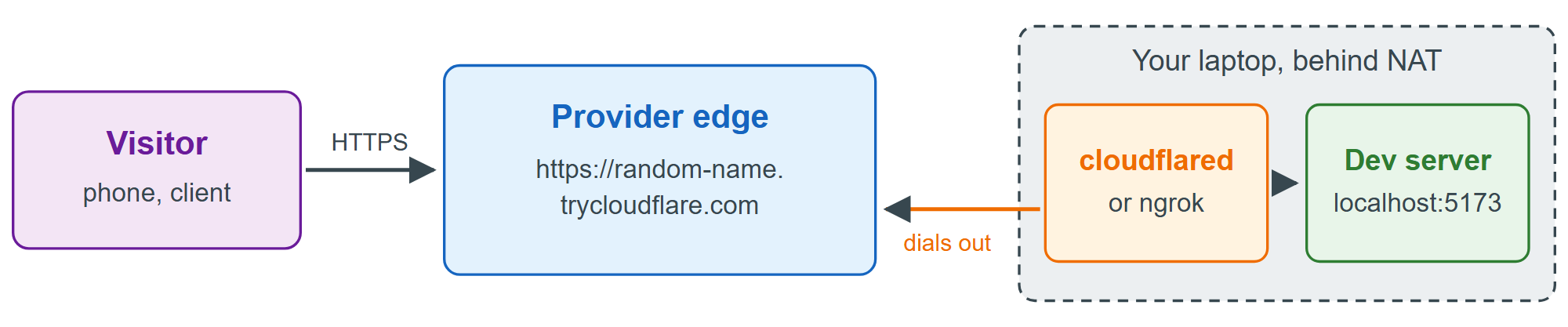
Sometimes you need a public HTTPS address for a server that runs only on your laptop: to show a client a work in progress, to test on a real phone over mobile data, or to receive webhooks from Stripe 238 or GitHub 29 . A tunnel needs no port forwarding, DNS or certificate: an agent on your machine opens an outbound connection to the provider's edge, which firewalls and carrier-grade NAT allow, and the edge sends requests for your public HTTPS URL back down that connection.
# ngrok: sign up at ngrok.com, then install the agent (brew, apt or Microsoft Store)
ngrok config add-authtoken <YOUR_TOKEN>
ngrok http 5173
# Cloudflare: no account needed for a temporary trycloudflare.com address
cloudflared tunnel --url http://localhost:5173
Each command prints its public URL and keeps running until you press Ctrl+C. Vite 25,978 rejects requests whose Host header it does not recognize, a guard against DNS rebinding attacks, so add the tunnel's domain to server.allowedHosts in vite.config.js, for example ['.trycloudflare.com'].
| Tool | Needs | Free use notes |
|---|---|---|
| ngrok 7,104 | Account | 1 GB, 20,000 requests a month; browser warning page |
| Cloudflare 2 Quick Tunnel | Nothing | Random URL; no Server-Sent Events |
| Tailscale 949 Funnel | Account | tailscale funnel 3000; ts.net names |
| VS Code 550 port forwarding | GitHub login | Ports panel; private by default |
| frp | Your own VPS | Open source (Apache 2.0) |
For a stable hostname on a domain whose DNS Cloudflare hosts, create a named tunnel: cloudflared tunnel login, cloudflared tunnel create dev, cloudflared tunnel route dns dev dev.mysite.com (adds the CNAME) and cloudflared tunnel run dev. ngrok's paid plans offer custom domains.