A package manager reads the dependency list in package.json, resolves every version range against the npm registry 2,036 (npmjs.com (https://www.npmjs.com/ 2,036 )), downloads the packages into node_modules and writes a lockfile recording the exact versions it chose. All four major clients use the same registry and the same package.json, so a library installed by one works with the others. They differ in speed, disk layout and defaults.
Installing Vite 8.3 25,978 with npm install -D vite adds 15 packages to node_modules: Vite itself plus the transitive dependencies it needs, such as Rolldown 181,166 , PostCSS 238,379 and Lightning CSS. How those packages are laid out on disk is where the clients differ most.
| Task | npm 12 | pnpm 12 69,400 | Yarn 4 11,798 | Bun 1.4 73,307 |
|---|---|---|---|---|
| Install all | npm install | pnpm install | yarn | bun install |
| Add a package | npm i pkg | pnpm add pkg | yarn add pkg | bun add pkg |
| Add dev package | npm i -D pkg | pnpm add -D pkg | yarn add -D pkg | bun add -d pkg |
| Remove | npm uninstall pkg | pnpm remove pkg | yarn remove pkg | bun remove pkg |
| Run a script | npm run dev | pnpm dev | yarn dev | bun run dev |
| Run a CLI once | npx pkg | pnpm dlx pkg | yarn dlx pkg | bunx pkg |
| CI install | npm ci | pnpm install --frozen-lockfile | yarn install --immutable | bun install --frozen-lockfile |
| Lockfile | package-lock.json | pnpm-lock.yaml | yarn.lock | bun.lock |
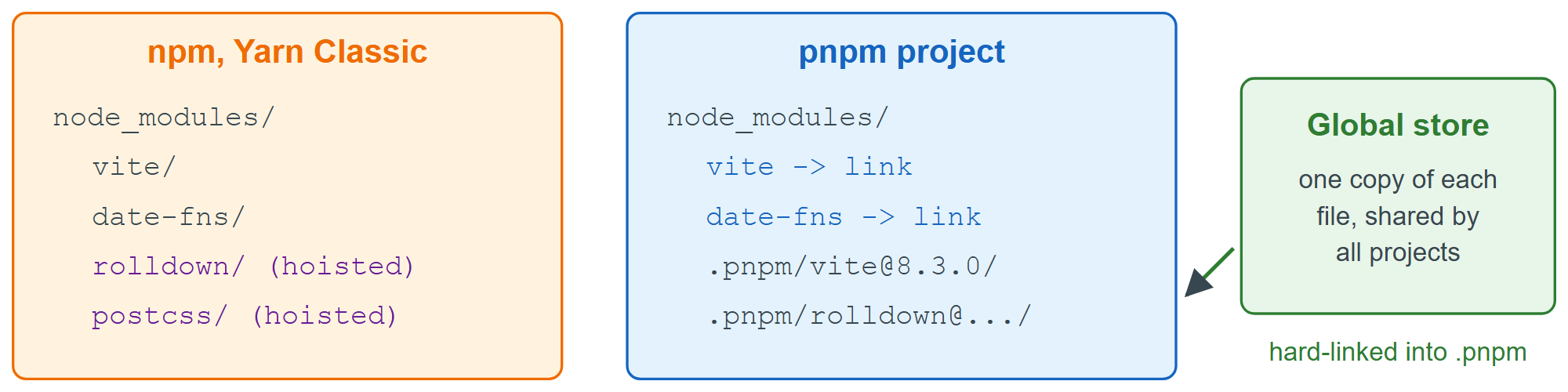
npm and Yarn Classic 11,798 hoist packages into one flat node_modules, so your code can import 'rolldown' even though you never declared it. Such a phantom dependency breaks without warning when Vite changes its internals. pnpm links only your direct dependencies into node_modules and keeps everything else under .pnpm, with the files hard-linked from a content-addressable store, so projects that use the same version share one copy on disk. Yarn 4 goes further by default: Plug'n'Play writes no node_modules at all, only a .pnp.cjs map that resolves imports (nodeLinker: node-modules in .yarnrc.yml switches back). Bun is an all-in-one JavaScript runtime whose built-in installer is compatible with npm projects and can migrate an existing npm, Yarn or pnpm lockfile.
Which should you use? npm comes with Node.js 2,131 and needs no setup, so the examples in this book use it. pnpm is the common choice for monorepos and large projects (Vite, Vue 5,482 and Nuxt 37,147 develop with it). Choose Yarn when a team already uses it and Bun when you adopt its runtime, but never mix lockfiles in one repository.