Internet Information Services (IIS 25,490 ) is the web server built into Windows, so any Windows 10 or 11 PC can run it at no extra cost; current Windows versions ship IIS 10.0. To install it with the mouse, search the Start menu for Turn Windows features on or off, tick Internet Information Services (expand World Wide Web Services > Application Development Features and tick CGI if you want PHP), click OK, and browse to http://localhost. The same steps from an elevated PowerShell 55,538 prompt, plus PHP:
# 1. IIS, the IIS Manager console and the CGI/FastCGI module
Enable-WindowsOptionalFeature -Online -All -FeatureName IIS-WebServerRole, IIS-WebServer,
  IIS-ManagementConsole, IIS-CGI
# 2. Unzip a PHP 8.5 "NTS x64" build from php.net to C:\PHP, then register it
$appcmd = "$env:windir\System32\inetsrv\appcmd.exe"
$php = "[fullPath='C:\PHP\php-cgi.exe']"
& $appcmd set config -section:system.webServer/fastCgi "/+$php" /commit:apphost
$map = "[name='PHP-FastCGI',path='*.php',verb='GET,HEAD,POST',modules='FastCgiModule'," +
       "scriptProcessor='C:\PHP\php-cgi.exe',resourceType='Either']"
& $appcmd set config -section:system.webServer/handlers "/+$map" /commit:apphost
# 3. Test page
Set-Content C:\inetpub\wwwroot\info.php '<?php echo "PHP " . PHP_VERSION;'
(Invoke-WebRequest http://localhost/info.php).Content
The last line should print the PHP version. Use the Non-Thread Safe (NTS) PHP build, which php.net recommends for FastCGI under IIS, and install the Visual C++ Redistributable for Visual Studio 2015-2022 6 that the download page links to. Your site's files go in C:\inetpub\wwwroot; run inetmgr to open IIS Manager, where you add sites, bindings and HTTPS certificates.
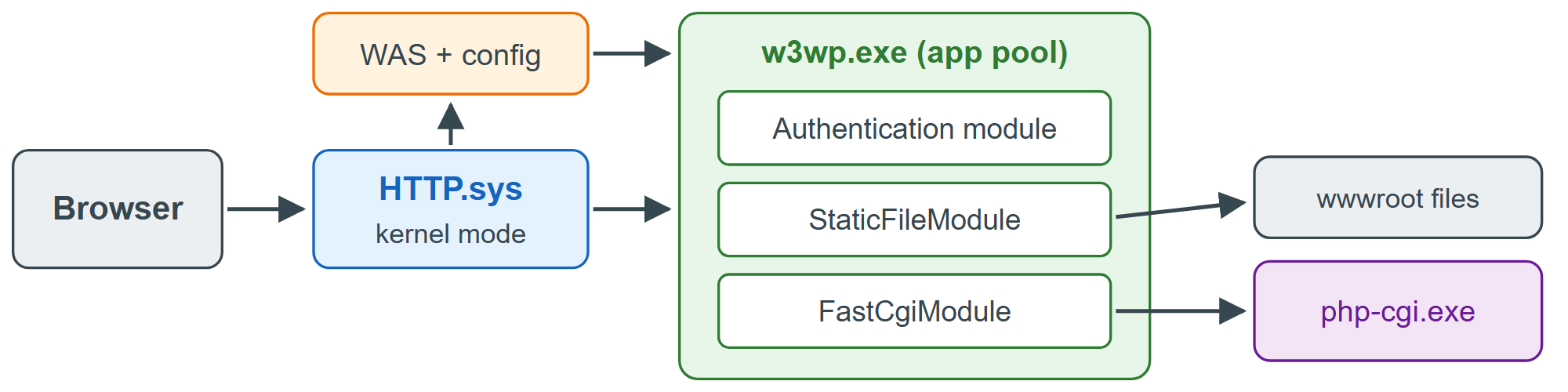
IIS runs only on Windows and holds 3.0% of websites today, down from 7.0% in 2021; choose it when you deploy ASP.NET 6 or work in a Windows-centric organization. For .NET applications, install Microsoft's .NET Hosting Bundle, whose ASP.NET Core Module runs your app inside the IIS worker process or forwards requests to its built-in Kestrel server.