LAMP names the classic open-source stack: Linux as the operating system, Apache as the web server, MySQL or MariaDB 3,681 as the relational database and PHP as the server-side language (Perl or Python in older usage). Every component is free, WordPress 48 , Drupal 2,652 , Joomla 3,017 and Laravel 2,157 run on it, and most VPS and cloud providers offer ready-made LAMP images. Ubuntu 24.04 225 LTS packages Apache 2.4.58, MySQL 8.0 524 (or MariaDB 10.11) and PHP 8.3.
# 1. Packages (apache2 starts automatically and is enabled at boot)
sudo apt update && sudo apt upgrade -y
sudo apt install -y apache2 mysql-server php libapache2-mod-php php-mysql php-mbstring php-xml
# 2. Firewall: keep SSH open, allow HTTP and HTTPS
sudo ufw allow OpenSSH
sudo ufw allow "Apache Full"
sudo ufw enable
# 3. Database: remove test data, then create a database and an application user
sudo mysql_secure_installation
sudo mysql -e "CREATE DATABASE app; CREATE USER 'app'@'localhost' IDENTIFIED BY 'Str0ng-pass!';
  GRANT ALL PRIVILEGES ON app.* TO 'app'@'localhost';"
# 4. Test PHP through Apache, then delete the test page
echo '<?php phpinfo();' | sudo tee /var/www/html/info.php
curl -s http://localhost/info.php | grep -o 'PHP Version [0-9.]*' | head -1
sudo rm /var/www/html/info.php
The site root is /var/www/html, owned by root; give your deploy user write access with sudo chown -R $USER:www-data /var/www/html rather than the chmod 777 seen in old tutorials, which lets any process on the machine rewrite your site. Each site gets a file in /etc/apache2/sites-available/, enabled with sudo a2ensite and checked with sudo apache2ctl configtest before sudo systemctl reload apache2. On Ubuntu the MySQL root account authenticates through the operating system (auth_socket), so sudo mysql needs no password, but applications must use their own accounts, as above.
Under the hood: mod_php versus PHP-FPM
libapache2-mod-php loads the PHP interpreter into every Apache process, which requires Apache's prefork multi-processing module: one process per connection, each carrying PHP's memory even when it only sends a CSS file. PHP-FPM (FastCGI Process Manager) runs PHP in a separate pool of workers, so Apache can use the threaded event module and hand only .php requests over a socket. Ubuntu installs the pieces but leaves the switch to you:
sudo apt install -y php8.3-fpm
sudo a2dismod php8.3 mpm_prefork
sudo a2enmod mpm_event proxy_fcgi setenvif
sudo a2enconf php8.3-fpm
sudo systemctl restart apache2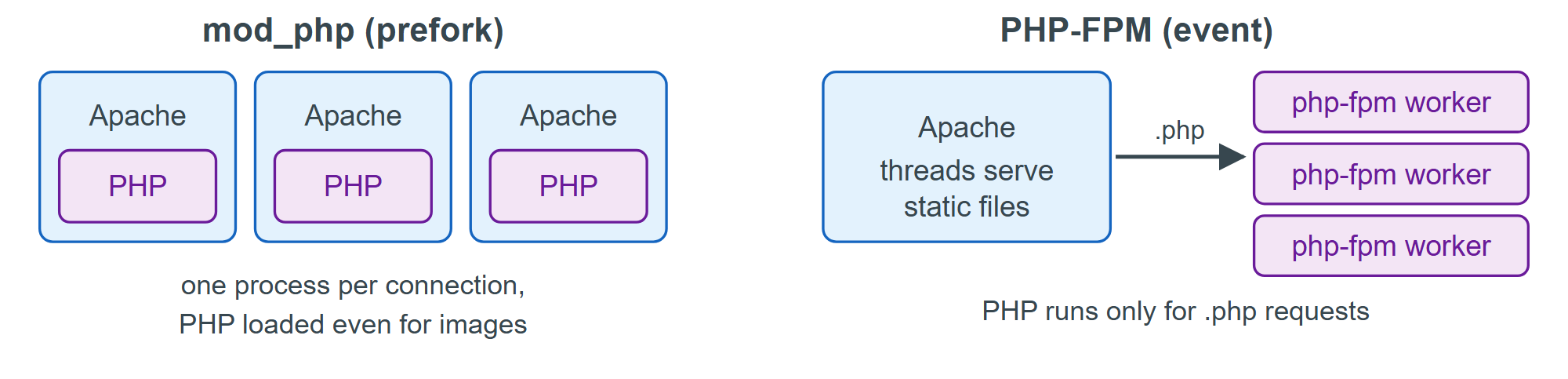
For production, add HTTPS with Certbot 1,690 (Securing with HTTPS) and automatic security updates (Ubuntu's unattended-upgrades package, installed by default, applies security updates daily). If you prefer nginx 75 , the LEMP variant ("E" for its pronunciation, "engine-x") always pairs it with PHP-FPM, because nginx has no embedded PHP module.