Plain HTTP travels as readable text, so anyone on the path, from café Wi-Fi to an ISP, can read passwords or inject ads and scripts into your pages. HTTPS wraps HTTP in TLS, which encrypts the traffic, detects tampering and proves through a certificate that the server really controls the domain. It is no longer optional: service workers, geolocation and most modern Web APIs (Web APIs) work only in secure contexts, and from Chrome 154 1 (October 2026) Always Use Secure Connections is on by default, so Chrome asks for confirmation before opening a public site that lacks HTTPS.
Free, automated certificates with ACME
Let's Encrypt 1,144 (https://letsencrypt.org/ 1,144 ), a nonprofit certificate authority, issues free domain-validated certificates through the ACME protocol. Your ACME client proves control of the domain, receives the certificate, and renews it on a timer.
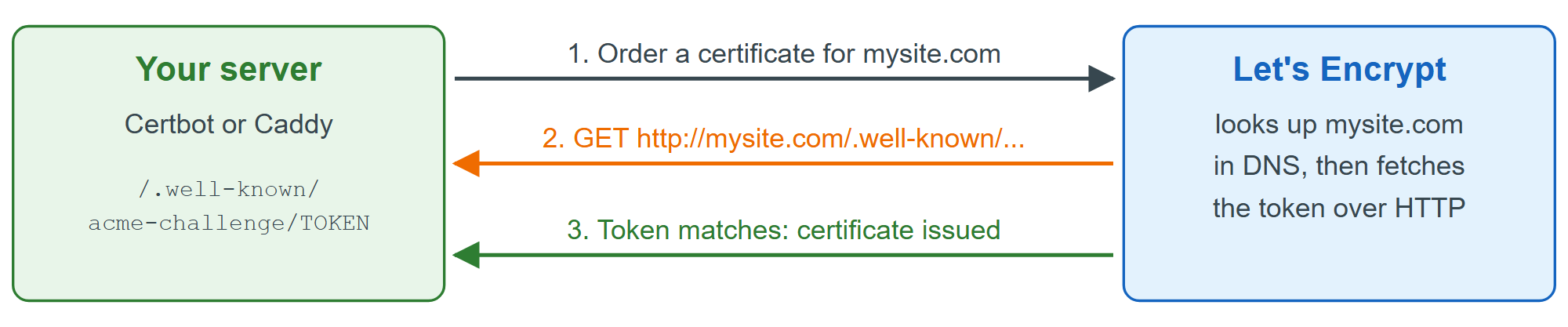
HTTP-01 therefore needs working DNS (Domain Names and DNS) and port 80 reachable (Port Forwarding). For a wildcard such as *.mysite.com, or a server the Internet cannot reach, use the DNS-01 challenge instead, which publishes the token as a TXT record at _acme-challenge.mysite.com.
For an existing nginx 75 or Apache server, the EFF's Certbot 1,690 (https://github.com/certbot/certbot 33,253 ) (Apache 2.0) obtains the certificate, edits your nginx or Apache configuration to use it and redirect HTTP, and installs a renewal timer:
sudo snap install --classic certbot
sudo ln -s /snap/bin/certbot /usr/local/bin/certbot
sudo certbot --nginx -d mysite.com -d www.mysite.com   # use --apache for Apache
sudo certbot renew --dry-run                           # prove renewal will work
Caddy 7,400 (https://github.com/caddyserver/caddy 76,123 ) (Apache 2.0, version 2.11.4 at the time of writing) is a web server with ACME built in. Name a domain in its Caddyfile and Caddy fetches certificates from Let's Encrypt or ZeroSSL 62,837 , redirects HTTP to HTTPS and renews in the background:
mysite.com {
  root * /var/www/mysite
  reverse_proxy /api/* localhost:3000
  file_server
}
www.mysite.com {
  redir https://mysite.com{uri}
}
Reload with sudo systemctl reload caddy, then grade the result at SSL Labs 8,340 (https://www.ssllabs.com/ssltest/ 8,340 ). For localhost names Caddy signs certificates with its own local authority; mkcert 59,701 (https://github.com/FiloSottile/mkcert 59,701 ) does the same for any dev server (mkcert -install, then mkcert localhost 127.0.0.1).