A GitHub-hosted runner is disposable: each job gets a new virtual machine, and only caches and artifacts survive it. A Jenkins 8,793 controller is a long-lived server on your own network, and so are its agents unless you make them disposable (Build Agents).
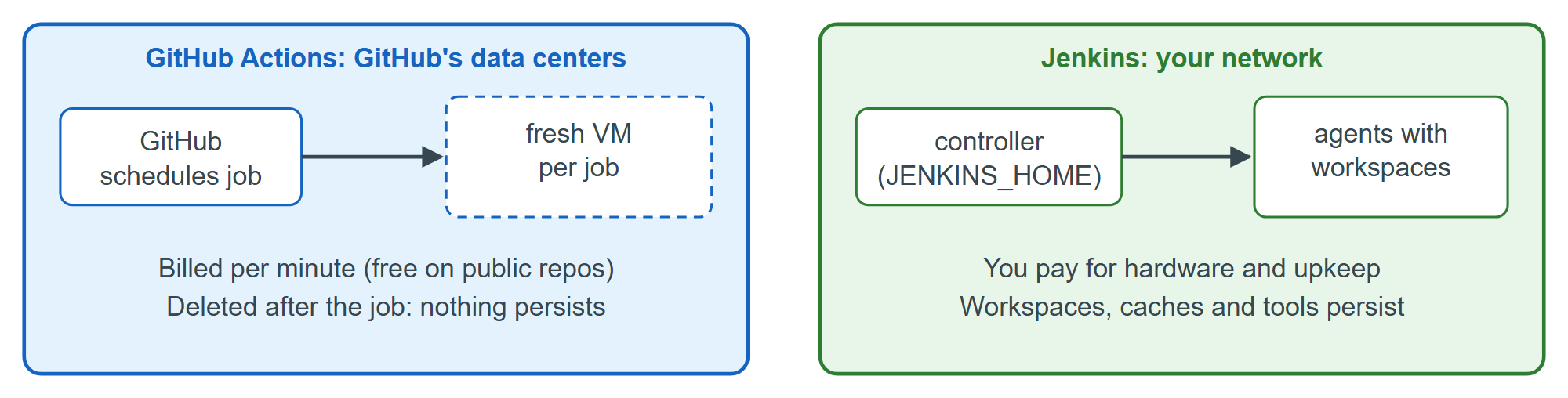
A short experiment shows the difference. This Pipeline job, inside-a-build, mirrors the "Inside a job" workflow of Inside an Actions Job: it reports where it runs, then lists and leaves a marker file in its workspace.
pipeline {
  agent any
  stages {
    stage('Look around') {
      steps {
        sh '''
          echo "Node $NODE_NAME, build $BUILD_NUMBER: $(nproc) CPUs, kernel $(uname -r)"
          echo "Workspace $WORKSPACE"
          ls marker-* 2>/dev/null || echo "The workspace is empty"
          touch "marker-$BUILD_NUMBER"
        '''
      }
    }
  }
}
Built twice on the controller of Installing Jenkins with Docker, its console logs read (trace and workspace lines trimmed):
Running on Jenkins in /var/jenkins_home/workspace/inside-a-build
Node built-in, build 1: 4 CPUs, kernel 6.18.33.2-microsoft-standard-WSL2
The workspace is empty
...
Node built-in, build 2: 4 CPUs, kernel 6.18.33.2-microsoft-standard-WSL2
marker-1
Finished: SUCCESS
Three things differ from Actions. The build ran on the built-in node, inside the controller's own container, with all four host CPUs: convenient here, and a security problem that Controller-Agent Trust fixes. The second build found the first one's file: a warm workspace can save an npm 2,036 ci, but it carries yesterday's state into today's build unless you clean it (cleanWs()). And no minutes were counted, because the cost is the machine you already own.