BookNest's adaptive catalog is a NavigableListDetailPaneScaffold whose list pane holds the BookRows of Layouts and Modifiers and whose detail pane shows the BookHeader and summary of the chosen book. The navigator's content key is the book ID, so the selection survives rotation and process death with no extra code:
  val navigator = rememberListDetailPaneScaffoldNavigator<Int>()   // the key: a book id
  val scope = rememberCoroutineScope()
  NavigableListDetailPaneScaffold(
    navigator = navigator,
    listPane = {
      AnimatedPane {
        LazyColumn(contentPadding = PaddingValues(16.dp),
          verticalArrangement = Arrangement.spacedBy(8.dp)) {
          items(books, key = { it.id }) { book ->
            BookRow(book, Modifier.clickable {
              scope.launch { navigator.navigateTo(ListDetailPaneScaffoldRole.Detail, book.id) }
            })
          }
        }
      }
    },
    detailPane = {
      AnimatedPane {
        val book = books.firstOrNull { it.id == navigator.currentDestination?.contentKey }
        if (book == null) Text("Choose a book", Modifier.padding(24.dp))
        else Column(Modifier.padding(24.dp), Arrangement.spacedBy(12.dp)) {
          BookHeader(book)
          Text(book.summary, style = MaterialTheme.typography.bodyLarge)
        }
      }
    },
  )
navigateTo is a suspend function, because it animates the pane change, hence the scope.launch. The same code gives three different screens:
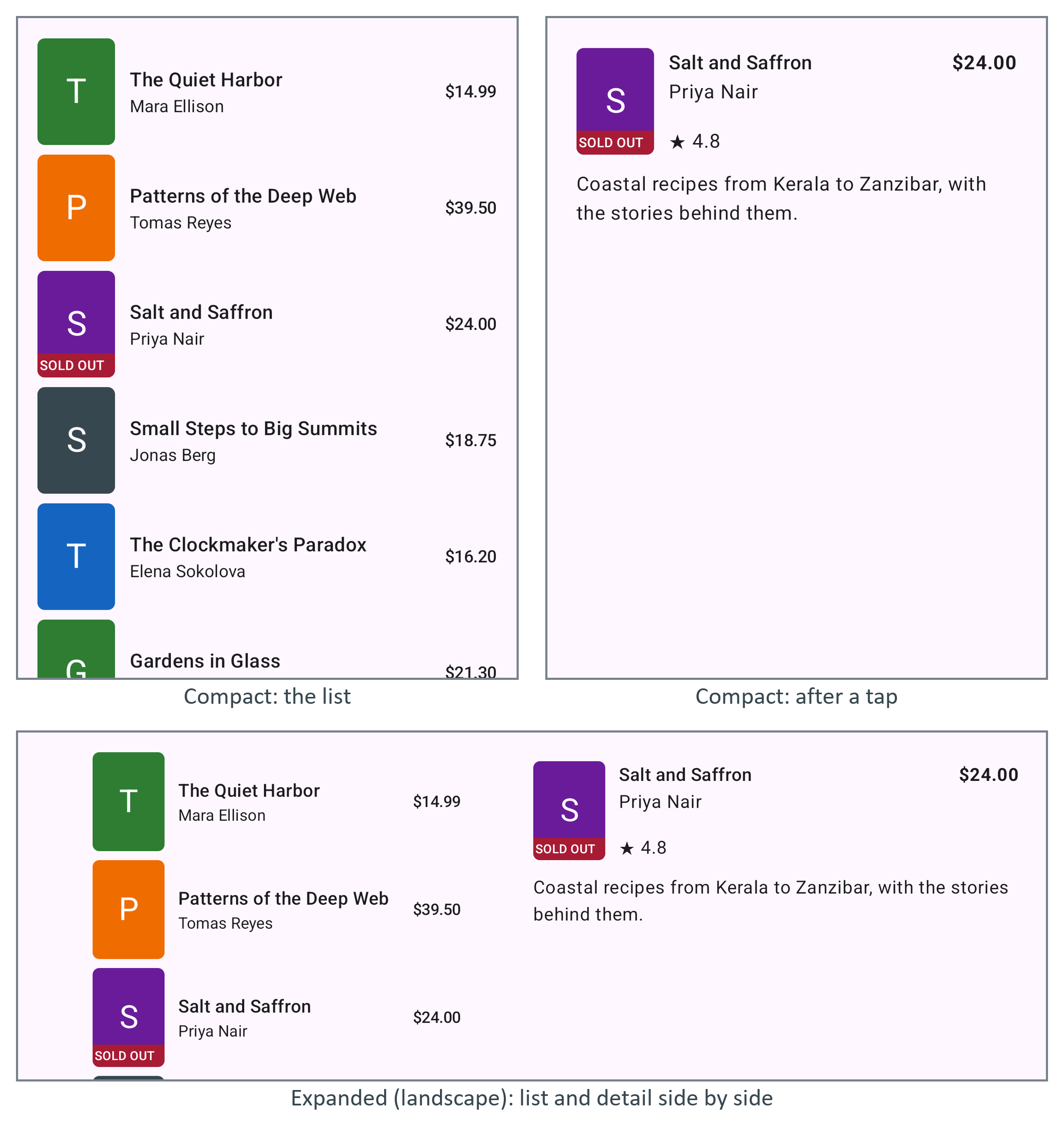
In portrait the phone is compact, so tapping Salt and Saffron replaced the list with the detail, and Back would return to the list. Rotated, the window is expanded (at least 840 dp) and both panes share it, with the selection kept. Test every screen at several sizes: rotate the emulator, or resize its display with adb shell wm size 1600x2560 and wm density 320 (undo with wm size reset), and on a real tablet drag the app into split screen.