The system-wide dark theme arrived in Android 10 (API 29). It is a configuration value (uiMode), like orientation, and isSystemInDarkTheme() reads it, which is why BookNestTheme uses it as the default of darkTheme. From the command line you flip it with cmd uimode:
adb -s emulator-5556 shell cmd uimode night yes
adb -s emulator-5556 shell am start -n com.example.booknest/.MainActivity --es stage theme
adb -s emulator-5556 logcat -d -v tag -s BookNestTheme:DNight mode: yes
Starting: Intent { cmp=com.example.booknest/.MainActivity (has extras) }
D/BookNestTheme: dark=true dynamic=false primary=#A1D39A primaryContainer=#245024
surface=#10140FThe dark surface is a very dark green-gray, not black, and primary becomes a light green, because an accent must be light to stand out on a dark background. Every component asked for a role and got the dark value.
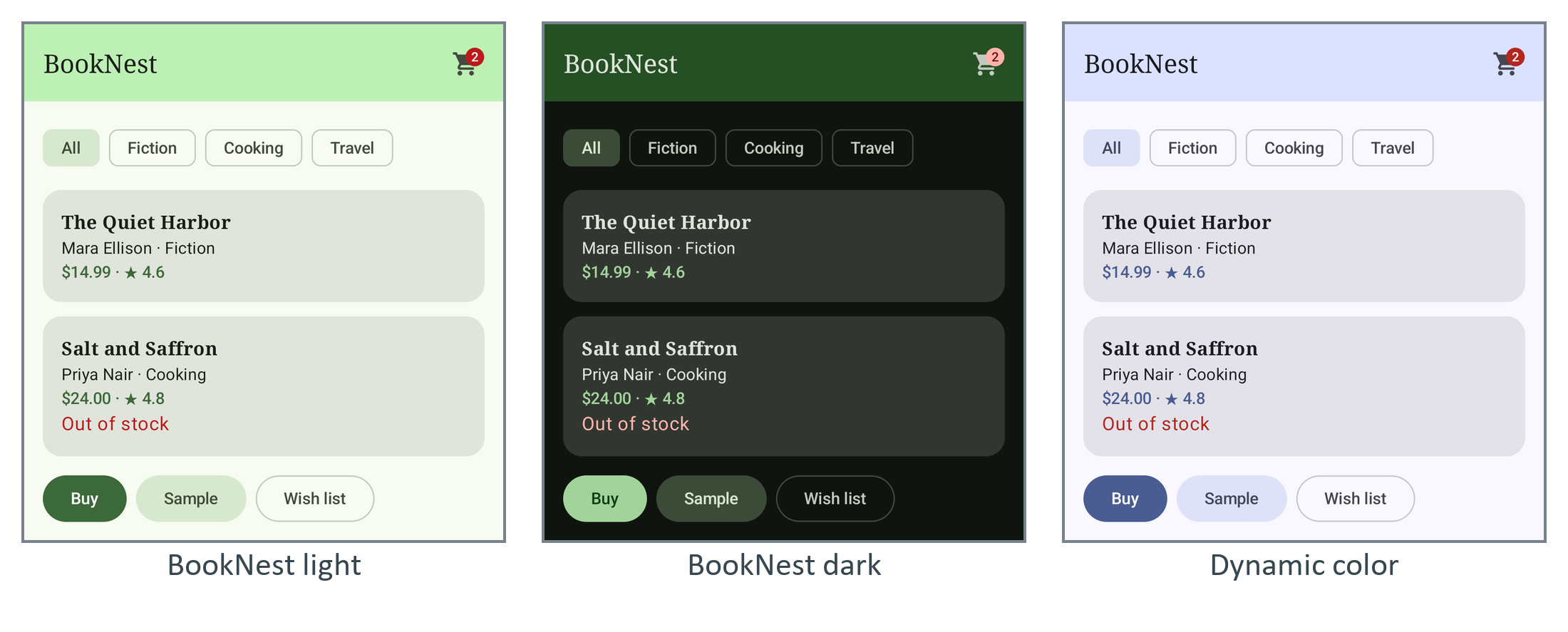
A uiMode change recreates the activity (Configuration Changes), and rememberSaveable state such as the selected chip survives it. Give the manifest a DayNight parent theme to avoid a white flash at launch. An in-app dark-mode switch is one argument, BookNestTheme(darkTheme = choice ?: isSystemInDarkTheme()), with the choice kept in DataStore 234 (Preferences with DataStore) and matching SystemBarStyles passed to enableEdgeToEdge().