Bootstrap 2,007 's validation styles build on constraint validation (Validation and Autofill). Because :invalid matches as soon as the page loads, Bootstrap only colors fields inside a .was-validated parent, which your script adds on submit. novalidate suppresses the browser's bubbles, .valid-feedback and .invalid-feedback messages (or -tooltip variants) follow a control, and .is-valid or .is-invalid force a state for errors found by the server.
<link rel=stylesheet href="https://cdn.jsdelivr.net/npm/bootstrap@5.3.8/dist/css/bootstrap.min.css">
<form class="needs-validation row g-3 p-3" novalidate>
  <div class="col-sm-6"><div class="input-group has-validation">
    <span class="input-group-text">@</span>
    <input class="form-control" id="user" pattern="[a-z0-9_]{3,15}" required aria-label="User">
    <div class="invalid-feedback">3-15 lowercase letters, digits or _.</div>
  </div></div>
  <div class="col-sm-6"><div class="form-floating">
    <input type="email" class="form-control" id="mail" placeholder="x" required>
    <label for="mail">Email</label><div class="valid-feedback">Looks good!</div>
  </div></div>
  <div class="col-sm-6"><input type="password" class="form-control" id="pw" minlength="8" required
    placeholder="Password" aria-label="Password"></div>
  <div class="col-sm-6">
    <input type="password" class="form-control" id="pw2" placeholder="Repeat password"
      aria-label="Repeat password"><div class="invalid-feedback">Passwords differ.</div>
  </div>
  <div class="col-sm-8"><div class="form-check form-switch">
    <input class="form-check-input" type="checkbox" role="switch" id="terms" required>
    <label class="form-check-label" for="terms">I accept the terms</label>
    <div class="invalid-feedback">Accept the terms to register.</div>
  </div></div>
  <div class="col-sm-4 text-end"><button class="btn btn-primary">Register</button></div>
</form>
<script>
  const form = document.querySelector('.needs-validation');
  form.addEventListener('submit', (event) => {
    pw2.setCustomValidity(pw2.value === pw.value ? '' : 'mismatch');
    if (!form.checkValidity()) event.preventDefault();
    form.classList.add('was-validated');
  });
  // Demo only: simulate typing and a click on Register.
  user.value = 'Ada!'; mail.value = 'ada@example.com'; pw.value = 'secret123'; pw2.value = 'x';
  form.querySelector('button').click();
</script>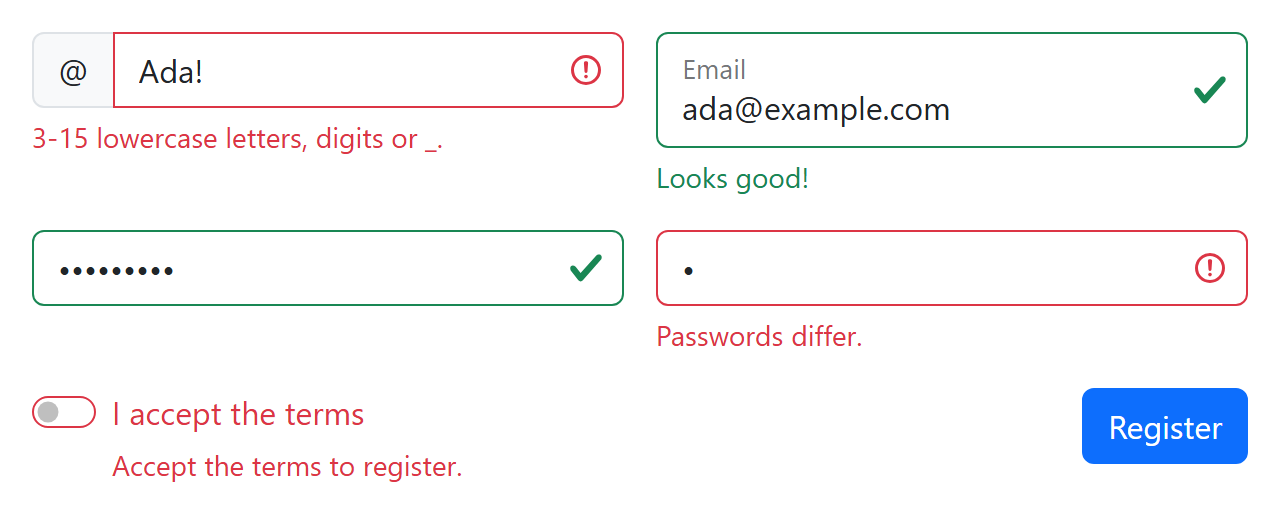
setCustomValidity() adds a rule HTML cannot express; any non-empty message makes the field :invalid, and checkValidity() then returns false, so preventDefault() blocks the submit. Remove .was-validated to reset.