A hybrid app is a web app shipped inside a native app: a native shell hosts a full-screen WebView, the WebView loads HTML, CSS and JavaScript bundled in the package, and a bridge lets that JavaScript call native code (Cordova). Capacitor 243,123 keeps this model and calls itself a "cross-platform native runtime" for web native apps. Every Capacitor app has four parts:
Your web app, built with any tool (Vite 25,978 , the Framework7 CLI 89 , or none). Capacitor only needs the output folder, named by webDir in the config file.
@capacitor/core, the JavaScript half of the runtime, with Capacitor.getPlatform() and the plugin proxies that turn a method call into a bridge message.
The native runtime: @capacitor/android, a Gradle 19,597 library written in Java, and @capacitor/ios, a Swift and Objective-C framework. It creates the WebView, serves your files and routes plugin calls.
Plugins, npm 2,036 packages holding a TypeScript API, a web fallback and native code for each platform.
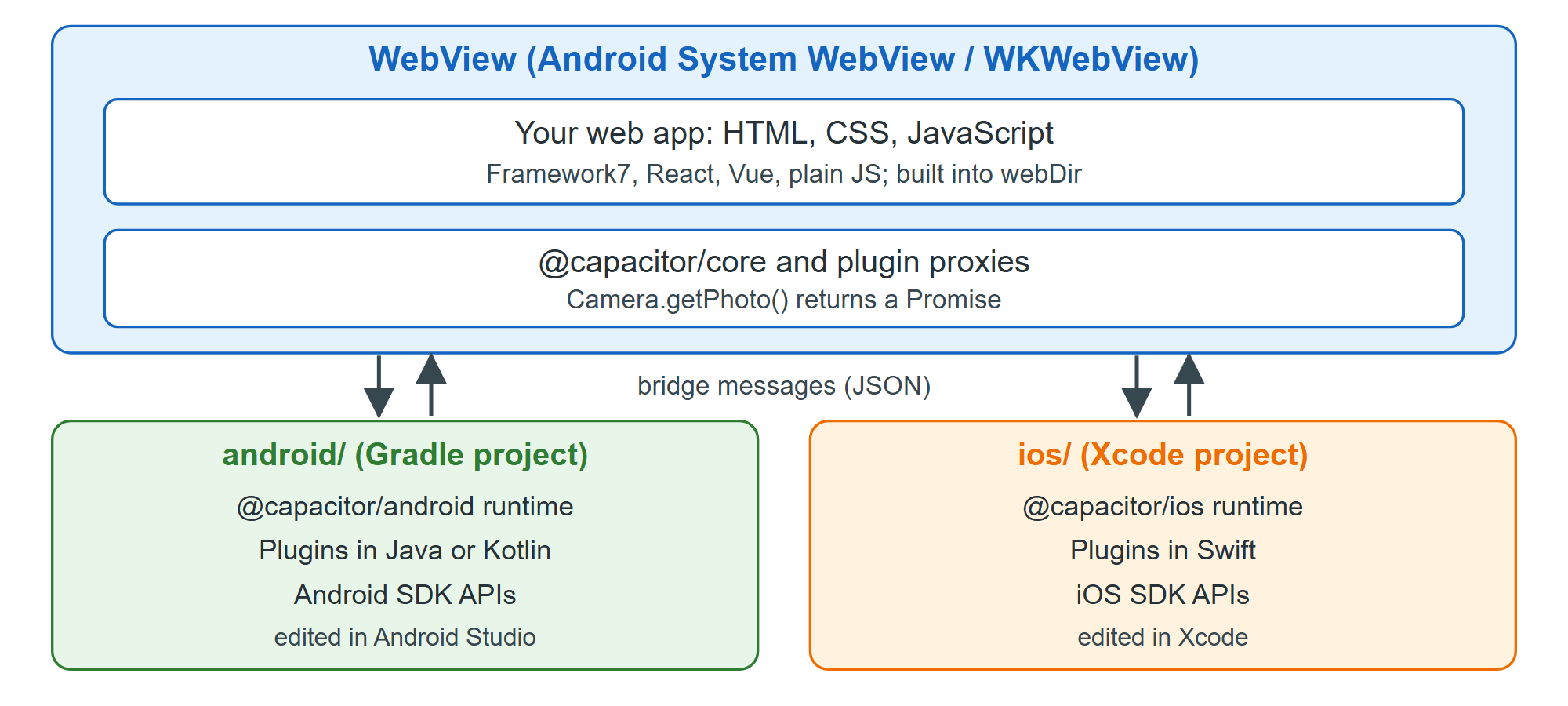
You can watch the runtime assemble itself in the log of the small BookNest app that Toolchain Requirements builds:
adb -s emulator-5578 logcat -d -s Capacitor:*09-23 21:57:54.557 2403 2403 D Capacitor: Starting BridgeActivity 09-23 21:57:54.933 2403 2403 D Capacitor: Registering plugin instance: CapacitorCookies ... 09-23 21:57:54.997 2403 2403 D Capacitor: Registering plugin instance: SystemBars 09-23 21:57:55.030 2403 2403 D Capacitor: Loading app at https://localhost 09-23 21:57:57.541 2403 2537 D Capacitor: Handling local request: https://localhost/
BridgeActivity owns the WebView and registers the built-in plugins before yours. The page loads from https://localhost, a virtual origin answered from the APK's assets/public folder, so no web server runs. How the Bridge Works follows one call through this machinery.