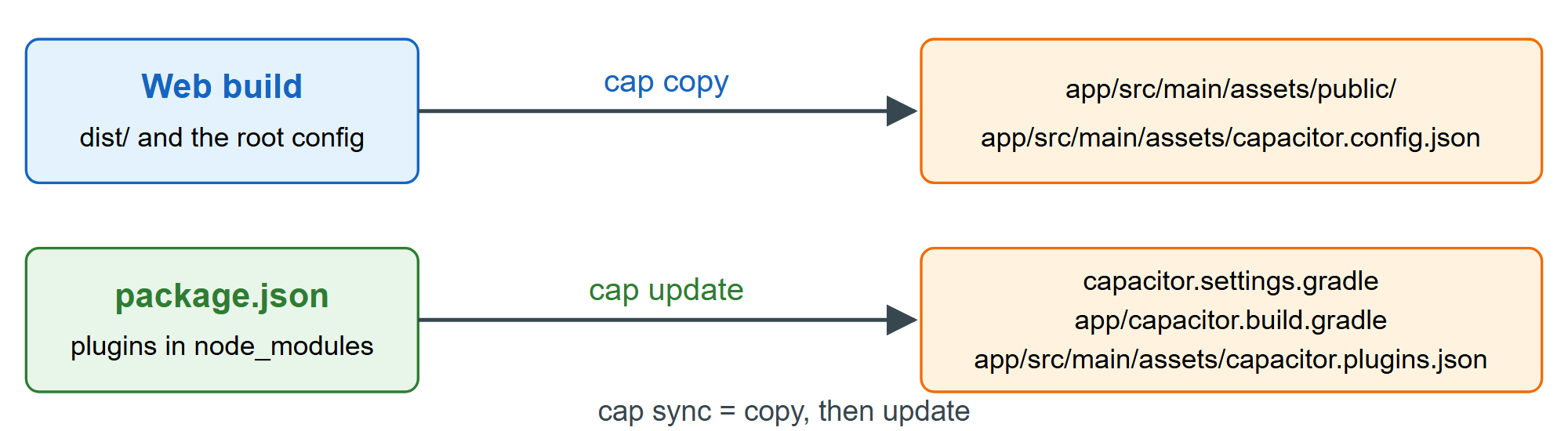
The native app never reads dist/; it reads a copy bundled into the APK. cap copy copies webDir into android/app/src/main/assets/public and writes a JSON copy of your config beside it. cap sync runs copy, then update (cap update), which refreshes the plugin wiring.
npx cap sync androidOutput
✔ Copying web assets from dist to android/app/src/main/assets/public in 22.93ms
✔ Creating capacitor.config.json in android/app/src/main/assets in 2.00ms
✔ copy android in 40.88ms
✔ Updating Android plugins in 1.83ms
✔ update android in 101.38ms
[info] Sync finished in 0.182s
npx cap copy android prints only the first three lines. Use copy when only web code changed, and sync after plugin, config or Git 1,932 changes; omit the platform to process all of them. --inline inlines the JavaScript source maps so Chrome 1 's remote inspector (Remote Debugging Android) shows your original files. Neither runs your build, so chain them (vite build && cap sync android).