PBRMaterial implements the Cook-Torrance model of Cook-Torrance BRDF with image-based lighting (Image-Based Lighting): an albedoColor (or albedoTexture), a metallic value (0 for paper, wood and paint; 1 for bare metal) and a roughness (0 mirror, 1 chalk). Two defaults surprise newcomers: metallic and roughness start as null, and until you set one (or metallicTexture) the material runs in specular-glossiness mode; and albedoColor is linear, like glTF's baseColorFactor, so convert hex colors with toLinearSpace(). The sweep is lit only by the CC BY 4.0 studio environment from Babylon 89,603 's asset library (HDR and .env); its third row belongs to Clear Coat and Sheen:
<canvas id="view" style="width: 620px; height: 250px"></canvas>
<script src="https://cdn.jsdelivr.net/npm/babylonjs@9.28.0/babylon.js"></script>
<script>
{
  const engine = new BABYLON.Engine(view, true, {}, true);
  const scene = new BABYLON.Scene(engine);
  scene.clearColor = BABYLON.Color4.FromHexString('#eceff1ff');
  scene.environmentTexture = BABYLON.CubeTexture.CreateFromPrefilteredData(
    'https://assets.babylonjs.com/ibl/Studio_Softbox_2Umbrellas_cube_specular.env', scene);
  const center = BABYLON.Vector3.Zero();
  new BABYLON.ArcRotateCamera('cam', -Math.PI / 2, Math.PI / 2, 10.2, center, scene).fov = 0.4;
  const amber = BABYLON.Color3.FromHexString('#e09a10').toLinearSpace();
  const ball = (x, y, settings) => {
    const mesh = BABYLON.MeshBuilder.CreateSphere('b', { diameter: 1.1, segments: 64 }, scene);
    mesh.position.set(x, y, 0);
    const pbr = new BABYLON.PBRMaterial('pbr', scene);
    return (mesh.material = Object.assign(pbr, { albedoColor: amber, metallic: 0 }, settings));
  };
  for (let step = 0; step <= 4; step++) {
    ball((step - 2) * 1.3, 1.25, { roughness: step / 4 });                  // lacquered paint
    ball((step - 2) * 1.3, 0, { metallic: 1, roughness: step / 4 });       // gold
  }
  ball(-1.3, -1.25, { roughness: 0.6 }).clearCoat.isEnabled = true;       // Section 7.5.4
  ball(0, -1.25, { roughness: 0.9 }).sheen.isEnabled = true;
  const brushed = ball(1.3, -1.25, { metallic: 1, roughness: 0.35 }).anisotropy;
  Object.assign(brushed, { isEnabled: true, intensity: 0.9 });
  scene.executeWhenReady(() => engine.runRenderLoop(() => scene.render()));
  scene.onAfterRenderObservable.add(() => { window.__done = scene.getFrameId() > 3; });
}
</script>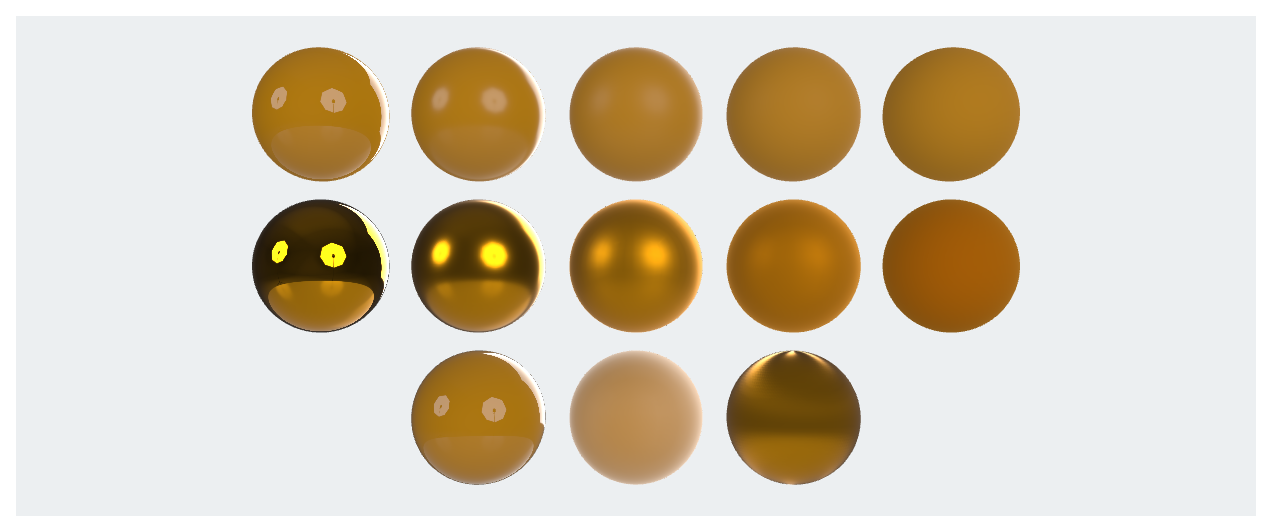
On the paint, a colorless reflection sits over the amber, sharp on the left and matte on the right. On the gold, the reflection itself takes the albedo color over no diffuse base, which is why metal with no environment renders nearly black. PBR lights use physical units and inverse-square falloff, so a light tuned for StandardMaterial may look dim (Ranges and Falloff).