An APK is what a phone installs; an Android App Bundle, required for new Play apps since August 2021, is what you upload. It holds the code and every resource for every device, in a layout Play can take apart:
aab=platforms/android/app/build/outputs/bundle/release/app-release.aab
unzip -Z1 $aab | cut -d/ -f1-2 | sort | uniq -c | grep -v BUNDLE-METADATA 1 BundleConfig.pb
1 META-INF/BOOKNEST.RSA
1 META-INF/BOOKNEST.SF
1 META-INF/MANIFEST.MF
5 base/assets
1 base/assets.pb
1 base/dex
1 base/manifest
400 base/res
1 base/resources.pb
49 base/rootbase/ is the base module: manifest, dex code, res for all densities and languages, and assets/www, BookNest's web app; the .pb files are protocol-buffer tables, and META-INF holds the upload signature. Play turns this into split APKs, a base APK plus configuration APKs for each device's density, CPU and languages. A bundle cannot be installed directly; bundletool 4,040 (github.com/google/bundletool (https://github.com/google/bundletool 4,040 ), Apache 2.0) makes APKs from it locally.
Because Play builds the APKs, it also signs them. Play App Signing, required for new apps since August 2021, splits the keys:
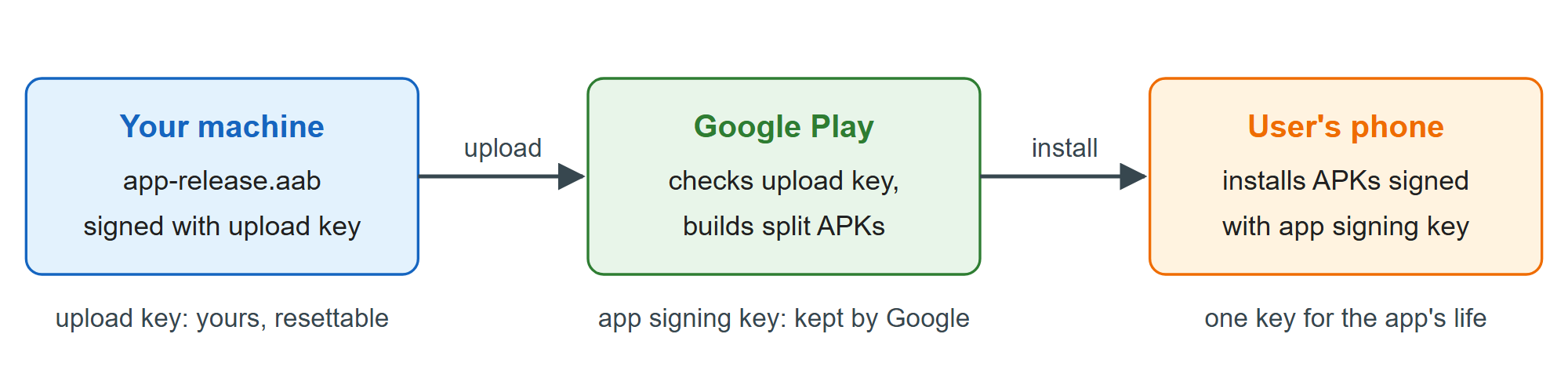
The app signing key that phones see is kept by Google and never changes; the upload key (Upload Keystore) only authenticates uploads, so a lost one can be reset. Services that check the app's signature, such as Google sign-in, need the app signing key's SHA-256 fingerprint from the console's App integrity page.