Android lets you sign with a key you generated yourself (Upload Keystore). iOS will not run an app at all, even on your own phone, unless Apple has vouched for the signature. Four pieces fit together:
Team: your developer account, identified by a ten-character Team ID.
Certificate: a key pair whose public half Apple signed. Apple Development certificates belong to one developer; the team's Apple Distribution certificate can be created only by the Account Holder or an Admin.
App ID: the bundle identifier registered with the capabilities the app may use, such as push.
Provisioning profile: an Apple-signed file binding an App ID to certificates and, for development and ad hoc profiles, to registered device IDs.
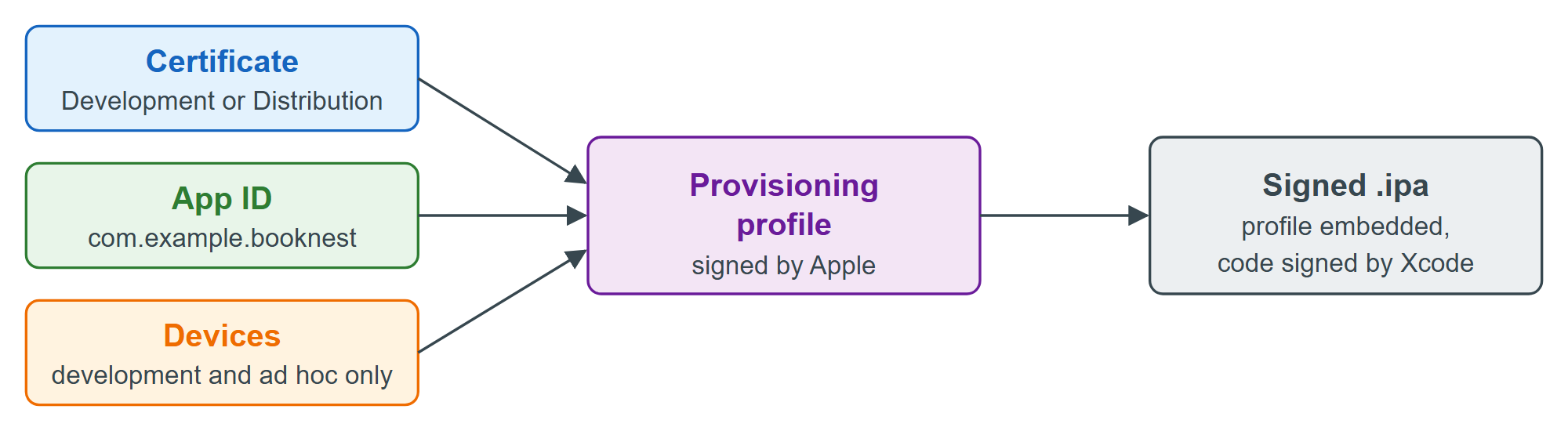
The generated project uses CODE_SIGN_STYLE = Automatic (Adding iOS): given a Team ID, Xcode 10 creates the pieces itself. A free Apple Account gets a Personal Team for your own device, but its profiles expire after seven days.
For command-line builds, cordova-ios reads build.json like Android (Upload Keystore); these keys come from cordova-ios 8.1.1's lib/build.js (not run here; the team ID is a placeholder):
{
  "ios": {
    "release": {
      "developmentTeam": "ABCDE12345",
      "codeSignIdentity": "Apple Distribution",
      "packageType": "app-store-connect",
      "automaticProvisioning": true
    }
  }
}
developmentTeam and codeSignIdentity become Xcode build settings, packageType is Xcode's export method (older Xcode releases called it app-store), and automaticProvisioning lets xcodebuild create profiles. cordova build ios --release --device then archives the app and exports a signed .ipa. Back up the distribution certificate from the Mac's Keychain as a password-protected .p12, as carefully as Android's upload keystore.