The filter panel is a panel panel-right panel-cover in app.f7 holding a form: a checkbox per genre, an In stock only toggle and a maximum-price slider. It filters nothing itself; each change becomes a Store action, and a getter does the work:
    const applyFilters = () => {
      const data = $f7.form.convertToData('#filter-form');
      $store.dispatch('setFilters', {
        genres: data.genres, inStock: data.inStock.length > 0, maxPrice: Number(data.maxPrice),
      });
    };
// ...in store.js:
    filteredBooks({ state }) {
      const { genres, inStock, maxPrice } = state.filters;
      return state.books.filter((b) => (genres.length === 0 || genres.includes(b.genre))
        && (!inStock || b.inStock) && b.price <= maxPrice);
    },
catalog.f7 now reads filteredBooks. Ticking Cooking, Fiction and Science Fiction with In stock only left books 1 and 5, since Salt and Saffron is sold out (A below); the slider at $15 left one. Back at $40, after Done, the catalog showed books 1 and 5 (B), and searching "harbor" within them left book 1.
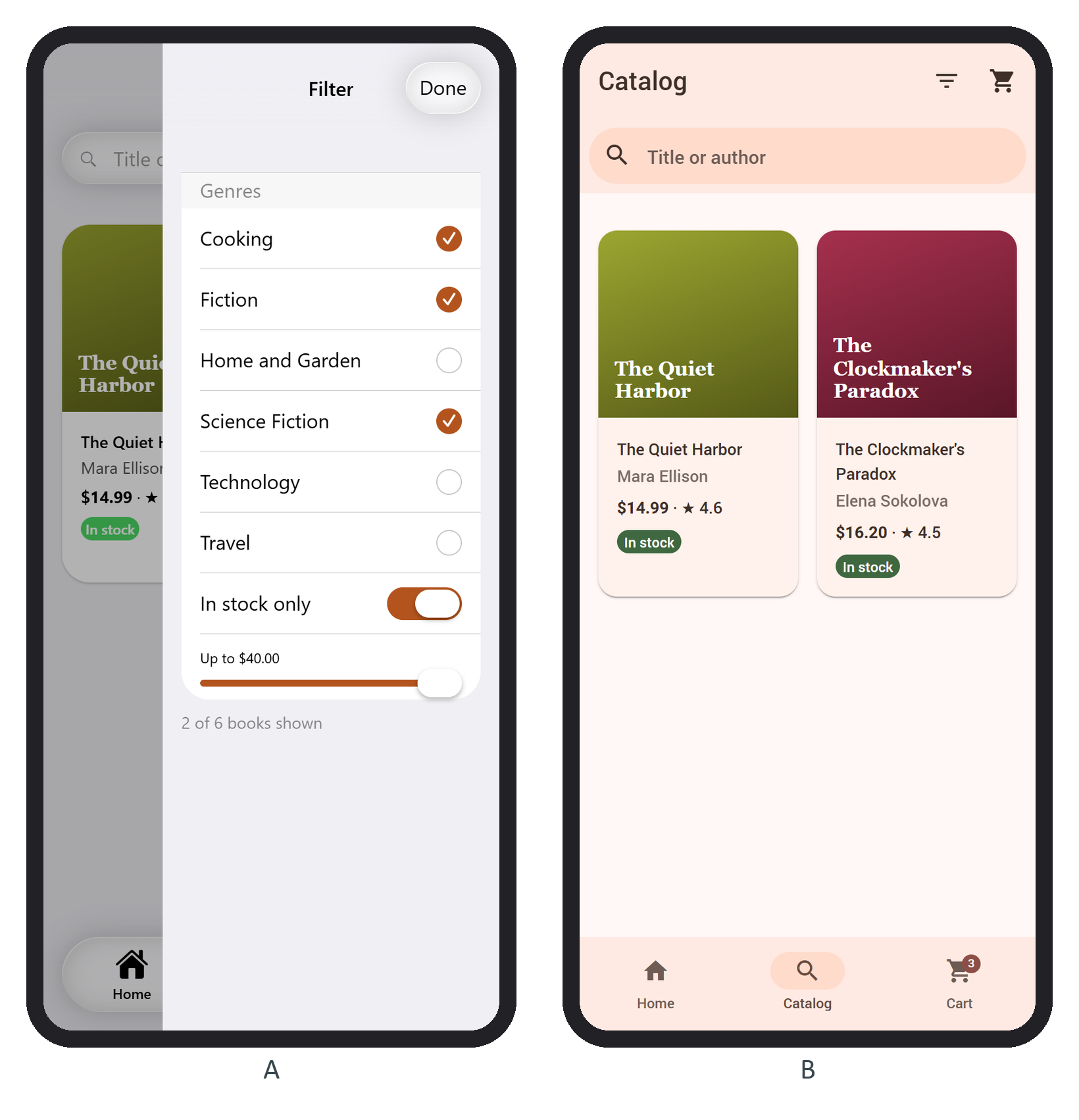
In the Store, the filters survive leaving the catalog.