Browsers install a PWA only from a secure origin, which includes localhost. Vite 25,978 's preview server serves the built www/ folder, and adb reverse makes the emulator's localhost:5350 reach it:
npx vite preview --port 5350 --host 0.0.0.0 &
adb -s emulator-5558 reverse tcp:5350 tcp:5350
adb -s emulator-5558 shell am start -a android.intent.action.VIEW -d http://localhost:5350/ \
com.android.chrome...
Starting: Intent { act=android.intent.action.VIEW dat=http://localhost:5350/...
pkg=com.android.chrome }Chrome 133 1 on the Android 16 emulator offered Install app from its menu. Without the Play Store, Chrome cannot mint a WebAPK, so it placed a shortcut badged with the Chrome logo; tapping it opened BookNest in Chrome's standalone WebappActivity, with no address bar and a #b3541e status bar. With the Play Store, the same steps produce a WebAPK, listed as a normal app.
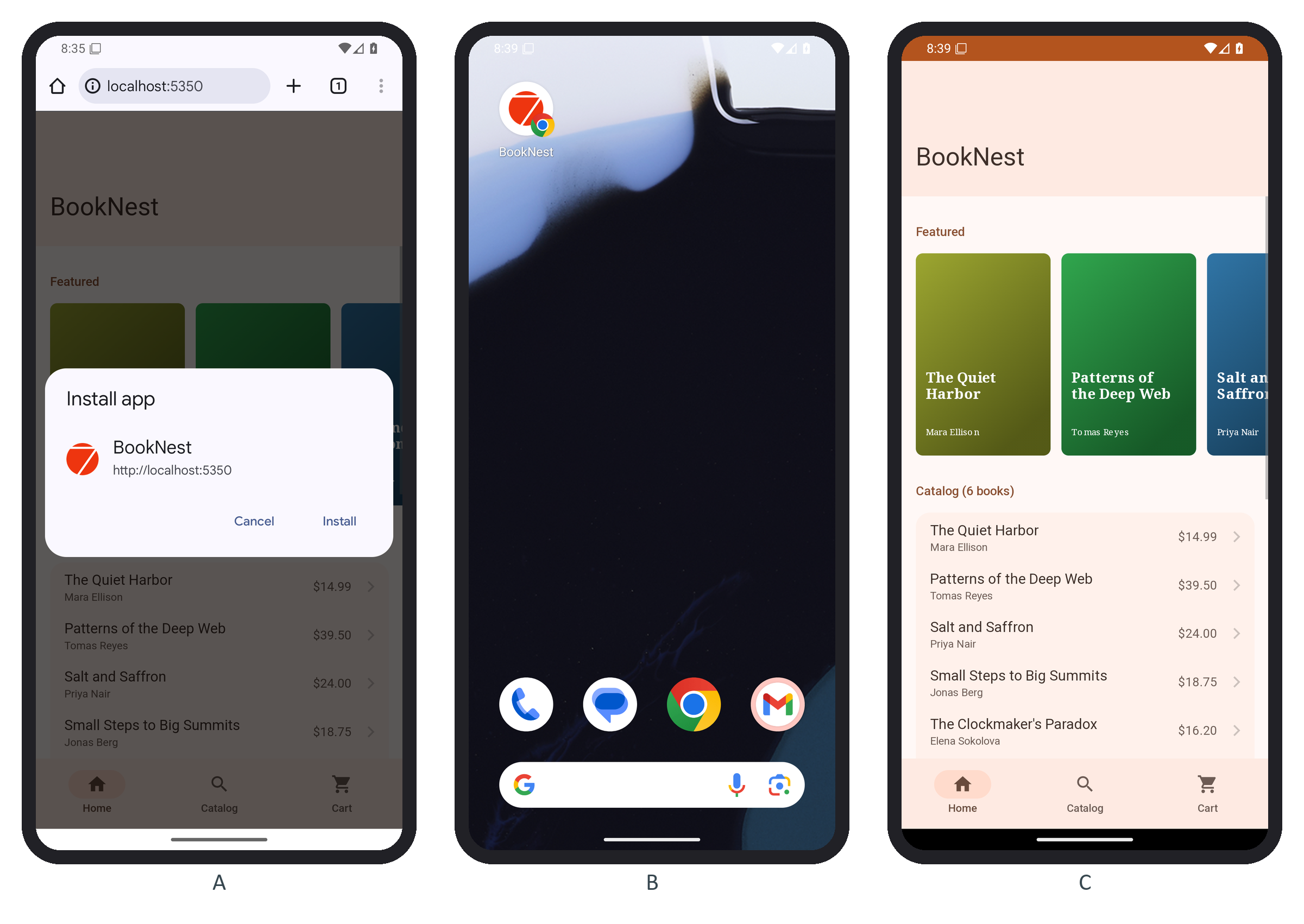
The icon is still the CLI template's Framework7 572,986 logo: replace assets-src/ and run framework7 assets before shipping. In a fresh desktop Chrome profile, Page.getInstallabilityErrors (DevTools protocol) returned an empty list, and an offline reload still rendered the home page and catalog from the service worker's cache.