The router never replaces the screen; it moves .page elements inside the view and lets CSS animate them. A MutationObserver, installed from Playwright 26,280 before tapping Salt and Saffron and again before tapping Back, recorded the view's router-transition-* class and each page's position class at every change:
   0 ms  view[-]  home:page-current
  66 ms  view[router-transition-forward]  home:page-current  book:page-next
 493 ms  view[-]  home:page-previous  book:page-current
   0 ms  view[-]  home:page-previous  book:page-current
  47 ms  view[router-transition-backward]  home:page-previous  book:page-current
 441 ms  view[-]  home:page-current
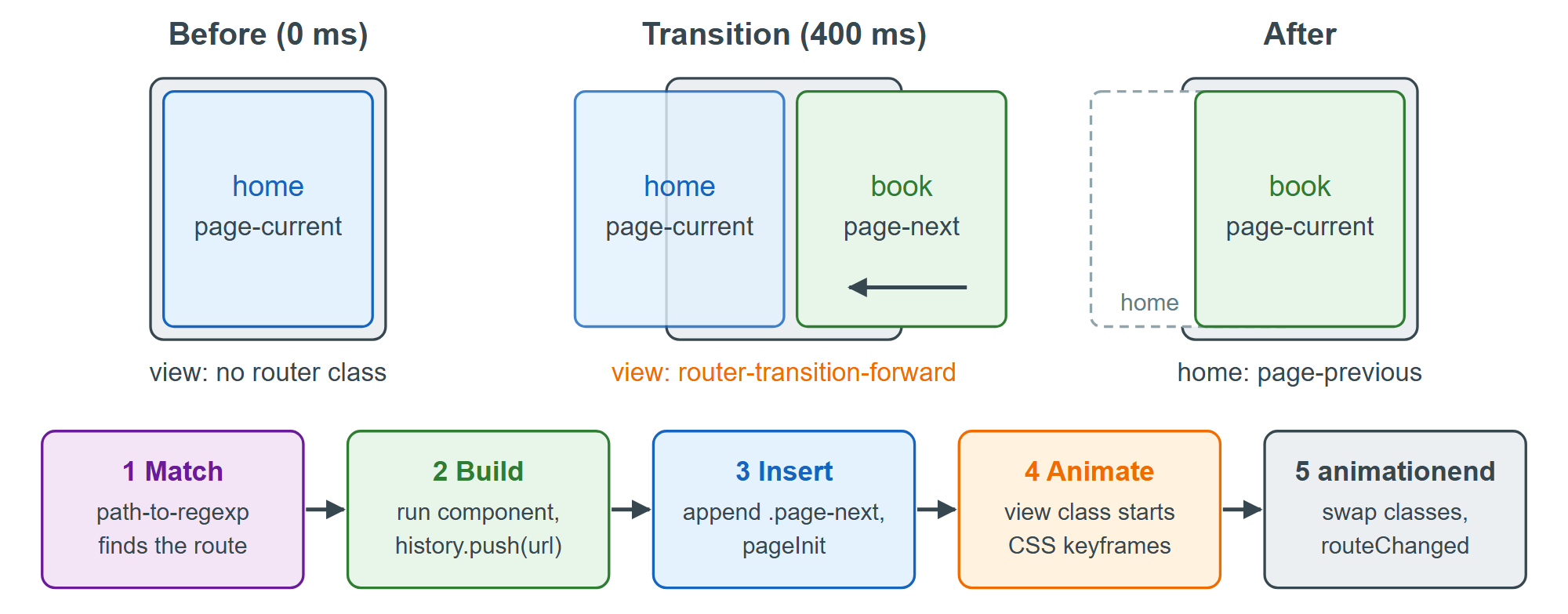
The transition is pure CSS. With router-transition-forward on the view, the iOS theme runs the keyframes ios-page-next-to-current (from translate3d(100%, 0, 0)) on .page-next and ios-page-current-to-previous on .page-current for --f7-page-transition-duration, 400 ms in Framework7 9.1.3 572,986 ; Material slides the new page in from 128 px. On animationend the router drops the view class and swaps the page classes. Going back reverses the animation, then destroys the book component and element, so the next visit rebuilds it.