An animation plays an @keyframes sequence (@keyframes) on its own clock: animation: slidein .5s ease-out 1s 3 alternate both sets name, duration, timing function (applied between each pair of keyframes, overridable inside one), delay, iteration count (or infinite), direction and fill mode; animation-play-state pauses it. Fill mode backwards applies the first keyframe during the delay, forwards keeps the last one afterwards, and both does both. A negative delay starts part-way through, which staggers elements or, with paused, freezes a frame.
<style>
  body { margin: 10px; display: flex; gap: 8px; font: 12px system-ui, sans-serif; }
  figure { margin: 0; width: 72px; height: 130px; position: relative; text-align: center;
           border-bottom: 3px solid #37474f; background: #eceff1; }
  .ball { position: absolute; left: 20px; bottom: 0; width: 32px; height: 32px;
          border-radius: 50%; background: #ef6c00; transform-origin: 50% 100%;
          animation: bounce 1s infinite paused; animation-delay: calc(var(--f) * -125ms); }
  @keyframes bounce {
    0%, 100% { translate: 0 0;     scale: 1.25 .75; }
    15%      { translate: 0 0;     scale: .9 1.1;  animation-timing-function: ease-out; }
    50%      { translate: 0 -75px; scale: 1 1;    animation-timing-function: ease-in; }
    90%      { scale: .9 1.1; }
  }
</style>
<script>
  for (let f = 0; f < 8; f++)
    document.write(`<figure>${f * 125} ms<i class="ball" style="--f:${f}"></i></figure>`);
</script>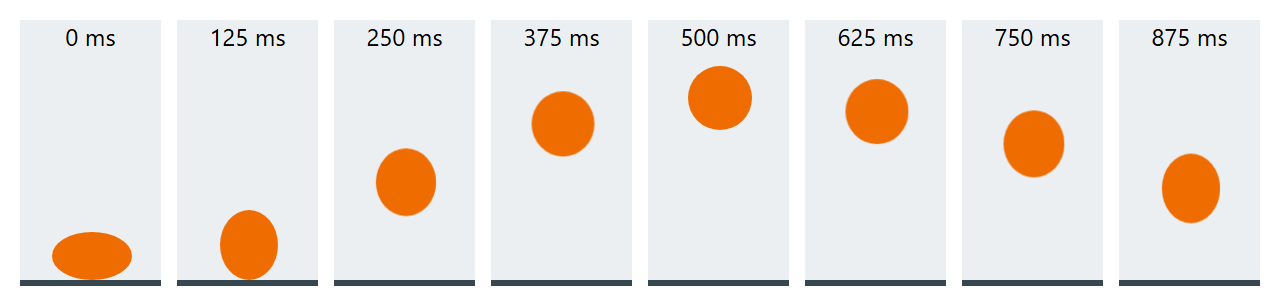
Per-keyframe timing functions slow the ball as it rises and speed it up as it falls; animating only translate and scale keeps it on the compositor (Animation Performance). Script gets animationstart, animationiteration and animationend events, and el.getAnimations() returns controllable Animation objects. Wrap large movement in @media (prefers-reduced-motion: no-preference).