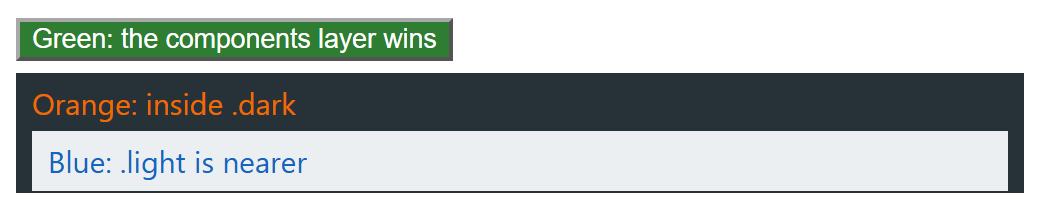
Cascade layers rank groups of rules before specificity is compared. The first layer declared is the weakest and unlayered styles beat every layer, so an ID in a low layer loses to a class in a higher one; !important reverses the order. Layers are Baseline widely available since September 2024. Import third-party CSS into a low layer, @import url("bootstrap.css") layer(vendor);, and your classes override it without specificity battles.
@scope (root) to (limit), Baseline newly available since March 2026, applies rules only between root and limit, keeping a component's styles out of nested content. It adds no specificity (:scope weighs 0-1-0), and when scoped rules tie, the nearer root wins before source order.
<!doctype html>
<style>
  @layer reset, components;                             /* reset < components < unlayered */
  @layer components { .btn { background: #2e7d32; color: #fff; } }
  @layer reset { #buy.btn { background: #9e9e9e; } }    /* 1-1-0, but a weaker layer */
  @scope (.light) { p { color: #1565c0; } }
  @scope (.dark) { p { color: #ef6c00; } }  /* later, but a farther root */
  body { font: 15px system-ui; }  div { padding: 1px 8px; background: #263238; }
  .light { background: #eceff1; }  p { margin: 4px 0; }  button { margin-bottom: 6px; }
</style>
<button id="buy" class="btn">Green: the components layer wins</button>
<div class="dark"><p>Orange: inside .dark</p>
  <div class="light"><p>Blue: .light is nearer</p></div></div>