Five global keywords, all Baseline widely available, work on every property. initial applies the specification's initial value (display: initial is inline, even on a <div>). inherit copies the parent's computed value. unset means inherit for inherited properties such as color and initial for the rest. revert rolls back to the browser's default stylesheet, usually what you actually want, and revert-layer rolls back only to the previous cascade layer (@layer and @scope).
<style>
  @layer base { h3 { color: #2e7d32; } }
  section { font: 13px sans-serif; color: #1565c0; }
  h3 { margin: 3px 0; color: #ef6c00; }
  .rl { color: revert-layer; }
</style>
<section>
  <h3>no keyword: default 1.17em, orange rule</h3>
  <h3 style="font-size: initial; color: initial">initial: medium (16px), black</h3>
  <h3 style="font-size: inherit; color: inherit">inherit: 13px, blue</h3>
  <h3 style="font-size: unset; font-weight: unset">unset: inherits size and normal weight</h3>
  <h3 style="font-size: revert; color: revert">revert: default size, color inherited</h3>
  <h3 class="rl">revert-layer: green from @layer base</h3>
</section>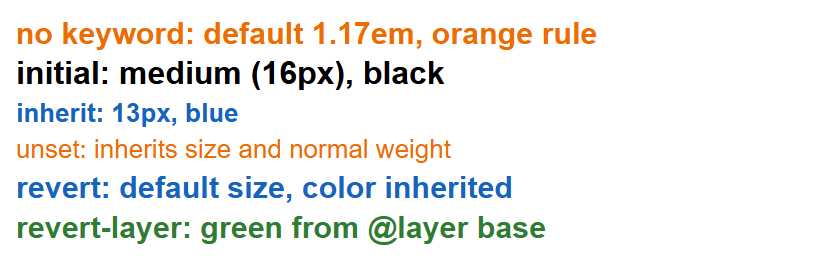
The all shorthand applies a keyword to every property: all: revert strips your styles from a widget, and all: unset turns a <button> into a bare clickable box.