When several declarations set the same property on one element, the cascade picks a winner by asking, in order: which declarations apply (matching selector and media query); which origin and importance ranks highest; which cascade layer (@layer and @scope); which selector has the higher specificity; which @scope root is nearer; and finally which declaration comes last. A later question is asked only on a tie.
| Rank | Declarations |
|---|---|
| 1 (highest) | Running CSS transitions |
| 2 | !important: browser, then user, then author |
| 3 | Running CSS keyframe animations |
| 4 | Normal author styles, inline styles last |
| 5 (lowest) | Normal user styles, then browser defaults |
Author styles are yours; user styles come from the reader's settings or extensions. !important reverses the origins, so a reader who needs large text can always override you.
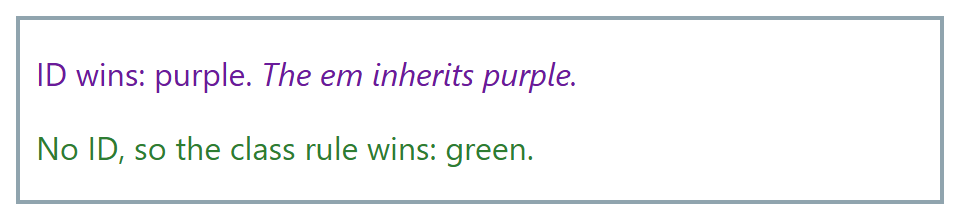
Specificity compares ID-CLASS-TYPE columns from left to right: #intro (1-0-0) beats p.note (0-1-1), which beats p (0-0-1), whatever the source order. Inheritance fills gaps: with no declaration, inherited properties such as color and font take the parent's value, while others such as border take their initial value.
<!doctype html>
<style>
  body { font: 16px system-ui; border: 2px solid #90a4ae; padding: 0 8px; }
  #intro { color: #6a1b9a; }  /* 1-0-0 */
  p.note { color: #2e7d32; }  /* 0-1-1 */
  p      { color: #ef6c00; }  /* 0-0-1: last, but least specific */
</style>
<p id="intro" class="note">ID wins: purple. <em>The em inherits purple.</em></p>
<p class="note">No ID, so the class rule wins: green.</p>