A scroll-driven animation is a @keyframes animation whose progress comes from scrolling instead of the clock. Set animation-timeline after the animation shorthand, which resets it:
scroll(<scroller> <axis>) maps a container's scroll range to 0-100%; defaults are the nearest scroller and the block axis.
view() tracks the element crossing its scrollport; animation-range narrows it with entry, exit, contain or cover plus optional percentages.
Durations are ignored. To drive an element outside the scroller, name the timeline with scroll-timeline or view-timeline and hoist the name to a common ancestor with timeline-scope.
<style>
  .app { timeline-scope: --feed; font: 14px system-ui; }   /* lets the bar see the name */
  .bar { height: 8px; background: #2e7d32; transform-origin: left;
         animation: grow linear both; animation-timeline: --feed; }
  .feed { height: 170px; overflow-y: auto; border: 1px solid #b0bec5; scroll-timeline: --feed; }
  .card { margin: 10px; padding: 12px; background: #e3f2fd; border-radius: 8px;
          animation: reveal linear both; animation-timeline: view();
          animation-range: entry 0% cover 35%; }
  @keyframes grow { from { scale: 0 1; } }
  @keyframes reveal { from { opacity: 0; translate: -80px 0; } }
</style>
<div class="app"><div class="bar"></div><div class="feed"><script>
  for (let i = 1; i <= 12; i++) document.write(`<div class="card">Card ${i}</div>`);
  document.currentScript.parentNode.scrollTop = 200;
</script></div></div>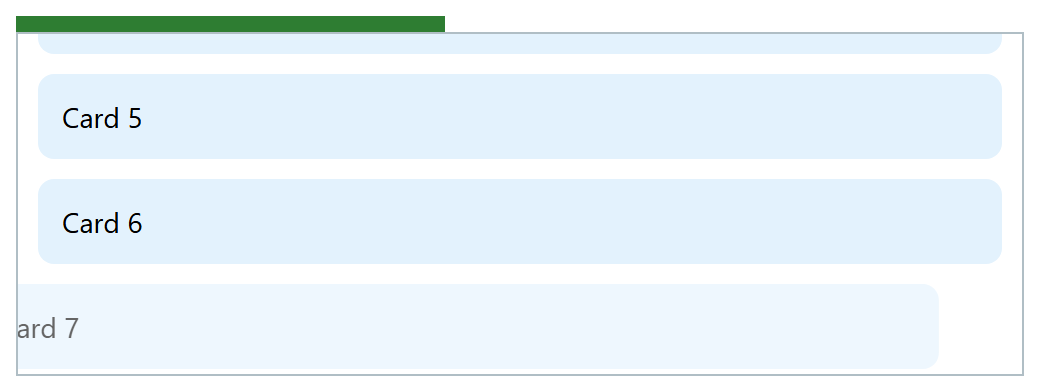
Scrolled 200 px, the bar has grown in proportion and the entering card is still sliding in. Unlike a scroll handler, a scroll timeline animating compositor-only properties (Animation Performance) can update off the main thread. Chrome 1 and Edge 115 and Safari 26 10 support it; Firefox 555 only in Nightly, so wrap the rules in @supports (animation-timeline: view()).