HTML has three list types. An ordered list <ol> is for items whose sequence matters (recipe steps, a top-ten chart); an unordered list <ul> is for items whose order does not change the meaning (features, menu links); a description list <dl> pairs terms <dt> with descriptions <dd>. Inside <ol> and <ul> every child is an <li> (or a <script> or <template>). To nest a list, put the inner list inside an <li>.
<ol> accepts start="5" (first number), reversed (count down) and type (1, A, a, I or i); an <li> inside it accepts value="7", which renumbers that item and those after it. type is still valid because numbering can carry meaning: a contract that cites "clause (iv)" needs Roman numerals even with CSS off. On <ul>, type="square" and compact are obsolete; use CSS (List and Table Properties). <menu> is a semantic synonym of <ul> for a toolbar of commands and is rendered the same way.
<!doctype html>
<html lang="en">
  <meta charset="utf-8">
  <style>
    body { font: 15px/1.4 system-ui, sans-serif; margin: 10px; display: grid;
           grid-template-columns: 1fr 1fr; gap: 0 28px; }
    h2 { font-size: 16px; margin: 4px 0 2px; }
    ol, ul, dl { margin: 0 0 4px; }
    dt { font-weight: 600; }
    dd { margin: 0 0 6px 18px; }
  </style>
  <section>
    <h2>Pancakes</h2>
    <ol>
      <li>Whisk 2 eggs with 300 ml milk.</li>
      <li>Add dry ingredients:
        <ul><li>200 g flour</li><li>1 tsp baking powder</li></ul>
      </li>
      <li>Fry each side for 90 seconds.</li>
    </ol>
    <h2>Countdown and appendix</h2>
    <ol reversed start="5"><li>Close hatch</li><li>Arm engines</li></ol>
    <ol type="i" start="3"><li>Glossary</li><li value="7">Index</li><li>Credits</li></ol>
  </section>
  <section>
    <h2>Glossary</h2>
    <dl>
      <dt><dfn>HTML</dfn></dt>
      <dd>HyperText Markup Language, the structure of a page.</dd>
      <dt><dfn>CSS</dfn></dt>
      <dt><dfn>Cascading Style Sheets</dfn></dt>
      <dd>The language that styles the structure.</dd>
    </dl>
  </section>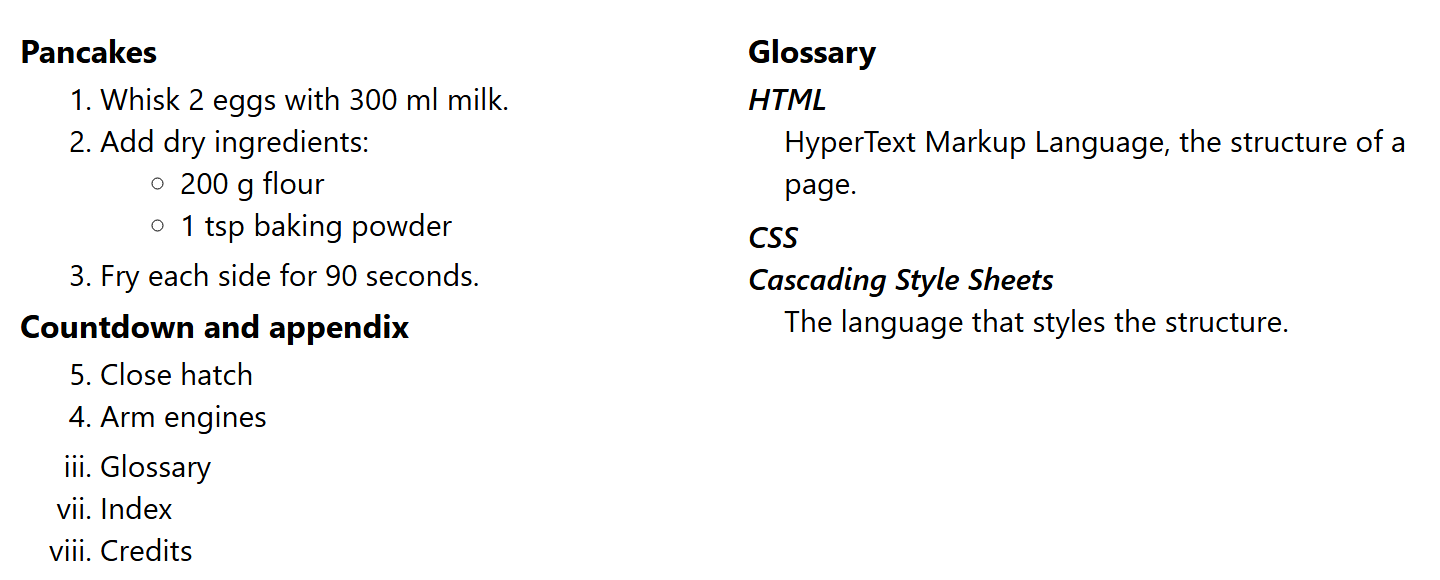
In the glossary, two <dt> elements share one <dd>, and <dfn> marks the defining instance of each term. You may wrap each name-value group in a <div> for styling. Specifications and FAQ pairs are good <dl> material.
Accessibility and pitfalls
Screen readers announce "list, 3 items", so use real lists, not typed dashes. A menu is a <ul> in <nav>.
Safari 10 does not expose a <ul> or <ol> as a list when CSS sets list-style: none, unless it is inside <nav>. Add role="list" if a bullet-free list elsewhere must still be announced.
Screen reader support for <dl> varies (VoiceOver offers no list navigation for it), so test before adding ARIA.
nowrap on <dd>, found in some old references, is not valid HTML; use CSS white-space: nowrap.
Interview question: "When do you choose <dl> over a table?" Use <dl> for one set of name-value pairs; switch to a <table> (Tables) once several records share the same columns.