Screen-reader users rarely read a page from top to bottom. They skim it through two structures that your markup creates: the outline of headings and the set of landmarks. In NVDA 29,469 , H jumps to the next heading, 1 to 6 to the next heading of that level, and D to the next landmark; other screen readers have equivalent commands.
HTML5 once specified an outline algorithm in which each <section> or <article> started a new level, so every section could begin with its own <h1>. Browsers never exposed that hierarchy in the accessibility tree, and in July 2022 the WHATWG replaced it: the outline is now simply all h1-h6 elements in document order. So give the page one level-1 heading and never skip a level going down (<h2> then <h3>, not <h4>); going back up by any number of levels is fine. Browsers are removing the leftovers too: Firefox 140 555 dropped the built-in styles that shrank an <h1> nested in <section>, <article>, <aside> or <nav>, and Chrome 136 1 started logging deprecation warnings for pages that rely on them.
<style>
  body { font: 15px system-ui; margin: 12px; }
  article { display: none; } /* only the generated outline is shown */
  ul { margin: 4px 0; padding: 0; }  li { list-style: none; }  .skip { color: #c62828; }
</style>
<article>
  <h1>Home Espresso Guide</h1>
  <section><h2>Choosing beans</h2><h3>Roast level</h3><h3>Freshness</h3></section>
  <section><h2>Dialing in</h2><h4>Grind size</h4></section>
  <aside><h2>Glossary</h2></aside>
</article>
<nav aria-label="Table of contents"><b>Contents</b><ul id="toc"></ul></nav>
<script>
  let prev = 0;
  for (const h of document.querySelectorAll('h1, h2, h3, h4, h5, h6')) {
    const level = +h.tagName[1];
    const li = toc.appendChild(document.createElement('li'));
    li.style.paddingLeft = `${(level - 1) * 18}px`;
    li.textContent = `h${level} ${h.textContent}`;
    if (level > prev + 1) { li.className = 'skip'; li.textContent += ' (skipped a level)'; }
    prev = level;
  }
</script>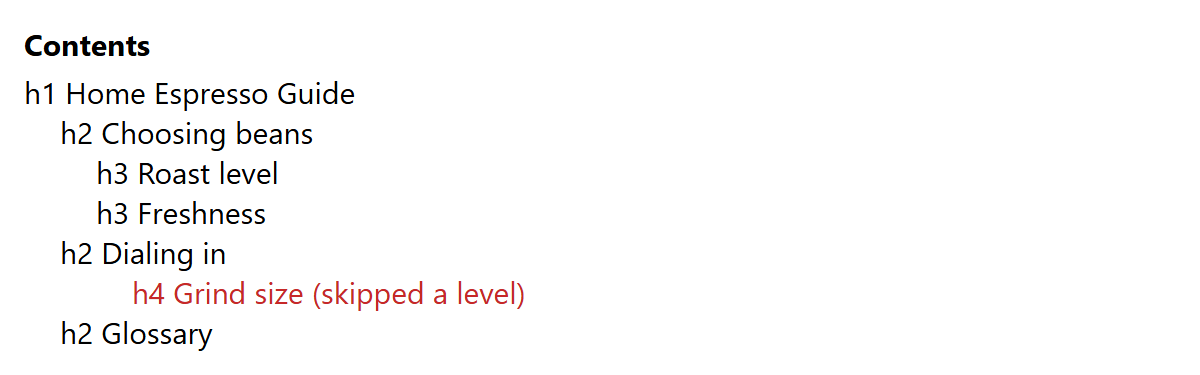
The script ignores sections entirely, because document order is all that screen readers use. The <h4> under "Dialing in" is flagged because it jumps from level 2 to level 4. The specification has since added a headingoffset attribute for embedding content whose heading levels should shift, but web-features 939 lists no shipping browser for it yet.
Landmarks
The W3C HTML Accessibility API Mappings specification defines which elements become landmarks. Several depend on context or on an accessible name from aria-label or aria-labelledby:
| Element | Landmark role | Condition |
|---|---|---|
| <header> | banner | Only when not inside <article>, <aside>, <main>, <nav> or <section> |
| <footer> | contentinfo | Same condition as <header> |
| <main> | main | Always; one visible per page |
| <nav> | navigation | Always |
| <aside> | complementary | Inside <body> or <main>; elsewhere only when named |
| <section> | region | Only when it has an accessible name |
| <form> | form | Only when it has an accessible name |
| <search> | search | Always (Baseline Widely available since April 2026) |
Use the native elements rather than <div role="navigation">, and do not repeat an implicit role (<main role="main">), which the ARIA in HTML specification marks as not recommended. Keep landmarks few and meaningful: one banner, one main, one contentinfo, and a distinct aria-label whenever a role appears more than once, such as "Primary" and "Footer" navigation. Everything visible should sit inside a landmark, or users who jump between landmarks will miss it.