The indication elements, often called phrase elements, label what text is: an abbreviation, a book title, a keystroke, program output, a date. Their meaning, not their default italics or monospace, is what screen readers, documentation tools and your scripts use.
| Element | Represents | Example |
|---|---|---|
| <em> | Stress that changes meaning | I <em>did</em> pay |
| <strong> | Importance or urgency | <strong>Stop</strong> |
| <abbr> | Abbreviation (title) | <abbr title="...">CSS</abbr> |
| <dfn> | Defining use of a term | <dfn>pixel</dfn> |
| <cite> | Title of a work | <cite>Dune</cite> |
| <code> | Computer code | <code>fetch()</code> |
| <kbd> | User input: keys, menus | <kbd>Ctrl</kbd> |
| <samp> | Program output | <samp>Not found</samp> |
| <var> | Variable in math or code | <var>x</var> + 1 |
| <time> | Date, time, duration | <time datetime="..."> |
| <data> | Value for machines | <data value="8412"> |
| <mark> | Relevant highlight | <mark>fog</mark> |
| <address> | Contact for page or article | <address>...</address> |
<!doctype html>
<html lang="en">
<head>
<meta charset="utf-8">
<title>Help: Saving files</title>
<style>
body { font: 15px/1.5 system-ui, sans-serif; margin: 10px; }
p { margin: 0 0 8px; }
kbd kbd { border: 1px solid #9aa0a6; border-bottom-width: 3px; border-radius: 4px;
padding: 0 4px; background: #f8f9fa; font-size: 0.85em; }
samp { background: #263238; color: #a5d6a7; padding: 1px 5px; }
mark { background: #ffe082; }
</style>
</head>
<body>
<p>An <dfn id="autosave">autosave</dfn> is written every <var>n</var> minutes
(<var>n</var> = 5 by default).
Last autosave: <time datetime="2026-09-15T09:30Z">9:30 UTC</time>.</p>
<p>Press <kbd><kbd>Ctrl</kbd>+<kbd>S</kbd></kbd> or choose
<kbd><samp>File</samp> > <samp>Save</samp></kbd>.
A full disk reports <samp>Error: ENOSPC</samp>; then run <code>git status</code>.</p>
<p>Files are <abbr title="JavaScript Object Notation">JSON</abbr>,
as defined in <cite>RFC 8259</cite>.
Plan: <data value="PRO-12">Pro</data>. You searched for <mark>autosave</mark>.</p>
<p>This article is <em>not</em> for version 1.
<strong>Never edit files while syncing.</strong></p>
<address>Questions? <a href="mailto:docs@example.com">docs@example.com</a></address>
</body>
</html>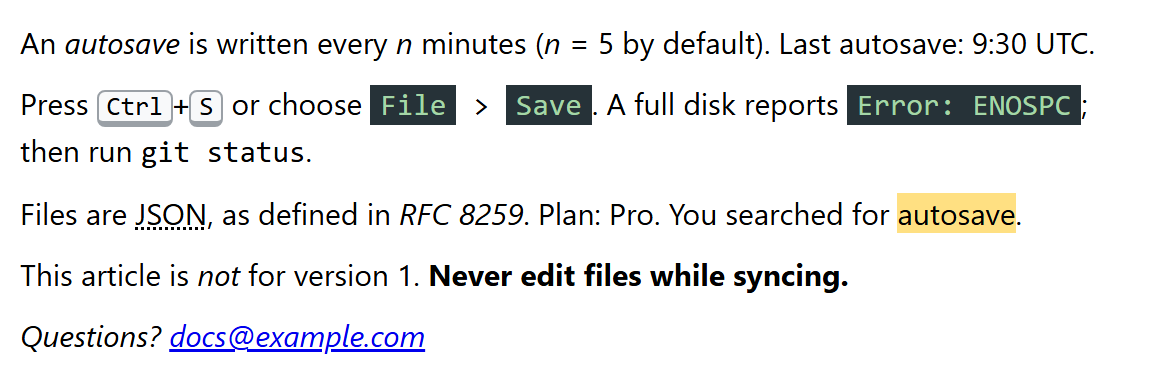
The nesting of <kbd> carries meaning. An outer <kbd> containing inner <kbd> elements is one key combination; a <kbd> wrapping <samp> means "choose what the program shows", such as a menu item; <samp> alone is output. A few more rules keep these elements honest:
<abbr>: spell the term out on first use; title is only a supplement, because its tooltip never appears on touch screens or for keyboard users.
<dfn>: mark only the place where a term is defined, and give it an id so other pages can link there.
<cite>: the title of a book, film, song, standard or web page, never a person's name.
<address>: contact details for the nearest <article> or the page, not any postal address in the text.
<mark>: relevance now (search hits, a passage quoted with added emphasis); <strong> is for importance in itself. Most screen readers do not announce <mark> by default.
time and data
<time> displays a friendly date while datetime holds a precise one: a year (2026), month (2026-09), date (2026-09-15), time (14:30), local date and time (2026-09-15T14:30), global date and time with an offset (2026-09-15T14:30Z or 2026-09-15T16:30+02:00), week (2026-W38) or duration (PT2H30M). Without datetime, the text itself must use one of these formats. <data> does the same for other values, such as product codes or prices, through its required value attribute. Scripts read them as el.dateTime and el.value, for example to show "2 hours ago" with Intl.RelativeTimeFormat (JavaScript) while the plain HTML still works without it.
Syntax Highlighting for code
Browsers show <code> in plain monospace. Colored code comes from an open-source library that tokenizes the text and wraps each token in a styled <span>. Each looks for <pre><code class="language-js"> blocks.
| Library (license) | GitHub 29 stars, Sep 2026 | Approach |
|---|---|---|
| highlight.js 24,999 (BSD-3-Clause) | about 25,000 | Regex grammars, 180+ languages |
| Prism 104,366 (MIT) | about 13,000 | Small grammars plus plugins |
| Shiki 13,832 (MIT) | about 14,000 | VS Code 550 TextMate grammars |
Install highlight.js with npm 2,036 install highlight.js (or a CDN <script>) and call hljs.highlightAll(). Build-time highlighting, as Astro 17,728 and VitePress 195,670 do with Shiki, ships colored HTML with no client-side JavaScript.