Head lists the standard <meta> names. For search, four things matter most: the title, the description, the canonical link and the robots rules. The listing is a search-ready <head> for an article page; the figure after it shows where each tag can surface in a search result.
<head>
  <meta charset="utf-8">
  <meta name="viewport" content="width=device-width, initial-scale=1">
  <title>Accessible Forms in HTML: Labels, Hints and Errors | Northwind Dev Blog</title>
  <meta name="description"
        content="Label inputs, link hints and announce errors so everyone can complete your forms.">
  <link rel="canonical" href="https://blog.northwind.example/accessible-forms">
  <meta name="robots" content="max-image-preview:large">
  <link rel="icon" href="/favicon.svg" type="image/svg+xml">
</head>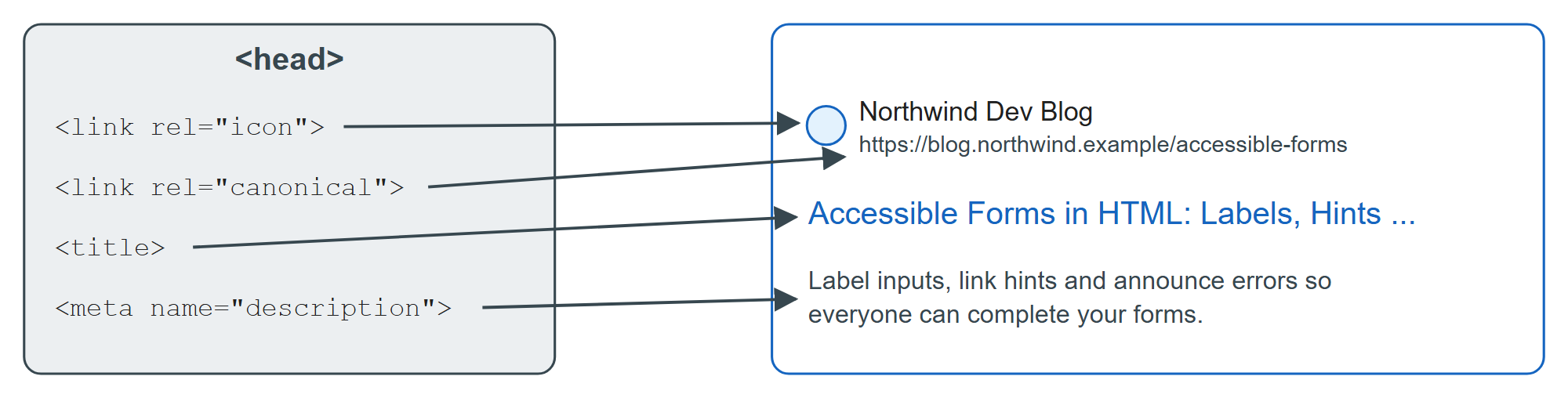
<title> heads Google's list of sources for the title link in results, followed by the visible page title, headings, og:title and anchor text pointing at the page. Put the topic first, the site name last, and make every title unique.
description feeds the snippet under the title. Google builds snippets mainly from page content and uses the description when it summarizes the page better, so write one or two sentences a person would click on.
rel="canonical" names the preferred URL when the same content is reachable at several addresses (tracking parameters, http and https, print versions). Google treats it as a strong signal, not a command; only a redirect is stronger. Always use an absolute URL.
robots sets indexing rules: noindex keeps a page out of results, nofollow tells crawlers not to follow its links, and max-image-preview:large allows large image previews. The HTTP header X-Robots-Tag does the same for PDFs and images.