A minimal valid document has five parts: the DOCTYPE, the <html> root, a <head> with metadata, a <title>, and a <body> with the visible content. The example below adds the two <meta> tags that every real page needs and a script that prints what the browser made of the file.
<!doctype html>
<html lang="en">
<head>
  <meta charset="utf-8">
  <meta name="viewport" content="width=device-width, initial-scale=1">
  <title>Hello, HTML</title>
</head>
<body>
  <h1>Hello, HTML</h1>
  <p>Spaces    and
     line breaks     collapse into single spaces.</p>
  <p id="info"></p>
  <script>
    document.getElementById('info').textContent =
      `Mode: ${document.compatMode}, charset: ${document.characterSet}, ` +
      `children of <html>: ${[...document.documentElement.children].map(e => e.tagName)}`;
  </script>
</body>
</html>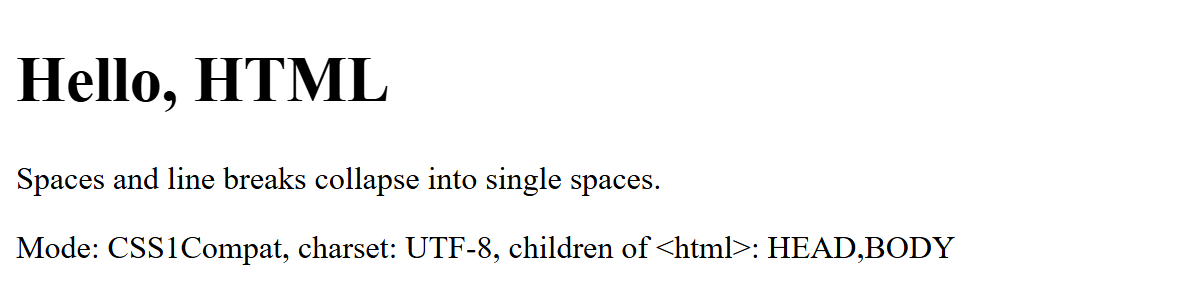
Each line has a job:
<!doctype html> switches the browser into no-quirks (standards) mode; document.compatMode reports CSS1Compat. Omit it and you get quirks mode (BackCompat), which emulates the layout bugs of Internet Explorer 5 and Netscape Navigator 4. The DOCTYPE is case-insensitive.
lang="en" tells screen readers which pronunciation to use and lets browsers pick hyphenation and translation.
<meta charset="utf-8"> declares the encoding. UTF-8 is the only valid choice, and the element must sit entirely within the first 1024 bytes of the file, so put it first in <head>.
The viewport <meta> stops mobile browsers from laying the page out in a virtual viewport, typically 980 pixels wide, and shrinking it to fit the screen.
<title> is required (exactly one) and appears in tabs, bookmarks and search results.
The listing also shows whitespace collapsing: runs of spaces and newlines in text render as one space. Use CSS white-space or <pre> when spacing matters.
Pitfall: a <meta charset> placed after a large inline <style> block can land beyond byte 1024. Browsers only prescan that far, so they start decoding with a guessed encoding and, when the late declaration disagrees, reload the page from memory with the right one. Structural Elements covers each head and body element in detail.