A <form> groups controls whose values are sent together: <input> (<input> and Its Types), <button>, <select> with <option> and <optgroup>, <textarea> and <output> (<output>). <fieldset>, <legend> and <label> give them structure and names. On <form>, action is the URL that receives the data (default: the current page), method is get (values in the query string), post (values in the body) or dialog (just close the enclosing <dialog>), enctype picks the body encoding, target where the response appears (_self, _blank, a frame name), and novalidate turns off validation.
Use get for searches and filters (the result can be bookmarked) and post for anything that changes data. File uploads need method="post" with enctype="multipart/form-data"; with the default encoding the browser sends only the file name. autocomplete sets the default for autofill (Validation and Autofill), and accept-charset now allows only UTF-8.
Structure: fieldset, legend and label
<fieldset> groups related controls in a box captioned by its first child, <legend>, which screen readers announce with the controls inside. <fieldset disabled> disables every control inside (except within the legend), and disabled controls are not submitted.
Every control needs a <label>: point for at the control's id, or wrap the control inside the label. Clicking the label focuses or toggles the control, and its text becomes the control's accessible name. A placeholder is not a label: it disappears as soon as the user types.
button, select and textarea
<button> can contain markup. Its type defaults to submit, so write type="button" for script-driven buttons such as "Show password". A submit button can override the form with formaction, formmethod, formenctype, formnovalidate and formtarget, and its own name/value pair is sent, so "Save draft" and "Publish" buttons can share one form.
<select> shows a drop-down; multiple allows several choices and size shows that many rows as a list box. <option> has value (defaulting to its text), selected, disabled and label; <optgroup label> adds group headings. <textarea> takes its initial value between its tags; rows and cols set its size, and wrap="hard" (with cols) submits line breaks where the text wrapped on screen.
<style>
  body { font: 15px/1.4 system-ui, sans-serif; margin: 12px; }
  fieldset { border: 1px solid #9ab; border-radius: 8px; margin: 0 0 10px; }
  legend { font-weight: 600; padding: 0 4px; }
  label { display: block; margin: 4px 0; }
  select, textarea { font: inherit; width: 100%; box-sizing: border-box; }
  button { font: inherit; padding: 4px 12px; margin-right: 6px; }
</style>
<form id="ticket" action="/tickets" method="post">
  <fieldset>
    <legend>Your request</legend>
    <label>Product
      <select name="product">
        <optgroup label="Software">
          <option value="ide">Code editor</option>
          <option value="cli" selected>Command-line tools</option>
        </optgroup>
        <optgroup label="Hardware">
          <option value="mon" disabled>Monitor (discontinued)</option>
        </optgroup>
      </select>
    </label>
    <label>Affected versions
      <select name="versions" multiple size="2">
        <option selected>4.1</option><option selected>4.2</option></select></label>
    <label>Problem
      <textarea name="details" rows="3" required>Steps to reproduce:
1. </textarea></label>
  </fieldset>
</form>
<button form="ticket" name="intent" value="send">Send request</button>
<button form="ticket" name="intent" value="draft" formnovalidate>Save draft</button>
<button form="ticket" type="reset">Reset</button>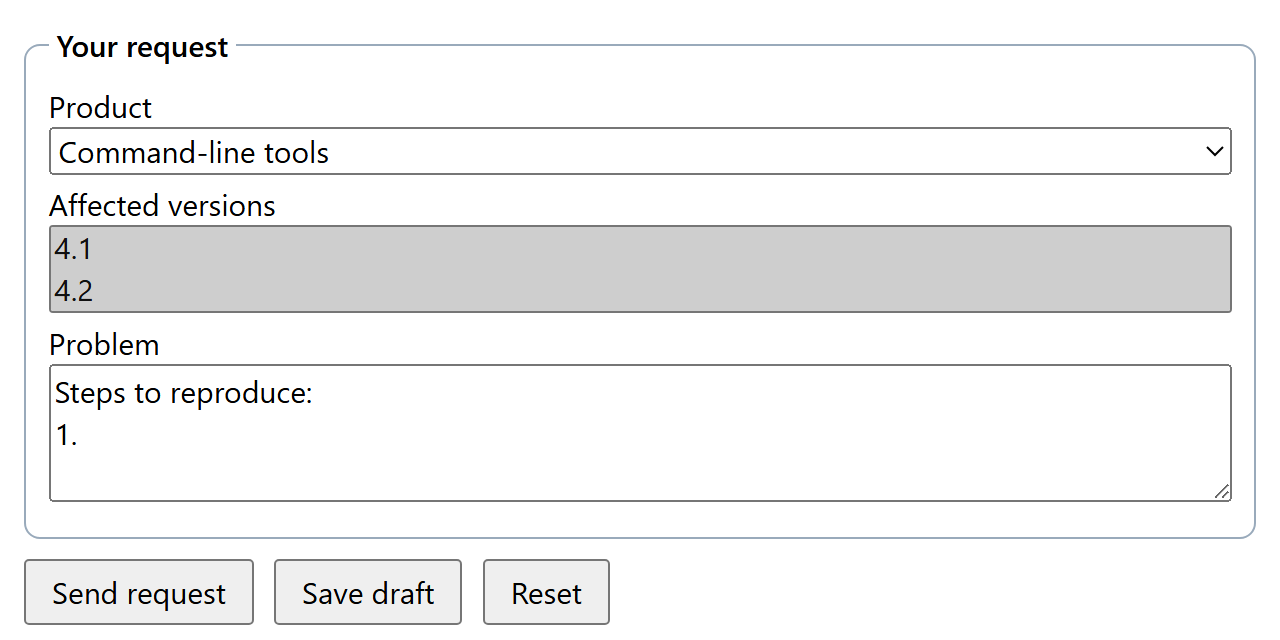
The buttons sit outside the <form> but belong to it through form="ticket". "Save draft" sends intent=draft and skips validation; the server sees versions=4.1&versions=4.2, one pair per selected option. Avoid control names such as action or submit: form.action would return the control instead of the URL, and form.submit() would stop being a function.
Practical Advice
Never nest forms. The parser ignores an inner <form> start tag, so its fields join the outer form.
Prefer readonly to disabled for values the user must see and the server must receive.