The same-origin policy blocks a script from reading cross-origin responses, but it never stopped a page from embedding them: <img>, <script src> and stylesheets have loaded from any host since the 1990s. Cross-Origin Resource Sharing (CORS) lets a server declare, with response headers, that a response may also be read by other origins; the browser enforces the decision. CORS relaxes the same-origin policy and never protects a server: curl 3,008 and server-side code ignore it.
Every cross-origin fetch() is a CORS request. For elements, the crossorigin attribute switches the fetch from the old "no-cors" embedding mode into CORS mode. It is valid on <script>, <link>, <img>, <audio> and <video>. The value anonymous (also an empty or invalid value) sends no cookies cross-origin; use-credentials sends them, and the server must then allow credentials explicitly.
Leaving the attribute off has concrete consequences: an image drawn into a <canvas> taints it, so getImageData() throws a SecurityError; an exception in a cross-origin script reaches window.onerror only as "Script error."; and integrity (integrity) cannot be checked. Module scripts always use CORS, which is why they fail when a CDN omits the header.
Simple and preflighted requests
A simple request uses GET, HEAD or POST with only safelisted headers, and a Content-Type of at most text/plain, multipart/form-data or application/x-www-form-urlencoded: requests an HTML form could already send. The browser sends it and checks Access-Control-Allow-Origin on the response. Anything else, such as PUT, a JSON body or an Authorization header, first triggers a preflight, an OPTIONS request asking permission.
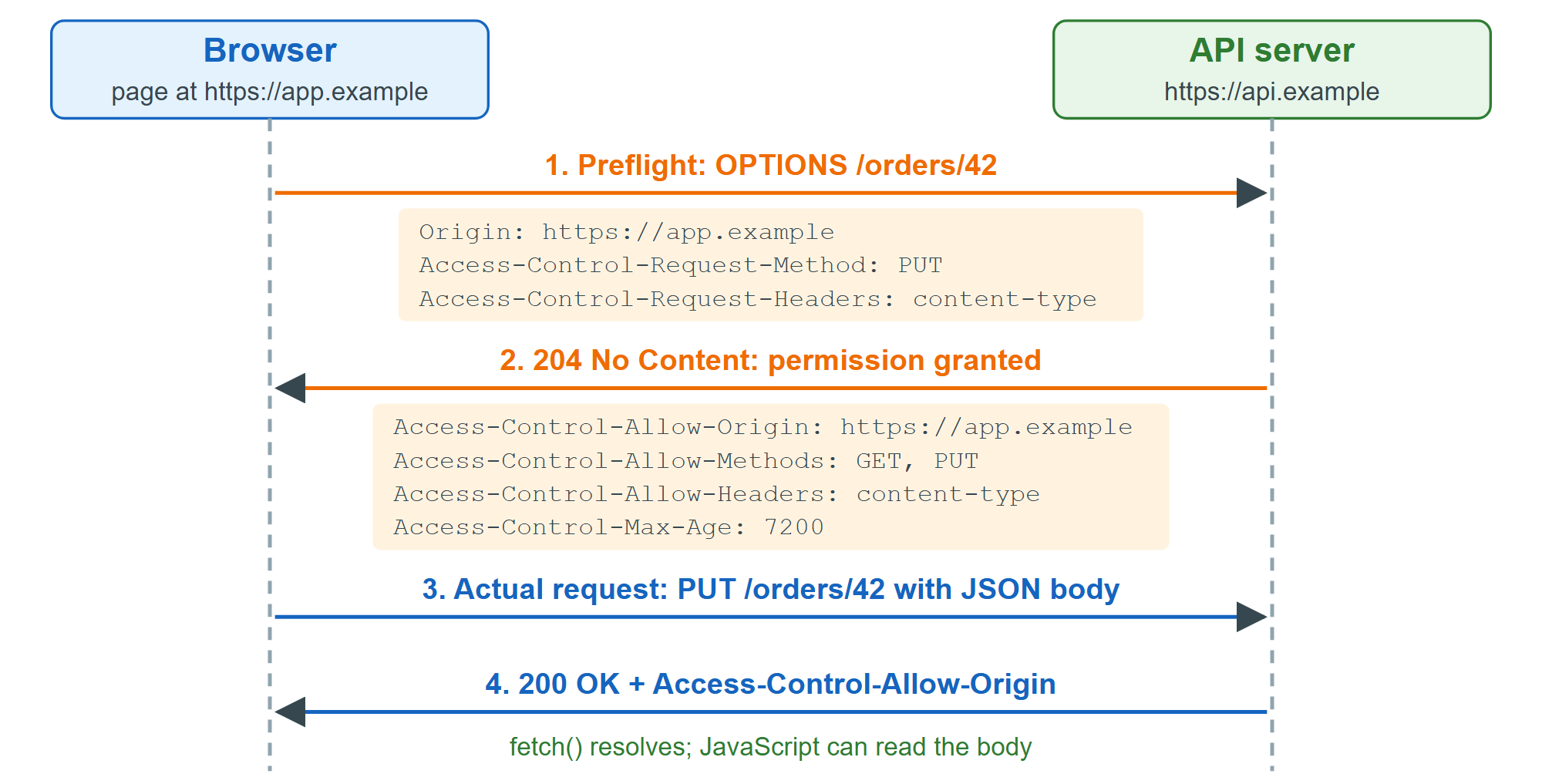
If step 2 lacks a matching header, step 3 is never sent and fetch() rejects with a TypeError. The browser caches a preflight for Access-Control-Max-Age seconds: 5 by default, capped at 2 hours in Chromium 4,389 and 24 hours in Firefox 555 . The demo makes three real requests:
<pre id="log" style="font: 14px/1.6 Consolas, monospace; margin: 12px"></pre>
<script>
  const log = (s) => (document.getElementById('log').textContent += s + '\n');
  const pkg = 'https://cdn.jsdelivr.net/npm/bootstrap@5.3.8/package.json';
  async function attempt(label, url, options) {
    try {
      const data = await (await fetch(url, options)).json();
      log(`${label}: OK, read version ${data.version}`);
    } catch (err) {
      log(`${label}: ${err.name}: ${err.message}`);
    }
  }
  (async () => {
    await attempt('1. Simple GET to jsDelivr ', pkg);
    await attempt('2. GET with X-Demo header ', pkg, { headers: { 'X-Demo': '1' } });
    await attempt('3. GET to example.com     ', 'https://example.com/');
  })();
</script>
jsDelivr 15,886 sends Access-Control-Allow-Origin: *, so request 1 succeeds. Request 2's custom header forces a preflight, and jsDelivr's OPTIONS response does not list X-Demo in Access-Control-Allow-Headers. Request 3 reaches a server with no CORS headers. The console shows the precise reason, but JavaScript gets only a generic error, so a page cannot use CORS failures to probe other servers.
On the server, the cors 6,195 (https://github.com/expressjs/cors 6,195 ) middleware for Express 24,430 (MIT, npm 2,036 install cors) takes an allowlist, app.use(cors({ origin: ['https://app.example'], credentials: true, maxAge: 7200 })), echoes the matching origin, answers preflights and adds Vary: Origin so caches keep per-origin responses apart. The client then calls fetch(url, { credentials: 'include' }).
A common interview question is whether CORS stops CSRF. It does not: a cross-site form POST is sent, with cookies, before any CORS check; CORS only hides the response. Use SameSite cookies and CSRF tokens.