The DOCTYPE
<!DOCTYPE html> must be the first thing in the file; only whitespace, comments and a byte order mark may come before it. It is not an element and never appears as one in the DOM: the parser turns it into a DocumentType node, available as document.doctype. Its only remaining job is to put the browser in no-quirks mode, as Anatomy of an HTML Document showed. The keyword is case-insensitive, so <!doctype html> (the form most formatters emit) is identical.
The HTML 4.01 and XHTML 1.0 DOCTYPEs with their long public identifiers and DTD URLs still trigger standards mode, but they add nothing, and DOCTYPE Variants lists them for when you maintain old pages. The only other conforming variant is <!DOCTYPE html SYSTEM "about:legacy-compat">, which exists for XML tools (such as XSLT processors) that cannot output a DOCTYPE without a system identifier.
The html element
<html> is the root element, exposed as document.documentElement. Its content model is exactly one <head> followed by one <body>. The start and end tags are optional, but write them, because the root is where you declare document-wide facts:
lang sets the language of all the text. Screen readers choose a voice from it, browsers use it for hyphenation, spell checking, translation prompts, font selection for CJK text and language-specific quotation marks, and CSS can target it with :lang().
dir="rtl" (or ltr, auto) sets the base text direction for Arabic, Hebrew or Persian pages (see Orientation).
class and data-* attributes on the root are the usual hook for page-wide state such as a dark theme, because every element can see the root in a CSS selector.
<!doctype html>
<html lang="en">
<head>
  <meta charset="utf-8">
  <title>lang demo</title>
  <style>
    body { font: 17px/1.4 Georgia, serif; margin: 12px; }
    p { border-left: 4px solid #1565c0; padding-left: 8px; }
    :lang(de) { border-color: #ef6c00; }
    :lang(fr) { border-color: #2e7d32; }
    code { display: block; font-size: 15px; }
  </style>
</head>
<body>
  <p>She said <q>structure first</q>, and meant it.</p>
  <p lang="de">Er sagte <q>Struktur zuerst</q> und meinte es.</p>
  <p lang="fr">Elle a dit <q>la structure d'abord</q> et le pensait.</p>
  <code id="out"></code>
  <script>
    const root = document.documentElement;
    out.textContent = `<${root.localName}> lang=${root.lang}; doctype: ${document.doctype.name}`;
  </script>
</body>
</html>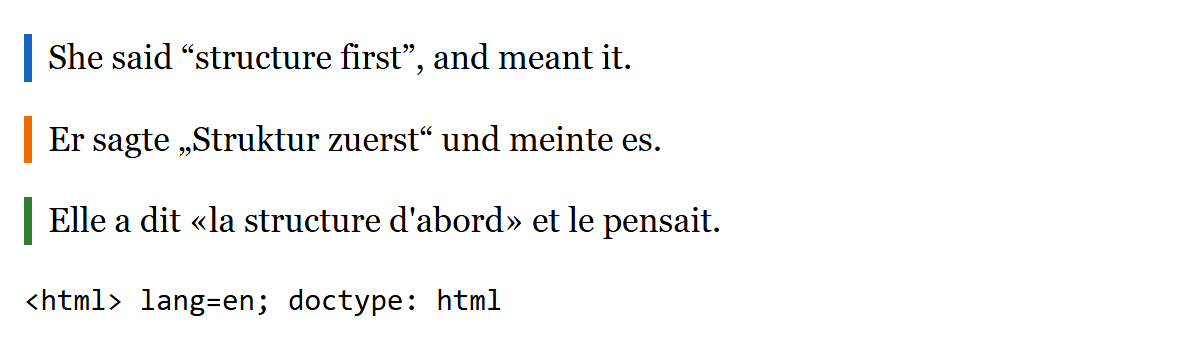
The same <q> element produces English, German and French quotation marks because browsers default the CSS quotes property to the behavior of auto, which picks marks for the inherited language, and each :lang() rule matches its paragraph because language is inherited from the nearest ancestor with lang. Hyphenation with hyphens: auto works the same way, but only for languages the browser has a dictionary for.
xmlns and the two serializations
Old templates often start with <html xmlns="http://www.w3.org/1999/xhtml 189 ">. In a document served as text/html that attribute is allowed only with exactly that value, and the specification says it "has absolutely no effect. It is basically a talisman." It matters only in the XML serialization of HTML (XHTML), which a server triggers by sending Content-Type: application/xhtml+xml. Then the XML parser is used, namespaces are real, tag names are case-sensitive, and a single unclosed tag stops rendering with an error page instead of being repaired.
Pitfalls: the manifest attribute (for the retired Application Cache) and the version attribute on <html> are obsolete; the specification points you to service workers (Tasks and Workers) for offline support. Set lang to the language of the content rather than the visitor's locale, and override it on any element that contains another language.