A favicon is the small image beside the page title in a tab or bookmark. Browsers still request /favicon.ico when a page declares no icon, hence the old advice to drop a 16x16 ICO in the site root. Today icons also appear on home screens, in app launchers and in search results, yet four <link> lines and a short manifest cover every current browser.
<link rel="icon" href="/favicon.ico" sizes="32x32">
<link rel="icon" href="/icon.svg" type="image/svg+xml">
<link rel="apple-touch-icon" href="/apple-touch-icon.png"><!-- 180x180 PNG -->
<link rel="manifest" href="/manifest.webmanifest">
The 32x32 ICO serves older browsers and tools such as RSS readers that only request /favicon.ico. The SVG, sharp 32,725 at any size, is used by Chrome 1 and Edge 80+, Firefox 41 555 + and Safari 26 10 +. iPhones use the 180x180 apple-touch-icon; Android and installed web apps read 192 and 512 px PNGs from the manifest.
Without sizes="32x32" Chrome may pick the ICO over the SVG, which must be served as image/svg+xml. An SVG favicon can carry its own CSS, including a dark-mode media query:
<svg xmlns="http://www.w3.org/2000/svg" viewBox="0 0 32 32">
  <style>
    rect { fill: #1565c0; } path { stroke: #fff; }
    @media (prefers-color-scheme: dark) { rect { fill: #90caf9; } path { stroke: #0d2a4d; } }
  </style>
  <rect width="32" height="32" rx="7"/>
  <path d="M12 7v18h10" fill="none" stroke-width="4"/>
</svg>
Preview an icon at the sizes it really appears. This page draws the same shapes at 16, 32 and 48 px on light and dark strips:
<svg width="0" height="0" style="position:absolute"><symbol id="i" viewBox="0 0 32 32">
  <rect width="32" height="32" rx="7" fill="var(--bg)"/>
  <path d="M12 7v18h10" fill="none" stroke="var(--fg)" stroke-width="4"/></symbol></svg>
<style>
  body { margin: 0; }
  p { display: flex; align-items: end; gap: 20px; margin: 0; padding: 10px; font: 14px sans-serif; }
  .light { --bg: #1565c0; --fg: #fff; background: #f1f3f4; }
  .dark { --bg: #90caf9; --fg: #0d2a4d; background: #202124; color: #e8eaed; }
</style>
<p class="light"></p><p class="dark"></p>
<script>
  for (const p of document.querySelectorAll("p")) p.innerHTML = [16, 32, 48]
    .map((s) => `<svg width="${s}" height="${s}"><use href="#i"/></svg>`).join("") + "Lamp Shop";
</script>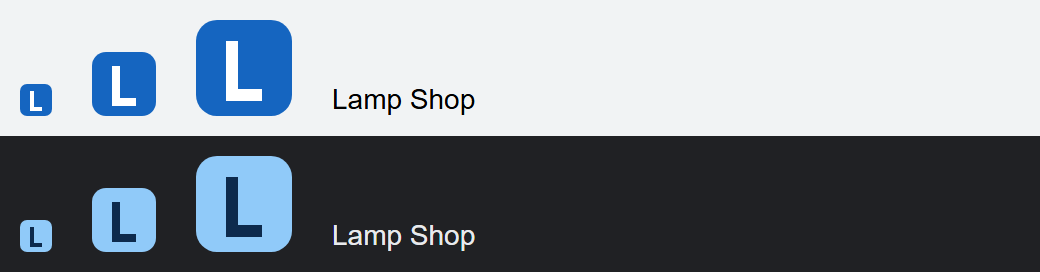
The manifest (Progressive Web Apps) lists the PNGs in its "icons" array; mark a 512 px icon whose artwork keeps a safe zone with "purpose": "maskable" so Android may crop it to any shape.
Browsers cache favicons aggressively, so rename a replaced icon (icon-v2.svg). Generate the ICO and PNGs with RealFaviconGenerator 132,294 (https://realfavicongenerator.net/ 132,294 ) or the open-source sharp (https://github.com/lovell/sharp 32,725 ) library in Node.