<input> is a void element whose type attribute turns it into one of 22 different controls. A missing or unknown type falls back to text, which is what makes the newer types safe to use: a browser that has no week picker shows a text box instead of nothing. The type also picks the phone keyboard and adds validation (Validation and Autofill).
| type | Collects | Submitted value / notes |
|---|---|---|
| text, search | One line of text (the default), a query | As typed; line breaks removed |
| password | Secret text, masked | Plain text unless the page uses HTTPS |
| An email address | Validated; multiple allows a comma list | |
| url | An absolute URL | Must include a scheme such as https: |
| tel | A phone number | Not validated: formats vary by country |
| number | A number, with spinner | min, max, step; empty if not a number |
| range | An approximate number, as a slider | Default 0-100, middle value |
| color | A color, with picker | #rrggbb; alpha attribute in Safari 18.4 10 + |
| date, time | A calendar date, a time of day | 2026-09-15, 14:30 |
| datetime-local | Date and time, no time zone | 2026-09-15T14:30 |
| month, week | Month or ISO week of a year | 2026-09, 2026-W38; text box in desktop Firefox 555 , Safari |
| checkbox | An on/off choice | value (default on) only when checked |
| radio | One choice of a same-name group | value of the checked radio |
| file | One or more files | Contents need POST + multipart/form-data |
| hidden | Nothing: invisible | Value set by the page, e.g. a CSRF token |
| submit, reset, button, image | Buttons (image shows a picture) | Prefer <button>, which can hold markup |
The old datetime type, which carried a UTC time zone, was dropped from the standard; use datetime-local plus the user's time zone from Intl (JavaScript).
<style>
  body { font: 14px system-ui, sans-serif; margin: 10px; }
  form { display: grid; grid-template-columns: repeat(3, 1fr); gap: 10px 14px; }
  label { display: flex; flex-direction: column; gap: 3px; font-weight: 600; }
  input:not([type=checkbox], [type=radio]) { font: inherit; font-weight: 400; }
  .row { flex-direction: row; align-items: center; font-weight: 400; }
</style>
<form>
  <label>text <input name="t" placeholder="Your name" list="names"></label>
  <label>password <input type="password" value="secret"></label>
  <label>search <input type="search" value="html forms"></label>
  <label>email <input type="email" value="ana@example.com"></label>
  <label>url <input type="url" value="https://mdn.dev"></label>
  <label>tel <input type="tel" value="+1 415 555 0123"></label>
  <label>number <input type="number" value="3" min="1" max="9"></label>
  <label>range <input type="range" value="70"></label>
  <label>color <input type="color" value="#1565c0"></label>
  <label>date <input type="date" value="2026-09-15"></label>
  <label>time <input type="time" value="14:30"></label>
  <label>datetime-local <input type="datetime-local" value="2026-09-15T14:30"></label>
  <label>month <input type="month" value="2026-09"></label>
  <label>week <input type="week" value="2026-W38"></label>
  <label>file <input type="file" accept="image/*" multiple></label>
  <div>
    <label class="row"><input type="checkbox" checked> checkbox</label>
    <label class="row"><input type="checkbox" id="mixed"> indeterminate</label>
  </div>
  <div>
    <label class="row"><input type="radio" name="size" value="s"> Small</label>
    <label class="row"><input type="radio" name="size" value="m" checked> Medium</label>
  </div>
  <div>
    <input type="hidden" name="csrf" value="f3a9">
    <input type="submit" value="Submit"> <input type="reset"> <input type="button" value="Button">
  </div>
  <datalist id="names"><option value="Ana"><option value="Bo"></datalist>
</form>
<script>document.getElementById('mixed').indeterminate = true;</script>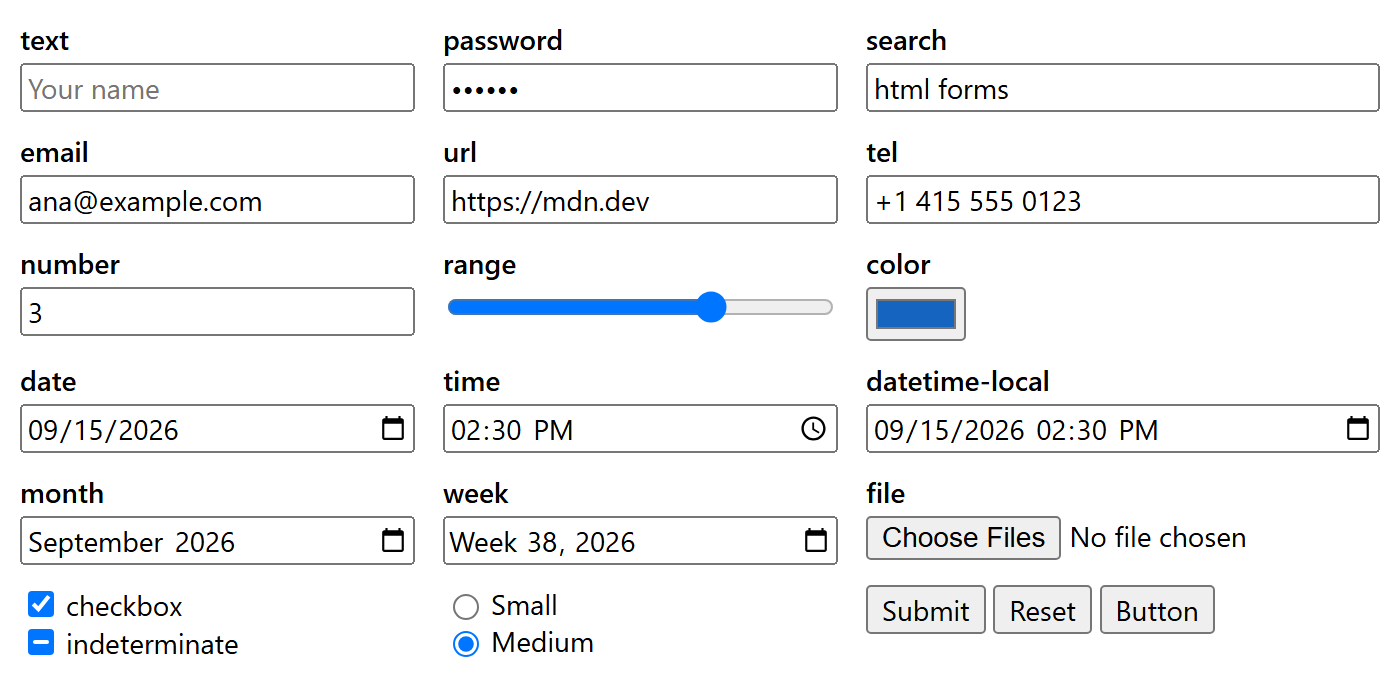
The figure shows Chrome 1 ; desktop Firefox and Safari show text boxes for month and week. The dash in the second checkbox is the indeterminate state, settable only from JavaScript (for a "select all" box whose children are partly checked); it never changes what is submitted.
Attributes that shape an input
Text types: placeholder, minlength, maxlength, pattern, size (width in characters).
Numeric and date types: min, max, step (step="any" allows decimals; step="900" on time means 15-minute steps).
Files: accept (image/*, .pdf), multiple, and capture="environment" to open a phone's rear camera.
Most types: list points at a <datalist> of suggestions that the user may ignore.
Keyboard hints: the global attributes inputmode (numeric, decimal, tel, ...) and enterkeyhint (search, send, next, done) change the phone keyboard without adding validation.
const make = (type, value) => Object.assign(document.createElement('input'), { type, value });
console.log('week:', make('week').type === 'week', '| datetime:', make('datetime').type);  // Chrome
console.log(make('date', '2026-09-15').valueAsDate.toISOString());
const qty = make('number', '12abc');
console.log(JSON.stringify(qty.value), qty.valueAsNumber); // sanitized: not a numberweek: true | datetime: text 2026-09-15T00:00:00.000Z "" NaN
Practical Advice
Do not use type="number" for postal codes, card numbers or IDs, which are not really numbers and are easy to change by accident with the spinner. Use type="text" inputmode="numeric" autocomplete="postal-code".
A type="hidden" value is visible and editable in DevTools. Never trust it for prices or permissions.