<h1> to <h6> rank headings. Screen reader users jump between them and search engines read them as the topics of the page, so pick a level for its rank, never its size: use one <h1> describing the page, and do not skip levels on the way down. <hgroup> pairs a heading with a subtitle or tagline, and today may contain exactly one heading plus <p> elements before or after it; the older multi-heading form is invalid.
HTML5 kept <b>, <i>, <u>, <s> and <small> but gave each a precise meaning.
| Element | Meaning (typical use) | Default look |
|---|---|---|
| <b> | Attention, no importance (keywords) | Bold |
| <i> | Alternate voice (foreign words, ships) | Italic |
| <u> | Non-textual annotation (misspelling) | Underline |
| <s> | No longer accurate (old price) | Strikethrough |
| <small> | Side comment (legal small print) | Smaller text |
| <sub>, <sup> | Typographic convention (H₂O, m²) | Lowered, raised |
| <q> | Short inline quotation | Quote marks added |
| <blockquote> | Long quotation as a block | Indented block |
| <del>, <ins> | Removed and added text (edits) | Struck, underlined |
| <pre> | Preformatted text, spaces kept | Monospace, no wrap |
| <br> | Line break in content (poems) | New line |
<!doctype html>
<html lang="en">
<head>
  <meta charset="utf-8">
  <title>Formatting</title>
  <style>
    body { font: 15px/1.45 system-ui, sans-serif; margin: 10px; }
    p, h1 { margin: 0 0 5px; }
    h1 { font-size: 1.5em; }
    hgroup { margin-bottom: 8px; }
    hgroup p { color: #555; font-style: italic; }
    u.typo { text-decoration: wavy underline red; }
    pre { background: #f1f3f4; padding: 4px 10px; margin: 5px 0; }
  </style>
</head>
<body>
  <hgroup><h1>The Tide Table</h1><p>Harbor news since 1887</p></hgroup>
  <p><b>Tide Table Pro</b> is now <s>$49</s> $29. The <i>Nautilus</i> sails at dawn.</p>
  <p>Water is H<sub>2</sub>O; the area is 12 m<sup>2</sup>.
    Spell check: <u class="typo">recieve</u>.</p>
  <p>The harbor master said <q cite="/news/412">no ship leaves before the fog lifts</q>.</p>
  <p>Departure moved to <del datetime="2026-09-14T08:00Z">Monday</del>
    <ins datetime="2026-09-14T08:00Z">Tuesday</ins>.</p>
<pre>
Tide   Time    Height
High   06:12   4.1 m
</pre>
  <p><small>Prices include VAT. Offer ends December 31, 2026.</small></p>
</body>
</html>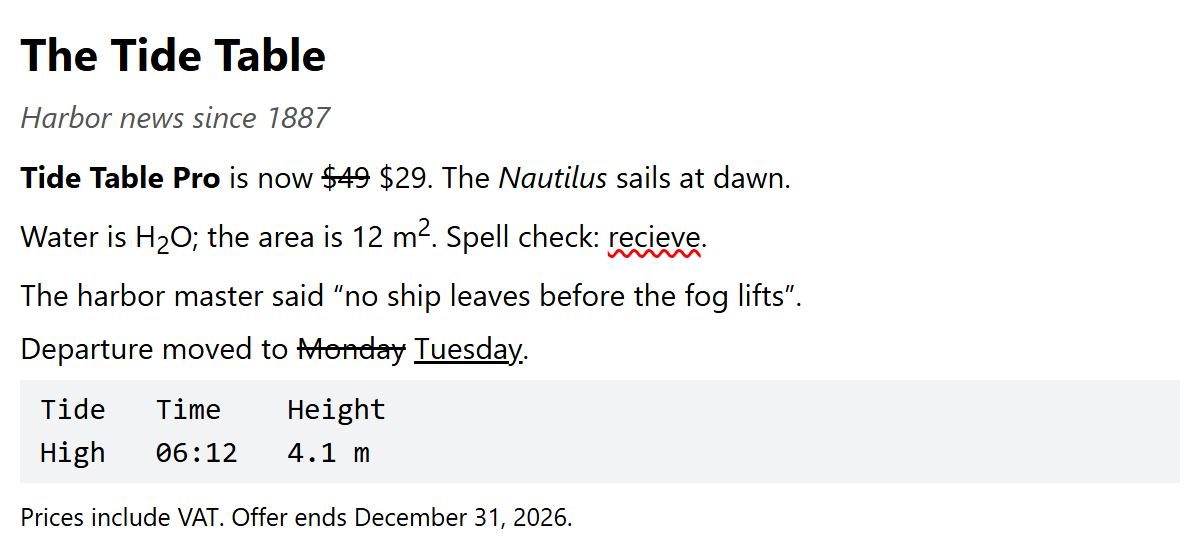
b, i, strong and em
The deciding question is whether the words would be spoken differently. <em> adds stress that changes the meaning ("I never said that" versus "I never said that"), and <strong> marks importance, seriousness or urgency. <b> and <i> add neither: they only offset text by convention. For purely visual bold or italic, style a <span> with CSS.
Quotations, Edits and Preformatted Text
<q> inserts the quotation marks itself through the default CSS rules q::before { content: open-quote } and q::after { content: close-quote }, so never type them inside. Change the characters with the CSS quotes property. The cite URL on <q> and <blockquote> is invisible to readers; name the source in the text too.
<del> and <ins> are transparent: they may wrap whole paragraphs or list items. Most screen readers do not announce them by default, so if the edit matters, add visually hidden text such as del::before { content: " [deleted] " }.
<pre> applies white-space: pre. The parser drops a single newline right after the start tag, so you can begin the content on the next line. Escape < as <, and add overflow-x: auto for long lines. For code, nest <code> inside <pre>; highlighters look for pre > code.