A custom element is a class that extends HTMLElement, registered with customElements.define(name, class). The name must start with a lowercase letter and contain a hyphen (user-card), so it can never collide with a future built-in tag, and it can be defined only once. Autonomous custom elements have been Baseline since January 2020. Avoid the other form, customized built-in elements (<button is="fancy-button">): Chrome 1 and Firefox 555 support it, but Safari 10 has said it never will.
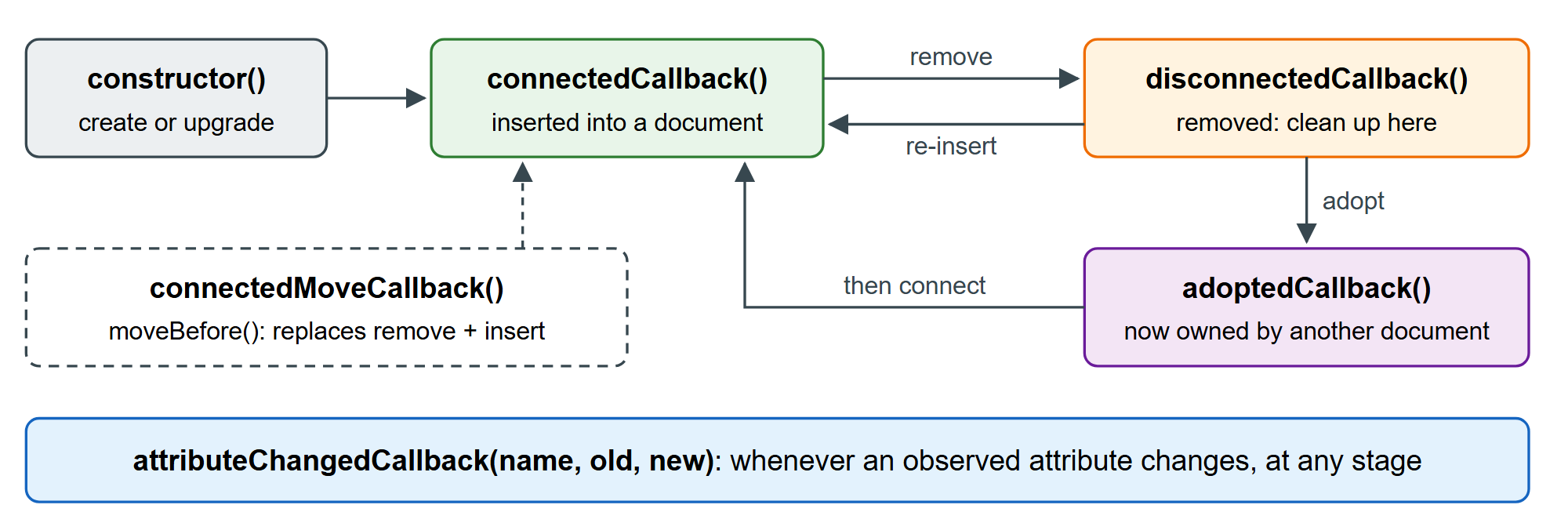
The browser calls up to five lifecycle callbacks on your class. The listing logs them while an element is created, upgraded, changed, moved, adopted by another document and removed.
class LifeLogger extends HTMLElement {
  static observedAttributes = ['status'];   // only these attributes trigger the callback
  constructor() { super(); console.log('constructor'); }
  connectedCallback() { console.log(`connected        parent=<${this.parentNode.localName}>`); }
  disconnectedCallback() { console.log('disconnected'); }
  adoptedCallback() { console.log('adopted'); }
  attributeChangedCallback(name, oldValue, newValue) {
    console.log(`attributeChanged ${name}: ${oldValue} -> ${newValue}`);
  }
}
const el = document.createElement('life-logger');   // not defined yet: a plain HTMLElement
document.body.append(el);
el.setAttribute('status', 'draft');
console.log('-- define --');
customElements.define('life-logger', LifeLogger);    // upgrade runs the callbacks now
console.log('-- change attribute --');
el.setAttribute('status', 'ready');
console.log('-- move --');
document.body.prepend(document.createElement('main'));
document.querySelector('main').append(el);
console.log('-- adopt into a new document --');
document.implementation.createHTMLDocument().body.append(el);
console.log('-- remove --');
el.remove();-- define -- constructor attributeChanged status: null -> draft connected parent=<body> -- change attribute -- attributeChanged status: draft -> ready -- move -- disconnected connected parent=<main> -- adopt into a new document -- disconnected adopted connected parent=<body> -- remove -- disconnected
Notice the upgrade: the element existed before its definition, so define() ran the constructor, replayed attributeChangedCallback for the observed attribute already present, then called connectedCallback. The same happens to tags parsed before your script loads. A move is a disconnect plus a connect, which resets state such as running animations; Chrome 133 and Firefox 144 add parent.moveBefore(el, ref), which calls connectedMoveCallback() instead, but Safari does not support it yet.
Form-associated elements and custom states
A custom control can join forms like a native <input>. Set static formAssociated = true, call this.attachInternals(), and use the returned ElementInternals to submit a value (setFormValue()) and report validity (setValidity()); <label>, disabled and form reset then work too. Its states set holds custom states that CSS matches with :state(). Form-associated custom elements are Baseline Widely available since September 2025, and :state() is Baseline since May 2024.
<style>
  body { font: 15px system-ui; margin: 16px; }
  star-rating { font-size: 28px; color: #b0bec5; cursor: pointer; }
  star-rating:state(rated) { color: #ef6c00; }
</style>
<form id="f">
  <label for="r">Rate this book:</label> <star-rating id="r" name="stars" value="4"></star-rating>
  <button>Send</button> <output id="o"></output>
</form>
<script>
  customElements.define('star-rating', class extends HTMLElement {
    static formAssociated = true;
    #internals = this.attachInternals();
    constructor() {
      super();
      this.addEventListener('click', (e) => (this.value = Number(e.target.dataset.n)));
    }
    connectedCallback() { this.value = Number(this.getAttribute('value')); }
    formResetCallback() { this.value = 0; }
    set value(v) {
      this.innerHTML = [1, 2, 3, 4, 5]
        .map((n) => `<span data-n="${n}">${n <= v ? '★' : '☆'}</span>`).join('');
      this.#internals.setFormValue(String(v));
      this.#internals.setValidity(v ? {} : { valueMissing: true }, 'Pick a rating');
      if (v) this.#internals.states.add('rated'); else this.#internals.states.delete('rated');
    }
  });
  const f = document.getElementById('f');
  f.onsubmit = (e) => {
    e.preventDefault();
    document.getElementById('o').value = new URLSearchParams(new FormData(f));
  };
  f.requestSubmit(); // submit once for the screenshot
</script>
The output shows the submitted form data, stars=4, produced by an element the browser had never heard of.
Pitfalls. Do not read attributes or add children in the constructor; the spec forbids it. connectedCallback can run many times, so keep one-time setup (like the click listener above) in the constructor and stop timers in disconnectedCallback. Hide not-yet-upgraded tags with :not(:defined) { visibility: hidden; }.