<template> holds a fragment of markup that the browser parses but does not render. Its contents are inert: scripts inside do not run, images do not load, styles do not apply, and document.querySelector() cannot find them. JavaScript reaches the fragment through the content property, a DocumentFragment, and stamps out copies with content.cloneNode(true). That makes templates the native, safe alternative to building markup with string concatenation and innerHTML, and to the old trick of hiding markup in <script type="text/template">.
<slot> is a placeholder inside a shadow root, the private DOM subtree that a custom element can attach to itself with attachShadow(). The element's ordinary children, called the light DOM, stay in the page, but they are displayed at the slot positions: a child with slot="title" goes into <slot name="title">, and all other children go into the unnamed default slot. Content written inside a <slot> is fallback shown when nothing is assigned. Note that the slot attribute alone does nothing; only an element with a shadow root distributes children into slots.
<style>body { font: 15px system-ui; margin: 12px; display: flex; gap: 12px; }</style>
<template id="card-tpl">
  <style>
    :host { display: block; width: 260px; border: 1px solid #ccc; border-radius: 8px; }
    header { background: #6a1b9a; color: #fff; padding: 6px 10px; border-radius: 8px 8px 0 0; }
    .body { padding: 4px 10px; }
    ::slotted(p) { margin: 6px 0; }
  </style>
  <header><slot name="title">Untitled</slot></header>
  <div class="body"><slot>No details yet.</slot></div>
</template>
<info-card>
  <strong slot="title">Offline mode</strong>
  <p>Pages you visited load without a connection.</p>
  <p>Changes sync when you are back online.</p>
</info-card>
<info-card></info-card>
<script>
  customElements.define('info-card', class extends HTMLElement {
    constructor() {
      super();
      const tpl = document.getElementById('card-tpl');
      this.attachShadow({ mode: 'open' }).append(tpl.content.cloneNode(true));
    }
  });
</script>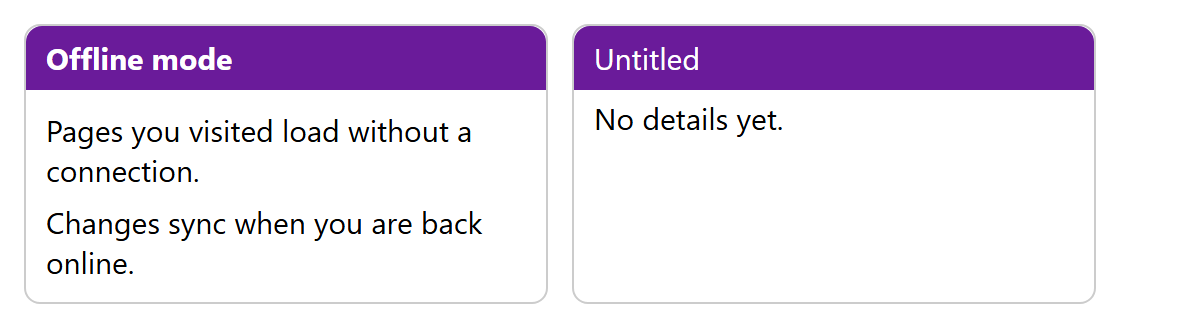
The first card fills both slots from its light DOM; the second has no children, so both slots show their fallback text. The <style> inside the template is scoped to each shadow root: header there cannot match any other header on the page, and page styles cannot reach into the card except through inherited properties (such as font), CSS custom properties and the ::part() selector. :host styles the custom element itself, and ::slotted() styles the assigned light-DOM elements themselves, not their descendants or text nodes.
From script, slot.assignedElements() returns what a slot currently displays, and the slotchange event fires when that set changes, so a tab component can rebuild its tab list when tabs are added. Everything here is Baseline Widely available: <template> since 2018, and shadow DOM with <slot> since July 2022.
Templates are also the engine inside libraries. The lit-html renderer in Lit 310,034 (https://github.com/lit/lit 21,842 ) (BSD-3-Clause, npm 2,036 install lit, version 3.3.3 at the time of writing) turns a tagged template literal into a <template> element once, clones it for each instance, and afterwards updates only the parts holding changed values. Custom Elements covers the custom element lifecycle, Declarative Shadow DOM the declarative <template shadowrootmode="open"> form that creates shadow roots without JavaScript (Baseline Widely available since August 2026), and Attaching Shadow DOM the full attachShadow() API.
Pitfalls: forgetting cloneNode(true) and appending tpl.content directly moves the nodes out of the template, so the second use gets an empty fragment. And remember that the shadow tree is not a security boundary: mode: 'closed' only hides element.shadowRoot from casual access.