The orientation elements control where characters go: the direction of a run of text, the position of a pronunciation guide, and the points where a long word may break. They prevent visible bugs as soon as a page shows names or reviews from around the world.
| Element | Purpose | Example |
|---|---|---|
| <bdi> | Isolate text of unknown direction | <bdi>{{userName}}</bdi>: 3 posts |
| <bdo> | Force a direction on every character | <bdo dir="rtl">abc</bdo> shows "cba" |
| <ruby> | Annotate base text with a small guide | <ruby>漢<rt>kan</rt></ruby> |
| <rt>, <rp> | Annotation; fallback parentheses | <rp>(</rp> |
| <wbr> | Line-break opportunity inside a word | Proxy<wbr>Factory |
Bidirectional Text: bdi and bdo
Arabic, Hebrew, Persian and Urdu run right to left (RTL), while digits and embedded Latin words inside them still run left to right. Text is always stored in logical (typing) order; at render time the browser runs the Unicode Bidirectional Algorithm (UBA, Unicode Standard Annex #9) to compute the visual order. Letters have a strong direction, digits are weak, and spaces and punctuation are neutral, taking the direction of their neighbors. That last rule scrambles sentences when you insert text you do not control: in NAME - 1st place with an RTL name, the dash and the digit join the name's RTL run and the line displays as 1 - EMAN st place (uppercase standing for RTL letters, as in the Unicode annex).
<bdi> (bidirectional isolate) lays out its content on its own, detecting the direction from the first strong character, so it neither affects nor is affected by the surrounding text. It is equivalent to <span dir="auto"> but shorter and clearer. <bdo> (bidirectional override) does the opposite: its required dir attribute forces every character into that order, whatever the characters' own direction.
<!doctype html>
<html lang="en">
<head>
<meta charset="utf-8">
<title>bdi and bdo</title>
<style>
body { font: 16px/1.45 system-ui, sans-serif; margin: 10px; }
h2 { font-size: 14px; margin: 6px 0 0; }
ul { margin: 0; }
</style>
</head>
<body>
<h2>With <span> (broken)</h2>
<ul><li><span>שרה</span> - 2nd place</li><li><span>أحمد</span>: 3 posts</li></ul>
<h2>With <bdi> (correct)</h2>
<ul><li><bdi>שרה</bdi> - 2nd place</li><li><bdi>أحمد</bdi>: 3 posts</li></ul>
<h2>With <bdo dir="rtl"></h2>
<ul><li><bdo dir="rtl">Hello, world!</bdo></li></ul>
</body>
</html>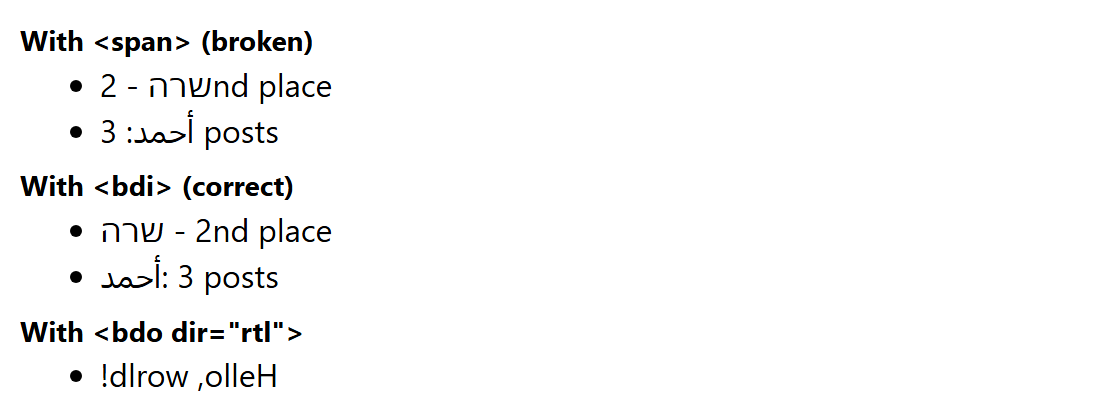
For whole pages and blocks, use the dir attribute: <html lang="ar" dir="rtl"> for an Arabic page and dir="auto" on inputs and containers holding user-generated text.
Ruby Annotations and wbr
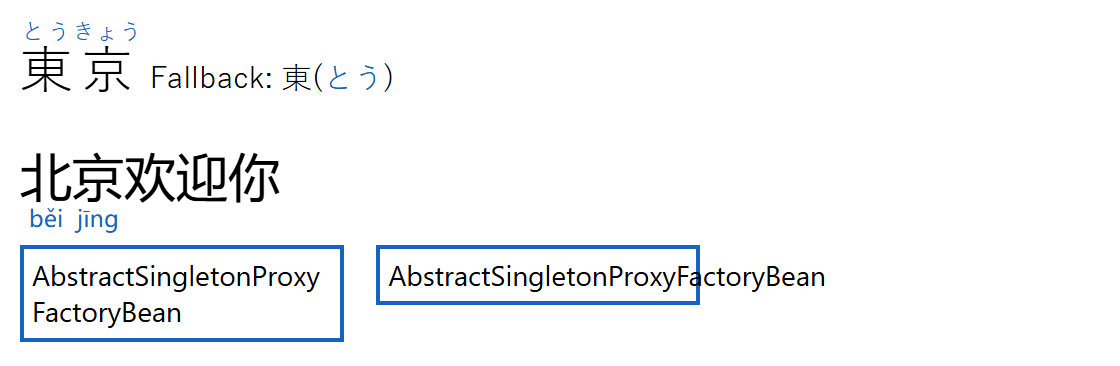
Ruby is small annotation text set above or beside base characters to show pronunciation: furigana in Japanese, pinyin in Chinese. The name comes from "ruby", the 5.5-point type size British printers used for such notes. Write the base text followed by its <rt>. The optional <rp> parentheses are hidden by the default rule rp { display: none } but appear in software without ruby support. The CSS property ruby-position (over, under, alternate, inter-character) has been Baseline since December 2024.
<wbr> marks where a line may break inside a long string such as a URL or identifier; the second box below overflows without it. The soft hyphen ­ also shows a hyphen at the break, and CSS overflow-wrap: anywhere breaks unmarked text as a last resort.
<!doctype html>
<html lang="en">
<head>
  <meta charset="utf-8">
  <title>ruby and wbr</title>
  <style>
    body { font: 15px/1.3 system-ui, sans-serif; margin: 10px; }
    .big { font-size: 26px; line-height: 2; margin: 0; }
    :lang(ja) { font-family: "Yu Gothic", "Hiragino Sans", sans-serif; }
    :lang(zh) { font-family: "Microsoft YaHei", "PingFang SC", sans-serif; }
    rt { font-size: 0.45em; color: #1565c0; }
    .under { ruby-position: under; }
    .flat, .flat :is(ruby, rt, rp) { display: inline; font-size: 15px; }
    .box { width: 150px; border: 2px solid #1565c0; padding: 4px; display: inline-block;
           vertical-align: top; margin: 6px 12px 0 0; font-size: 14px; }
  </style>
</head>
<body>
  <p class="big" lang="ja">
    <ruby>東<rp>(</rp><rt>とう</rt><rp>)</rp>京<rp>(</rp><rt>きょう</rt><rp>)</rp></ruby>
    <span class="flat">Fallback: <ruby>東<rp>(</rp><rt>とう</rt><rp>)</rp></ruby></span></p>
  <p class="big" lang="zh-Hans"><ruby class="under">北<rt>běi</rt>京<rt>jīng</rt></ruby>欢迎你</p>
  <div class="box">Abstract<wbr>Singleton<wbr>Proxy<wbr>Factory<wbr>Bean</div>
  <div class="box">AbstractSingletonProxyFactoryBean</div>
</body>
</html>