Global attributes are valid on every HTML element, from <html> to <span>, although some only affect elements a user can see or type into. Event handler attributes such as onclick are allowed everywhere too.
| Attribute | Purpose |
|---|---|
| id, class, style, title | ID, CSS classes, inline CSS, tooltip text |
| lang, dir, translate | Language, text direction, translation opt-out |
| hidden, inert | Hide (until-found too); disable a subtree |
| tabindex, accesskey, autofocus | Tab order, shortcut key, focus on load |
| contenteditable, draggable | Editing (true, plaintext-only); dragging |
| spellcheck, autocapitalize, autocorrect | Typing aids for editable text |
| inputmode, enterkeyhint | Virtual keyboard layout and Enter-key label |
| popover, nonce | Popover; CSP nonce (<dialog> and popover, nonce) |
| data-* | Custom data; read as element.dataset strings |
| slot, part, exportparts, is | Shadow DOM, custom elements (no is in Safari 10 ) |
| itemscope, itemprop and other item* | Microdata for search engines (Search Engine Optimization) |
| role, aria-* | Accessibility semantics (WAI-ARIA spec) |
<p id="ship" data-ship-id="324" hidden>Cruiser X3</p>
<p contenteditable="plaintext-only" style="border: 1px dashed #888">Click to edit me.</p>
<p lang="ar" dir="rtl">مرحبا بالعالم!</p>
<script>
  document.body.append('dataset.shipId = ' + document.getElementById('ship').dataset.shipId);
</script>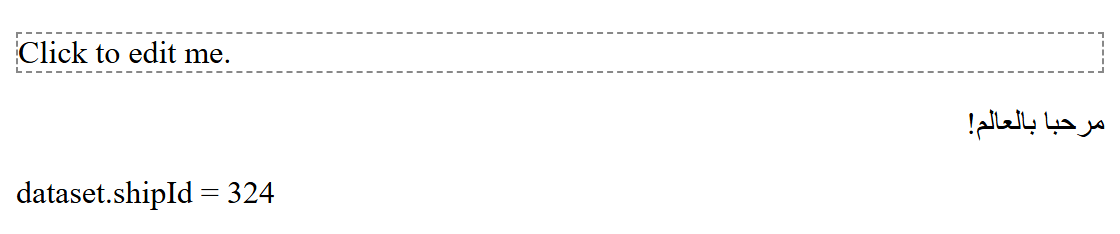
hidden is only a default display: none in the browser's style sheet, so an author rule that sets display overrides it; add [hidden] { display: none !important; } to your reset. Microdata still works, but Google recommends JSON-LD in a <script type="application/ld+json"> block, which keeps structured data out of your markup (Search Engine Optimization). The dropzone attribute in older references only ever shipped with a webkit prefix and was removed from the standard in 2017.