<head> holds metadata content: information about the document rather than the document itself. The specification requires exactly one <title> and allows at most one <base>; everything else is optional. The order matters more than most people expect. <meta charset> must sit within the first 1024 bytes, <base> must precede every URL it should affect, and style sheets block rendering until they arrive, so the head of a production page usually looks like this:
<head>
  <meta charset="utf-8">
  <meta name="viewport" content="width=device-width, initial-scale=1">
  <title>Pricing | Acme Analytics</title>
  <meta name="description" content="Plans for teams of 1 to 10,000, with a free tier.">
  <meta name="color-scheme" content="light dark">
  <meta name="theme-color" content="#1565c0">
  <link rel="canonical" href="https://acme.example/pricing">
  <link rel="preconnect" href="https://fonts.gstatic.com" crossorigin>
  <link rel="stylesheet" href="/css/site.css">
  <link rel="stylesheet" href="/css/print.css" media="print">
  <!-- Non-critical CSS: load without blocking rendering, with a no-JS fallback -->
  <link rel="stylesheet" href="/css/comments.css" media="print" onload="this.media='all'">
  <noscript><link rel="stylesheet" href="/css/comments.css"></noscript>
  <link rel="icon" href="/favicon.svg" type="image/svg+xml">
  <link rel="manifest" href="/site.webmanifest">
  <style>
    .hero { min-height: 60vh; } /* small critical rules inline */
  </style>
  <script src="/js/app.js" type="module"></script>
</head>
title
<title> supplies the text for the browser tab, bookmarks, history, screen-reader announcements when the page loads, and the headline of a search result. It is an escapable raw text element: character references such as & are decoded, but tags inside it are shown literally, never parsed. Read or change it with document.title. Google sets no length limit but truncates long titles to fit the device width, and recommends a unique, descriptive title per page without repeated keywords. Put the page-specific part first (Pricing | Acme Analytics), because tabs and search results cut off the end.
style and link
<style> embeds CSS; <link rel="stylesheet"> references an external file, which the browser can cache across pages. Both accept media (the sheet applies only when the media query matches, though a non-matching <link> is still downloaded at low priority) and blocking="render", which is currently supported only in Chromium 4,389 and Safari 10 . The type="text/css" attribute you see in old code is obsolete: CSS is the only style language browsers support.
The rel attribute turns <link> into a general-purpose relationship declaration. The keywords below are the ones you will meet most; Favicons and App Icons covers icons, Performance Hints in Markup the performance hints, and Security the crossorigin and integrity attributes.
| rel value | What the browser or crawler does |
|---|---|
| stylesheet | Downloads and applies CSS; render-blocking unless media does not match |
| icon, manifest | Tab icon; web app manifest for installable apps |
| canonical, alternate | Preferred URL of duplicate content; translations (hreflang) or feeds |
| preload (+ as) | Fetches a resource needed by this page early, at high priority |
| modulepreload | Fetches a JavaScript module into the module map ahead of time |
| preconnect, dns-prefetch | Opens a connection, or only resolves DNS, for a third-party origin |
| prefetch | Caches a resource for a likely next navigation, at idle priority |
| next, prev | Series navigation hints; Google no longer uses them |
base
<base href> changes the URL that every relative URL in the document resolves against, and <base target> sets the default browsing context for links and forms. It must come before any element with a URL attribute, and a document may contain only one.
<!doctype html>
<html lang="en">
<head>
  <meta charset="utf-8">
  <title>base demo</title>
  <base href="https://cdn.example.com/docs/v2/" target="_blank">
</head>
<body style="font: 16px system-ui; margin: 12px">
  <a href="intro.html">intro.html</a> | <a href="../v1/">../v1/</a> |
  <a href="/login">/login</a> | <a href="#faq">#faq</a>
  <pre id="out"></pre>
  <script>
    out.textContent = [...document.links]
      .map(a => `${a.getAttribute('href').padEnd(11)} -> ${a.href}`).join('\n');
  </script>
</body>
</html>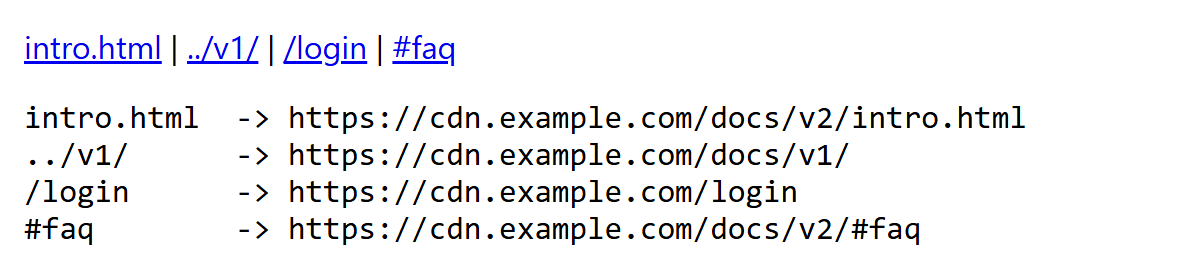
The last line is the classic <base> trap: a fragment link such as #faq also resolves against the base URL, so it navigates away from the page instead of scrolling. Single-page applications that set <base href="/app/"> break in-page anchors this way, which is why most sites avoid <base> and use root-relative URLs.
meta
<meta> has four forms: charset declares the encoding, name with content gives document metadata, http-equiv with content is a pragma directive that mimics a few HTTP headers, and property (from the Open Graph protocol, Open Graph and Social Cards) is read by social networks. The table lists the values worth knowing.
| Tag | Effect |
|---|---|
| charset="utf-8" | Encoding; must be first, within 1024 bytes |
| name="viewport" | Mobile layout width and zoom; keys width, initial-scale, viewport-fit, interactive-widget |
| name="description" | Summary that search engines may show as the snippet |
| name="robots" / googlebot | Crawler rules such as noindex, nofollow, nosnippet |
| name="color-scheme" | Supported color schemes, applied before CSS loads |
| name="theme-color" | Browser UI color; Safari and Chrome 1 on Android only |
| name="referrer" | Default referrer policy (referrerpolicy) |
| name="author", generator, application-name | Informational metadata |
| name="keywords" | Standard, but ignored by Google Search |
| http-equiv="refresh" | Reload or redirect after N seconds: content="5; url=/new" |
| http-equiv="content-security-policy" | CSP without frame-ancestors, report-uri or sandbox |
| http-equiv="x-ua-compatible" | Internet Explorer only; ignored by current browsers |
noscript
<noscript> renders its content only when scripting is disabled or blocked. Inside <head> it may contain only <link>, <style> and <meta>, which makes it the natural fallback for the async style sheet in the first listing. In <body> it can hold any flow content, typically a message that the application needs JavaScript. Keep it for genuine fallbacks; it does nothing when a script fails to download or throws an error.