Expo Router 6,418 (https://github.com/expo/expo/tree/main/packages/expo-router 52,467 ) (MIT) turns the files in src/app/ (or app/) into screens, as Next.js 10,514 does for web pages. Each file's default export is a screen and its path is the URL, on Android, iOS and the web alike. Add it to an existing project:
npx expo install expo-router expo-constants
npx expo install react-dom› Installing 2 SDK 57.0.0 compatible native modules using npm > npm install npm WARN ERESOLVE overriding peer dependency added 55 packages, removed 3 packages, and audited 575 packages in 14s ... › Added config plugin: expo-router
In a fresh project, add react-native-screens 3,732 to the first command (BookNest had it from Installing React Navigation). Then set "main": "expo-router/entry" in package.json and add "experiments": { "typedRoutes": true } next to "scheme": "booknest" in app.json. Don't skip the second command: the ERESOLVE warning was npm 2,036 fetching react-dom 19.3.0, a peer of the router that wants React 19.3 7,897 , and the next npm install failed until expo install pinned SDK 57's 19.2.3. Rebuild the development build once, as the router adds native code. The new entry point builds the navigation tree from src/app/:
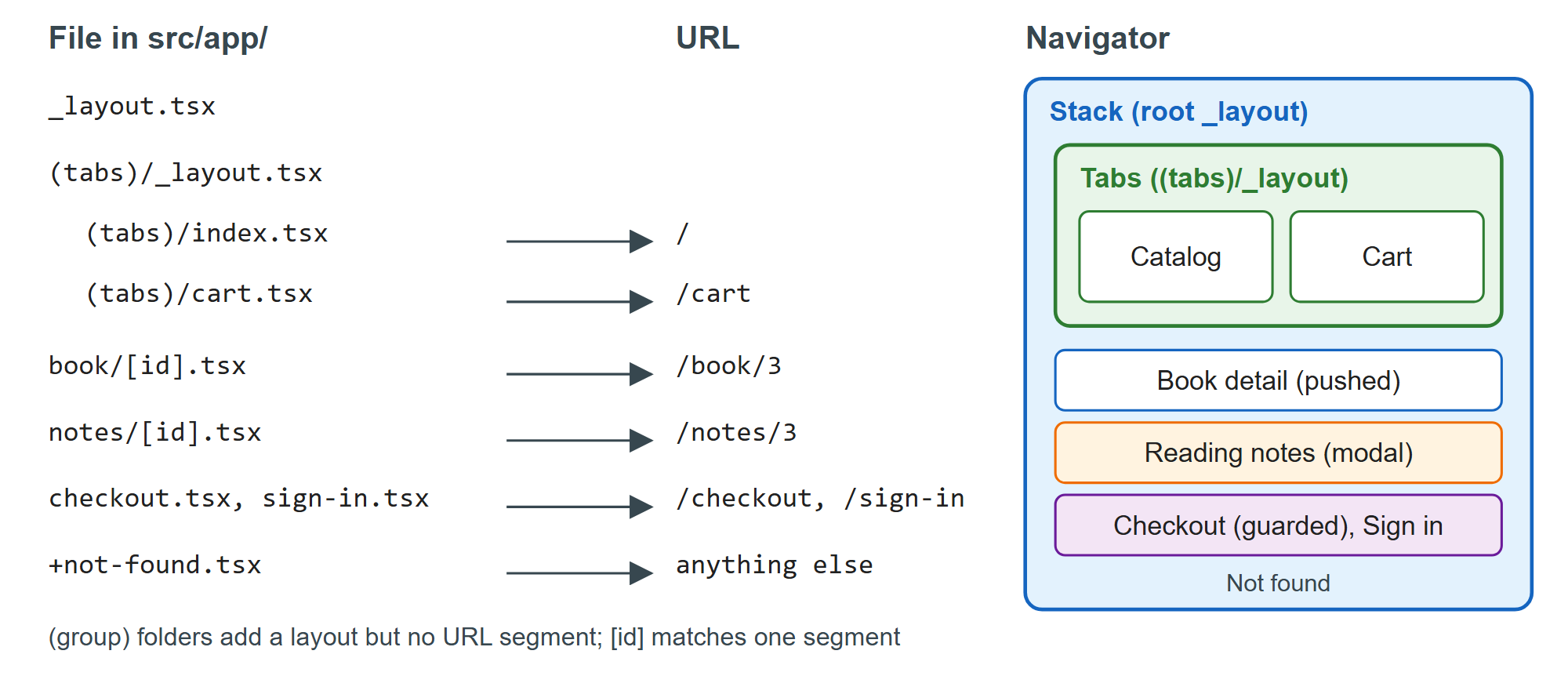
The rules fit in a few lines. index.tsx is the folder's own URL. _layout.tsx wraps its siblings in a navigator and renders nothing by itself. A folder in parentheses, such as (tabs), groups screens under a layout without adding a URL segment, which is why the catalog lives at / and not at /tabs. [id].tsx matches one segment and [...rest].tsx any number. Files starting with + are special: +not-found.tsx catches unknown URLs, and +native-intent.tsx can rewrite incoming links (Deep Links). Keep components that are not screens, such as BookRow and the session context, outside src/app/, or they become routes too.