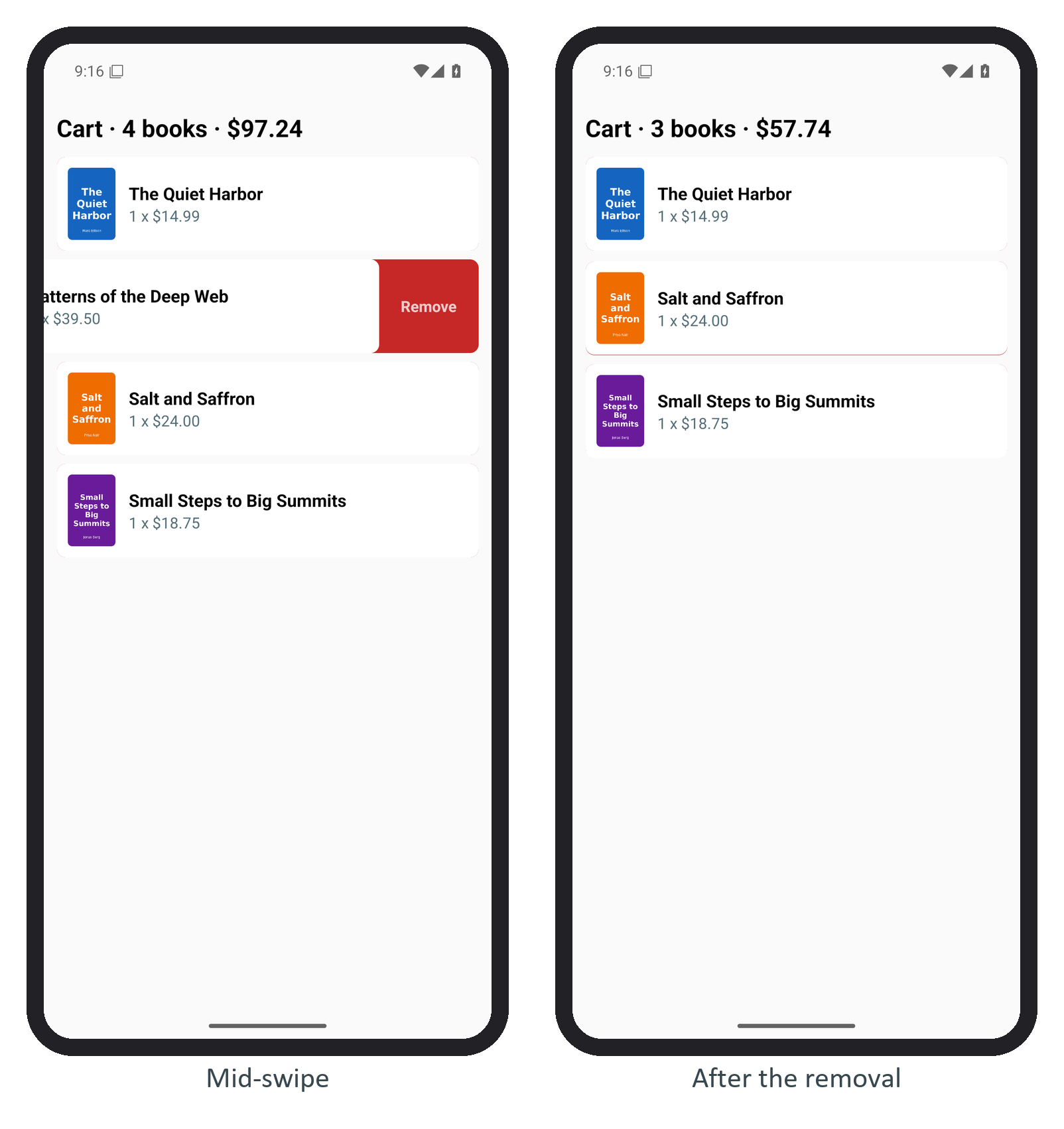
BookNest's cart now lets you swipe a book to the left to remove it. A red Remove strip behind the row fades in as it moves; past 120 dp, or on a fast flick, the row slides out, the removal is committed on the JavaScript thread, and the rows below close the gap. A short swipe springs back. activeOffsetX([-12, 12]) activates the pan only on horizontal movement, so vertical drags still scroll.
const REMOVE_AT = -120;                           // dp of travel that commits the removal
function SwipeRow({ book, onRemove }: { book: Book; onRemove: (id: number) => void }) {
  const { width } = useWindowDimensions();
  const x = useSharedValue(0);
  const swipe = Gesture.Pan()
    .activeOffsetX([-12, 12])                    // horizontal intent only; vertical scrolls
    .onUpdate((e) => { x.value = Math.min(0, e.translationX); })
    .onEnd((e) => {
      if (x.value < REMOVE_AT || e.velocityX < -800) {
        x.value = withTiming(-width, { duration: 180 }, () => scheduleOnRN(onRemove, book.id));
      } else {
        x.value = withSpring(0);                 // not far enough: snap back
      }
    });
  const row = useAnimatedStyle(() => ({ transform: [{ translateX: x.value }] }));
  const hint = useAnimatedStyle(() => ({ opacity: Math.min(1, x.value / REMOVE_AT) }));
  // ...the row sits in a GestureDetector, inside a View with exiting and layout animations
The screen was driven with adb shell input motionevent so that the finger could pause mid-swipe for the first screenshot: a short swipe on Salt and Saffron that sprang back, then a long one on Patterns of the Deep Web, which logged removed book 2.
Gesture Handler 6,788 also ships a ready-made ReanimatedSwipeable with action panels. Either way, a swipe is invisible to TalkBack, so offer the removal as an accessibility action too (Accessibility and i18n).